6
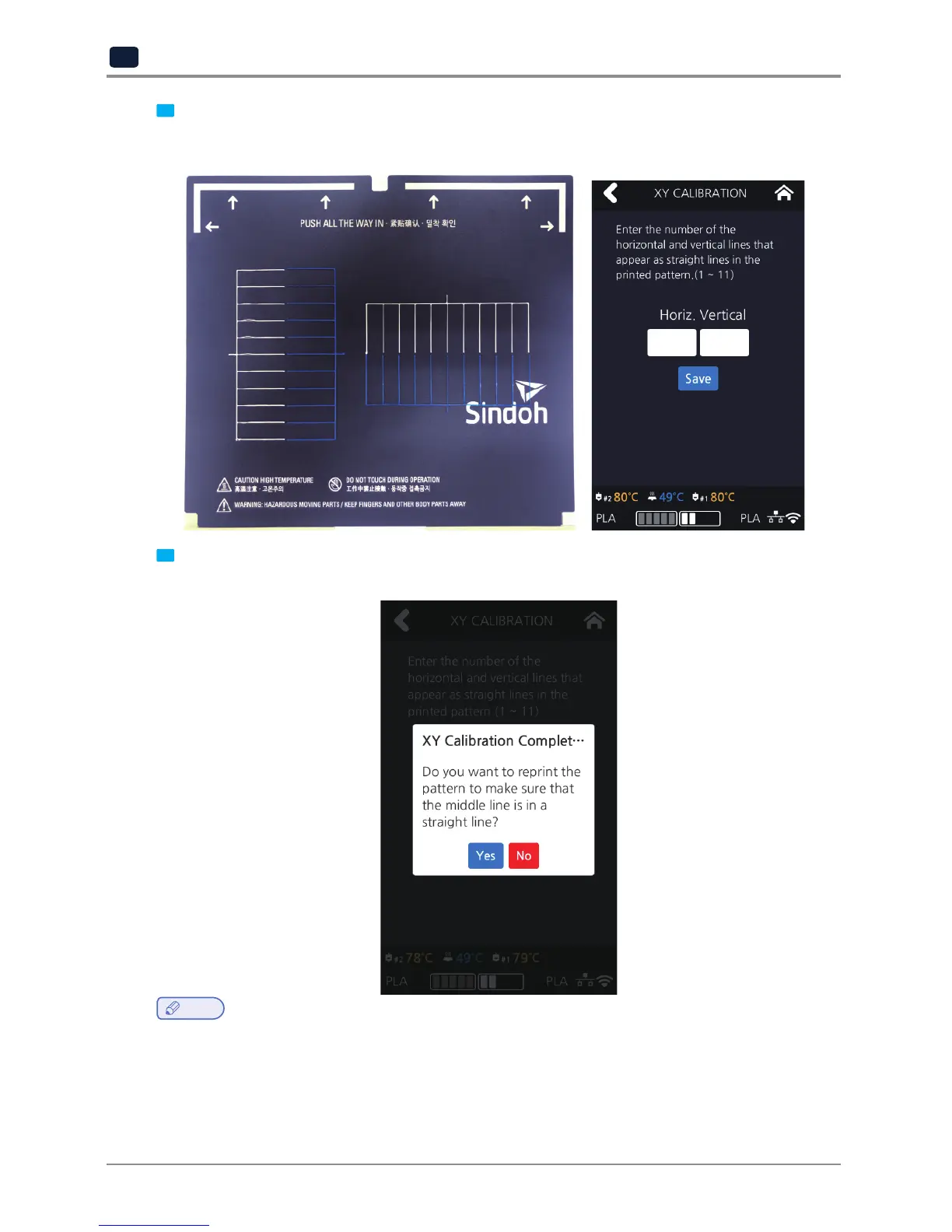
After printing the XY calibration pattern, enter the number of the line that is most linear among those printed
with nozzles 1 and 2, and then press the [Save] button. Select the most linear line (No.1 starts from the left for
vertical lines and from the top for horizontal lines).
1
2
3
4
5
6
7
8
9
10
11
1 2 3 4 5 6 7 8 9 10 11
7
To print the pattern for the calibrating nozzle again, press the
[OK]
button. Press the
[Cancel]
button to return to
the Home screen.
Note
-
Generally, the use of PLA material is recommended when performing XY-Calibration. Inevitably, XY-Calibration
using ABS material is also possible.
After the calibration is complete, there may be remainders on the bed during the process of removing the
calibration pattern. (Pattern marks do not affect the function of the bed.)



 To Next Page