SERVICE MANUAL
34
4. Test Pattern Screen / Erasing Memory
Test pattern screen is used at factory. But some patterns
are useful for maintanance.
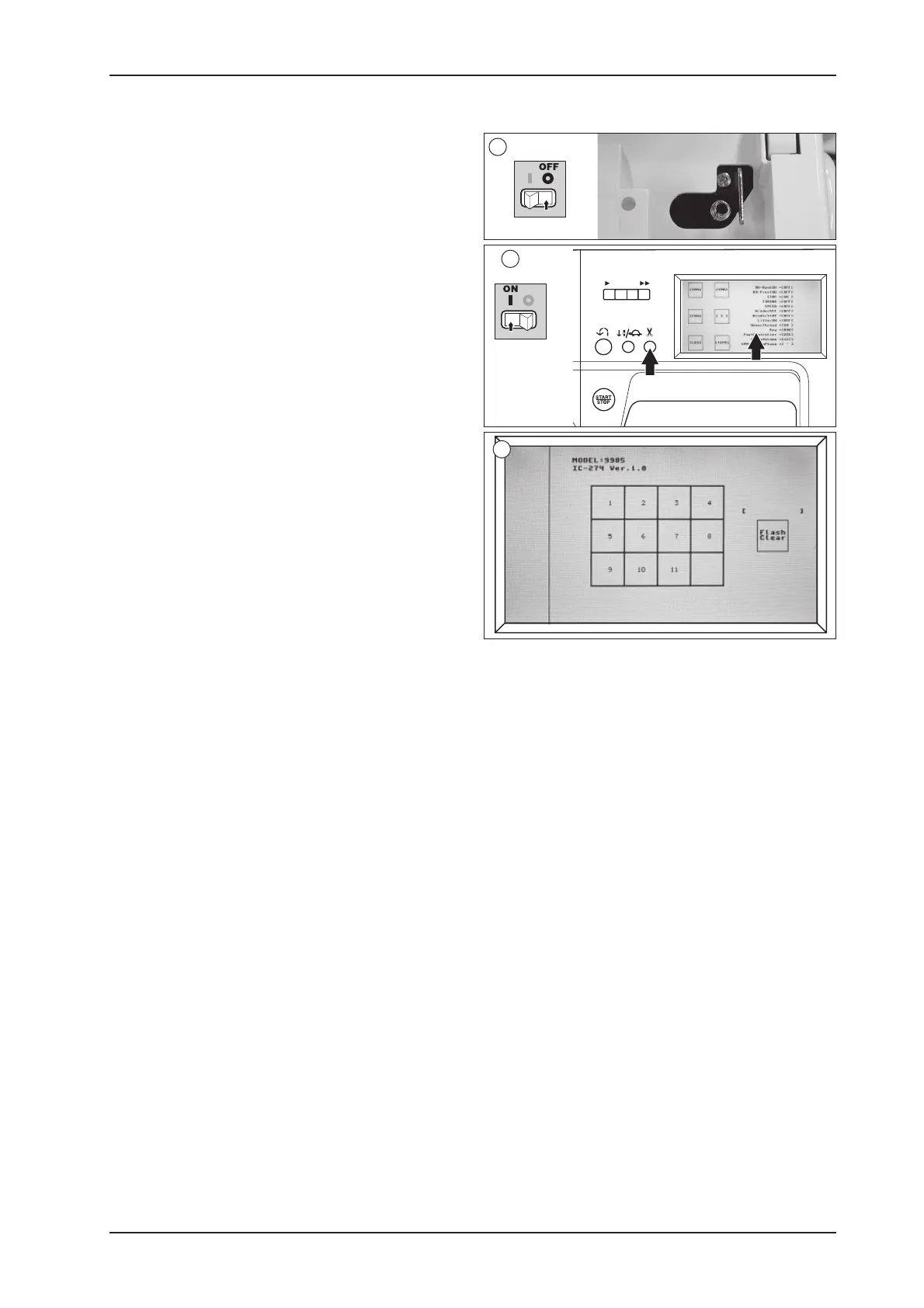
1. Turn off the power switch and push the bobbin winder
spindle to the right.
2. Turn on the power switch with pressing the thread
cutter button and touching the screen. Test pattern
screen will appear.
3. By touching button 1-11, below patterns are selected.
Selected pattern is indicated left side and selected
button is highlighted.
Button No. Pattern
1 Trial run pattern
2 Forward revese adjusting stitch (Page 21)
3 9-9-Scallop-B-9-Car-Tacking
4 Zigzag stitch
5 Straight stitch center needle position
6 Zigzag-Straight (center needle)-reverse
7 Scallop
8 9-9-B
9 Dog
10 Key-hole buttonhole
11 Straight (center needle) -Feed “0”
* No. 6 is indicated first pattern only.
* No. 11 is not indicated pattern.
You can erase memorized data (beep sound ON/OFF,
screen calibration, memorized pattern) by touching the
“FlashClear” button.
When you touch the button, the message “Erasing” will
appear. And when erasing is completed, “Erase OK!!”
will appear one second.
+
2
1
3



 To Next Page