14
A
B
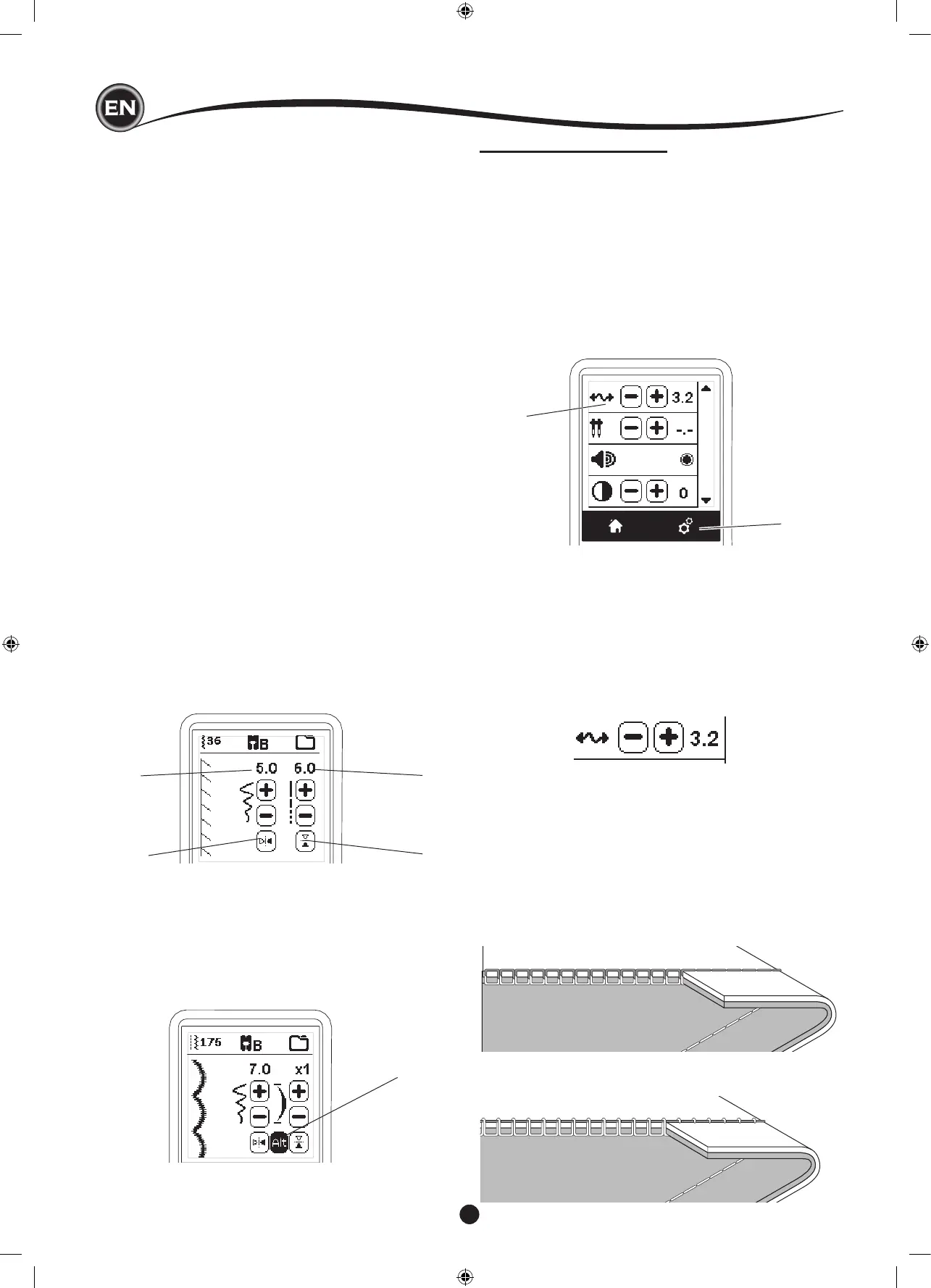
This machine sets the thread tension automatically when
pattern is selected. However, you can change the thread
tension, as follows.
To increase the upper thread tension, press the + button.
To decrease the upper thread tension, press the – button.
If you change from pre-set, number will be highlighted.
You can start sewing while in this mode and change tension
while sewing.
To return to previous screen, stop sewing and press the Setting
Button again.
When another stitch pattern is selected, thread tension will
return to pre-set.
Preset Thread Tension
Upper and bobbin thread will lock approximately in the middle
of fabric.
SettIng of the StItch pattern
Your machine will automatically select optimum settings for
each stitch. You can make adjustments to every stitch as
desired. Adjusted settings only affect the selected stitch and
will be reset to default when another stitch is selected. Adjusted
settings are not automatically saved when the machine is
turned off.
f. Stitch Width/Needle Position
Increase or decrease the stitch width using + and - buttons.
For straight stitches, use + and - to move the stitch position
left or right.
When a setting is changed, the numbers will be highlighted.
When trying to exceed minimum or maximum settings, a
warning sound will be heard.
g. Stitch Length/Density
Increase or decrease the stitch length using + and -
buttons.
When sewing stitches from the Satin category (stitches
157-174), use the + and - buttons to increase or decrease
stitch density. This may be necessary depending on the
type of thread being used.
When a satin stitch is selected, the icon changes to show
that stitch density is active instead of stitch length.
h. Width Mirroring
By pressing the Width Mirror button, stitch will ip from left
to right.
i. Length Mirroring
By pressing the Length Mirror button, stitch will ip from top
to bottom.
When mirroring is active, the button will be highlighted. If
mirroring is not available, a warning sound will be heard.
j. Elongation
Stitches in the Elongation category (stitches 175-197) can
be elongated. The entire stitch will be longer but the density
will remain the same. Press the Alt button to show the
elongation setting instead of density for satin stitches. The
density changes to show an elongation symbol. Increase or
decrease the elongation of the satin stitch using the + and -
buttons.
f
h
g
i
j
MACHINE SETTINGS
Before or during the sewing process, you can adjust the
settings by pressing the Setting Button.
The Setting Screen will appear.
This screen is scrolled by pressing the right side arrow buttons.
Pressing the Setting Button again, machine will return to
previous screen.
NOTE:
All settings except for thread tension will remain until you
change them. Thread tension will return to pre-set when you
change the pattern. Default settings will differ depending on the
stitch selected.
Upper Thread Tension Too Tight
Bobbin thread will appear on the top side of the fabric.
Decrease upper thread tension.










 To Next Page