37
SEWING
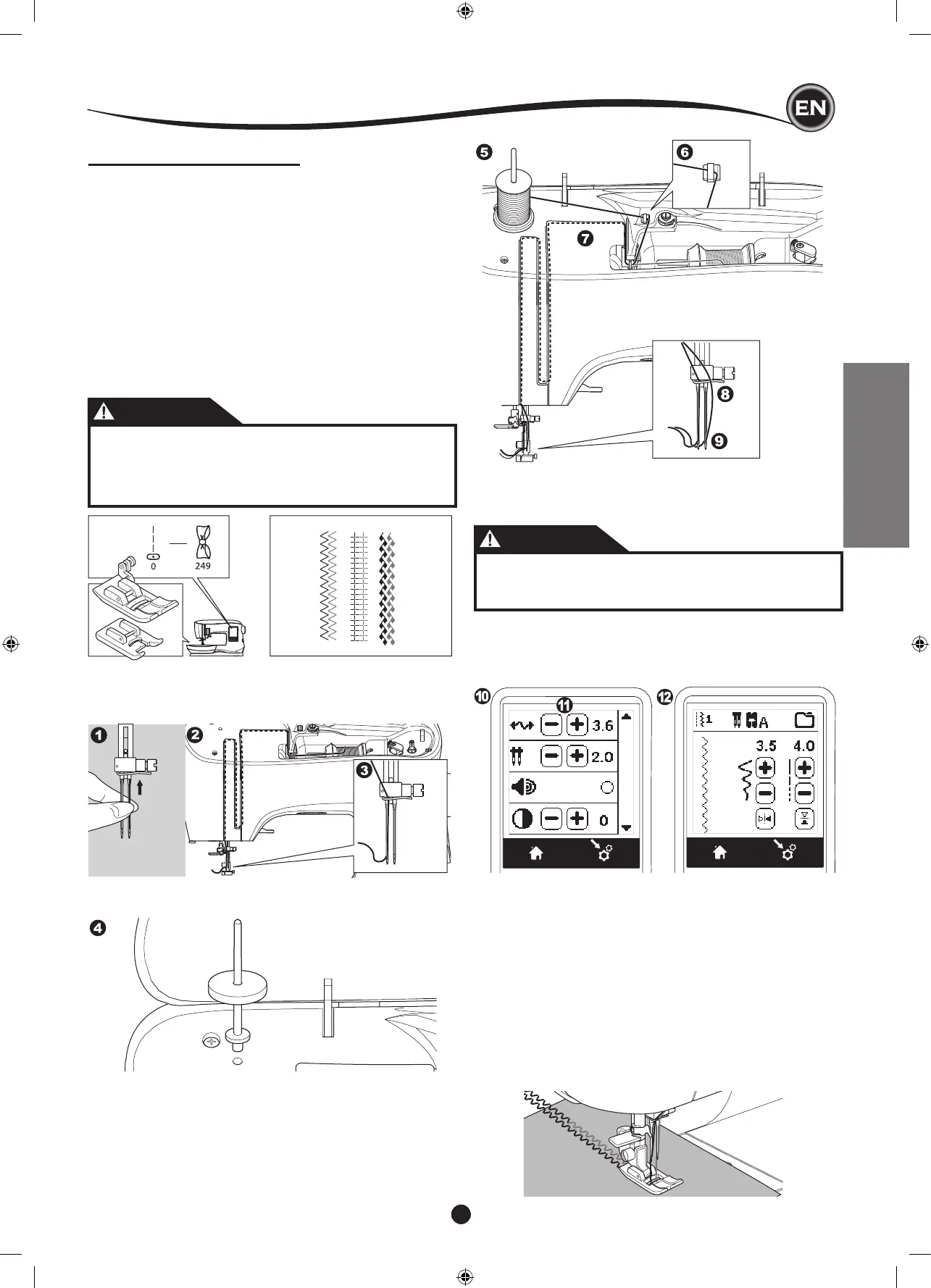
10. Press the Setting Button.
11. Set the twin needle width to be used by pressing the + or -
button.
CAUTION
To prevent accidents:
If you did not set the twin needle width corrctly, needle
may hit the needle plate and break.
12. Press the Setting Button again and select the pattern you
desire.
Twin needle mark will appear on screen and the stitch width
will be reduced automatically.
TWIN NEEDLE SEWING
Interesting effects can be produced by sewing decorative
stitches using a twin needle. Try using two different colors of
thread for even more variety. Always make a test sample rst
to help you determine the best settings for the stitch you are
sewing.
All patterns except No. 11, 16-31 may be sewn with a twin
needle.
All-Purpose Foot or Satin Foot (A, B)
NOTE:
A twin needle is not provided with this machine.
CAUTION
To prevent accidents.:
a. Use only SINGER branded twin needles for this
machine. Other needles may break.
b. The needle threader cannot be used. Thread each
needle eye manually.
1. Remove the single needle and insert twin needle.
2. Thread the rst thread as usual, following threading route.
3. Thread the left needle eye by hand from front to back.
4. Push the Auxiliary Spool Pin with felt washer into the hole.
5. Place second spool of thread.
6. Hook second thread to the hook from rear opening.
7. Thread the second thread same as rst.
8. For better sewing results, do not place the thread into the
needle bar thread guide.
9. Thread right needle eye by hand from front to back.
13. Always test the selected stitch by rst turning the hand
wheel toward you slowly, to ensure that the swing of the
needle doesn’t hit the sides of the foot.
14. Sew the stitches.
Twin needle mode will remain until you change the setting to “-.-”.
When the twin needle mode has been set back to “-.-”, the twin
needle icon will disappear from the main screen.
NOTE:
Twin needle sewing may be also used with sequencing by
setting to twin needle mode.










 To Next Page