28
SEWING ON BUTTONS
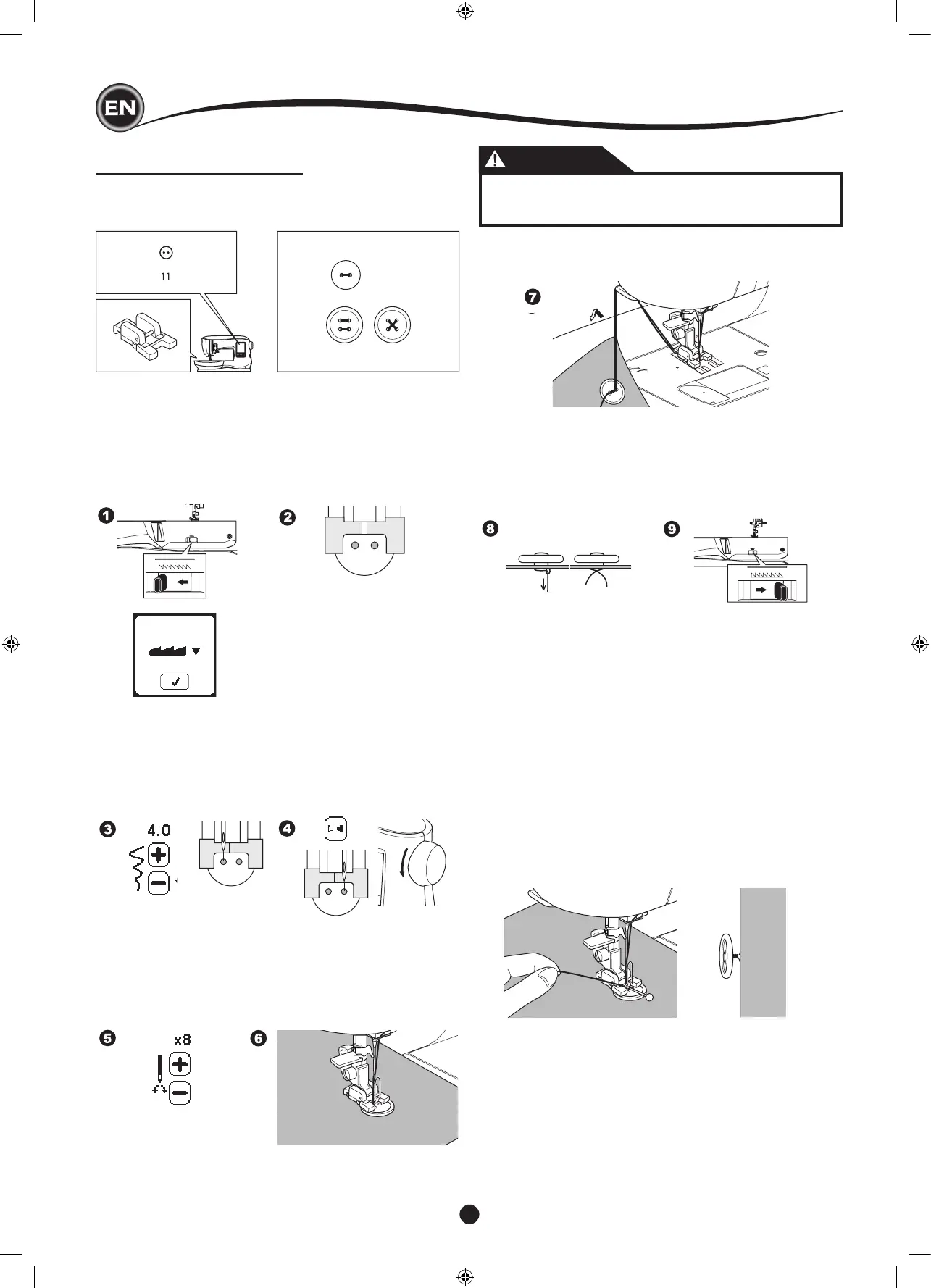
No. 11
Button Sewing Foot
3. Adjust the stitch width so that the needle enters the left
hole of button.
4. Check the swing of the needle by pressing the Width
Mirror Button to be sure the needle will not hit the button.
Bring the needle down into the holes of the button with the
handwheel to verify.
1. Lower the feed dogs by moving the Drop Feed Lever to the
left. (A pop up message appears when selecting stitch no.
11, press the “
✓”
mark.)
2. Attach the Button Sewing Foot. Align two holes of the
button with slot of presser foot and lower foot to hold the
button securely.
5. Set the number of stitches to sew on the button by pressing
the + and - buttons. Eight stitches is standard.
6. Start to sew at slow speed. The machine will sew the
number of stitches set on the display and then tie off and
stop.
CAUTION
To prevent accidents:
Make sure that the needle does not hit the button
during sewing, otherwise needle may break.
7. Raise the foot and cut the threads remaining about 10 cm (4”)
long.
8. Pull the thread ends to the wrong side of the fabric with a
hand sewing needle. Tie the threads together to secure.
9. After sewing, move the Drop Feed Lever to the right.
NOTE:
To sew a 4-hole button, follow the procedure above for the
rst two holes. Then lift presser foot slightly and move fabric
to permit stitching the other two holes, either parallel or criss-
cross.
Buttons on coats and jackets often have a thread shank to
make them stand away from the fabric. Insert a straight pin or
sewing machine needle under the center slit of the foot from
the front. Sew over the pin or needle. To create a thread shank,
pull thread to the back side of the button and wind the thread
around the stitches. Tie the thread ends securely.










 To Next Page