Introduction to Components
3-9
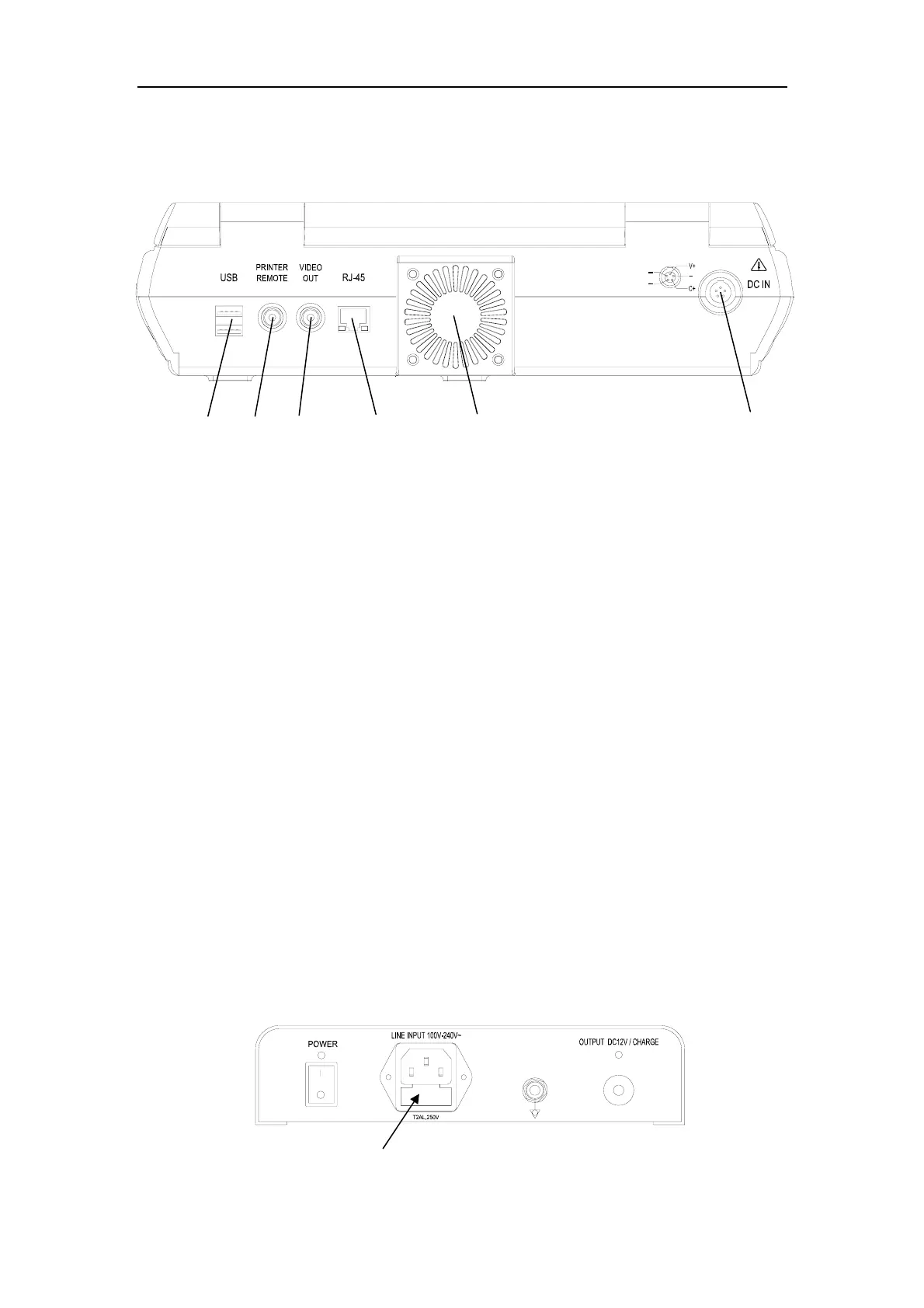
3.2.4 Rear Panel (see Fig. 3-6)
1— USB Port; 4—Network Port;
2— Print Control Port; 5—Heat Dissipation Fan;
3— Video Out Port; 6—External DC Power In Port.
Fig. 3-6 Rear Panel
Note: External DC power-in port is for connection with special DC power supply,
then either a battery in the battery compartment or not is acceptable. If
there is a battery inside, the system works and the battery is recharged in
the meantime.
3.2.5 Adapter
The input voltage range of adapter is 100V-240V~, 50Hz/60Hz. Connect AC power
and the adapter, turn on the adapter switch and the adapter power indicator is on. If
the adapter power indicator is off, check whether the AC input power is valid. If the AC
input power is valid, please check the adapter fuse, whose location is as indicated by
the arrow in Fig. 3-7. Pull out the fuse box and take out the fuse to check it. If the fuse
is broken, please replace it with a new one. The fuse type: T2AL,250V. The adapter
output port indicator is the charging indicator . please refer to section 4.1.1.2 for more
details.
Fig.3-7 Adapter
1 2 3
4
5
6



 To Next Page