30
Skydio X2 Color/Thermal - Operator Manual © 2022 Skydio, Inc. All rights reserved.
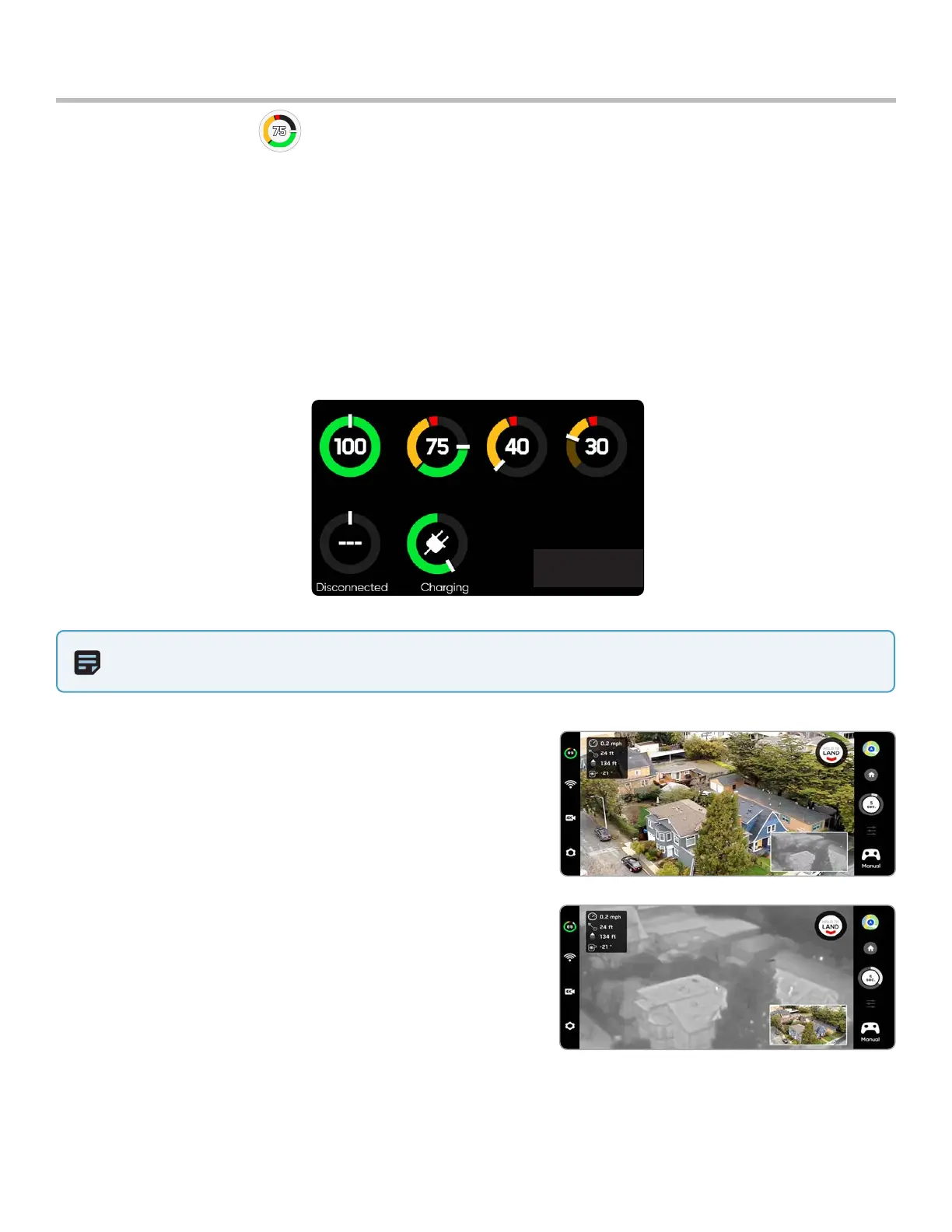
Battery indicator messaging displays how much battery is available for flight, how much battery is available for a
return trip, and how much battery is required to land.
Flight
Battery indicator
NOTE: Flight time dynamically changes based on altitude and distance to home.
Percentage - displays battery charge remaining
Green - indicates battery capacity for nominal flight before the time limit required to safely return and land
Yellow - indicates how much battery capacity is required to safely return
Red - indicates how much battery capacity is required to land
Countdown - when the battery capacity has less than two-minutes, the indicator will begin a countdown
Landing - when the battery capacity is zero the indicator will change to an alert symbol and X2 will land
Show Thermal (X2E Color/Thermal only) - toggles the display of the
thermal camera live feed.
• On (default) displays live feed from the color and thermal
cameras as well as a small picture-in-picture (PIP) feed from the
thermal camera
• O and only the live feed from the color camera will display
Picture-in-picture (PIP) (X2E Color/Thermal only) - live feed of the
thermal camera. Tap on the PIP to toggle between viewing the
thermal camera feed full screen and the color camera feed full
screen.



 To Next Page