40
Section 4 – Inspections Before Operation Function tests
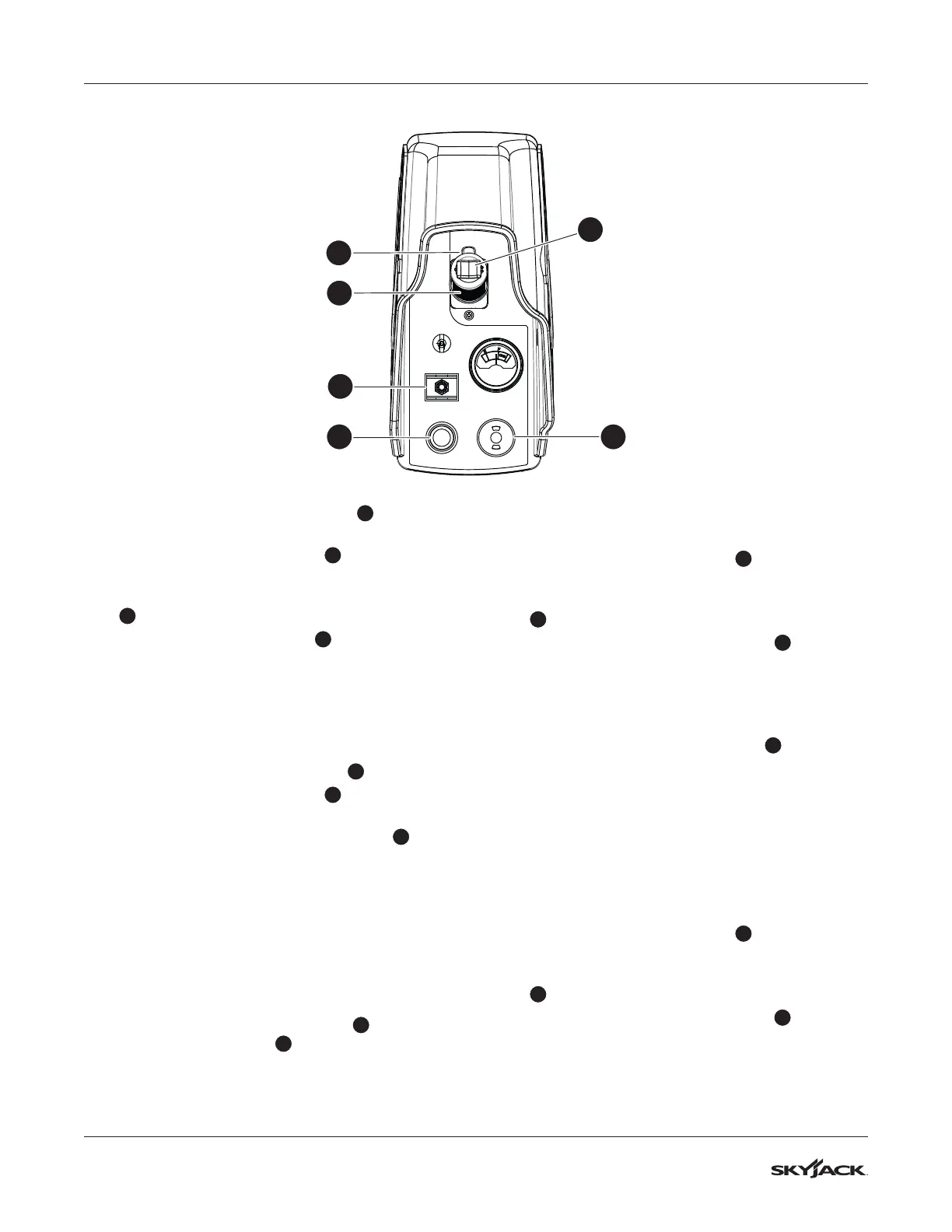
5. Push the emergency stop button
4
on the
platform control console.
6. Move the lift/off/drive switch
6
to the drive
position.
7. Squeeze and hold the function-enable switch
1
.
8. Push the controller handle
2
to drive forward.
▪
Result: The drive function does not operate.
4.3-7 Do a test of the function-enable
switch
1. Make sure the path you plan to travel is clear.
2. Pull the emergency-stop button
4
.
3. Move the lift/off/drive switch
6
to the drive
position.
4. Do not use the function-enable switch
1
, and
try to drive the MEWP by moving the controller
handle forward.
▪
Result: The drive function does not operate.
4.3-8 Do a test of the steer function
1. Move the lift/off/drive switch to the drive
position.
2. Squeeze and hold the function-enable switch.
3. Press the steering rocker switch
3
on top of
the controller handle
2
to steer left and right.
▪
Result: The steer wheels turn left and right.
4.3-9 Do a test of the drive function
1. Make sure the path of intended motion is clear.
2. Move the lift/off/drive switch
6
to the drive
position.
3. Squeeze and hold the function-enable switch
1
.
4. Slowly push the controller handle
2
until the
MEWP starts to move. Then, release the handle,
so that it goes back to the center position.
▪
Result: The MEWP moves in the forward
direction and then stops.
5. Slowly pull the controller handle
2
until the
MEWP starts to move. Then, release the handle,
so that it goes back to the center position.
▪
Result: The MEWP moves in the opposite
direction and then stops.
4.3-10 Do a test of the anti-tiedown
function
1. Make sure the path of intended motion is clear.
2. Move the lift/off/drive switch
6
to the drive
position.
3. Squeeze and hold the function-enable switch
1
for more than 7 seconds.
4. Slowly push the controller handle
2
to move
the MEWP in the forward direction.
▪
Result: The MEWP does not move in the
forward direction.
5 4
3
1
6
2



 To Next Page