6.2 “CLOC” – DATE AND TIME PARAMETERS
The Cloc parameter (an abbreviation of “CLOCK”), is used to modify the current date and time.
This parameter can be modified with just the user password.
The modification procedure is:
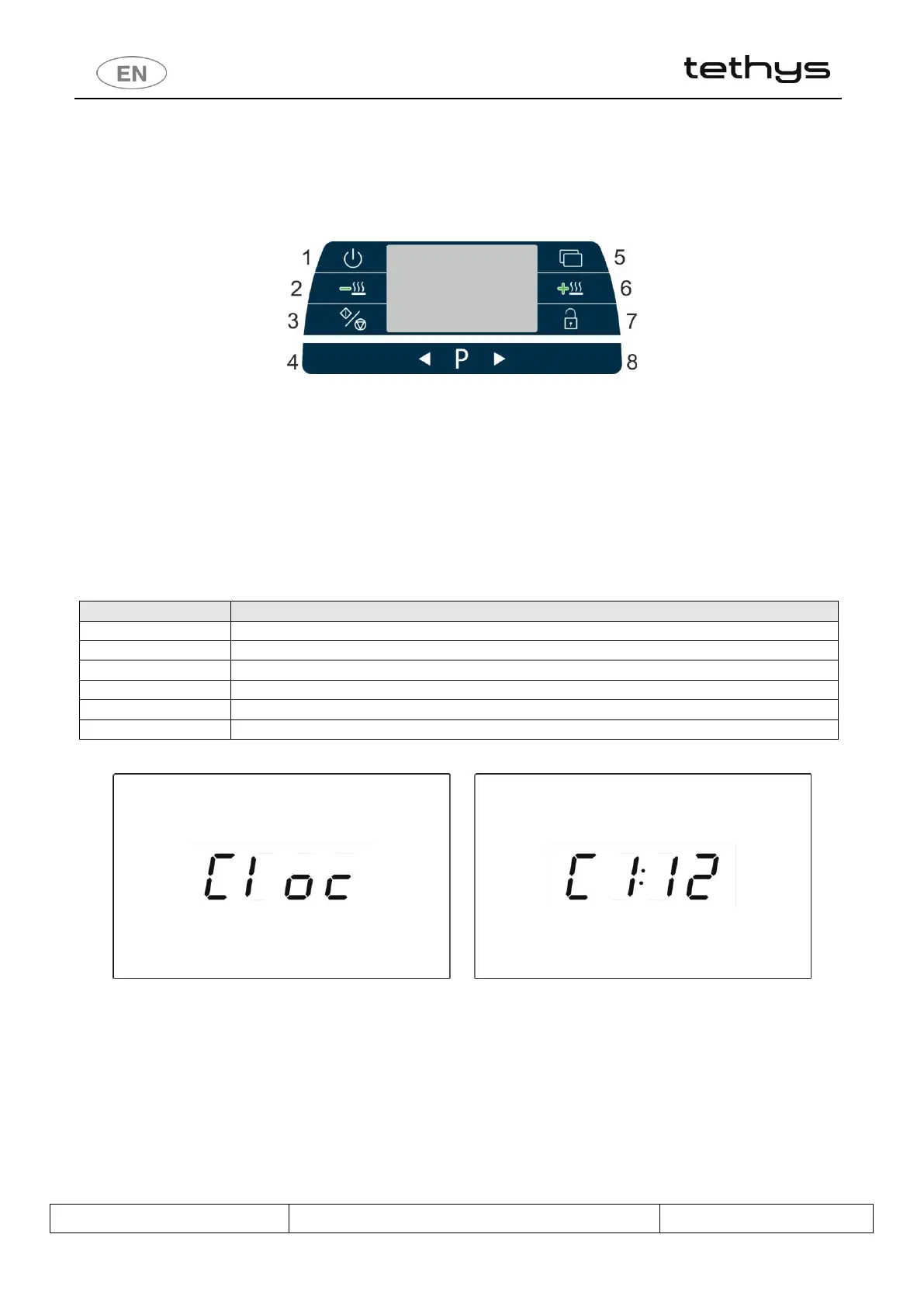
a) To select the Cloc parameter, hold pressed the Start/Stop button (3) when the indication “Cloc” is on the
display (ref. also to the par . “ACCESSING THE SETUP MODE”).
b) Selection buttons (4-8): for modifying the value of the parameter.
c) Functions button (5) – quick press: to move from one parameter to the next. (on Tethys D60 the operator can
also use the “Drying +” key (6) with the same function).
d) Start/Stop button (3): hold pressed to confirm the modification
e) Door opening button (7): hold pressed to quit the parameter being modified and the Cloc function.
During modification, the parameter concerned flashes.
fig. 29 – Cloc parameters. Hold down the Start/Stop button to access the parameters, in this case identified as C1, C2, etc. Parameter C1 sets the
current year, C2 the month, etc. Use the Selection buttons to modify the parameter. Use the “Functions” button to move to another parameter.
Confirm changes using the Start/Stop button.


 To Next Page