User Guide 13
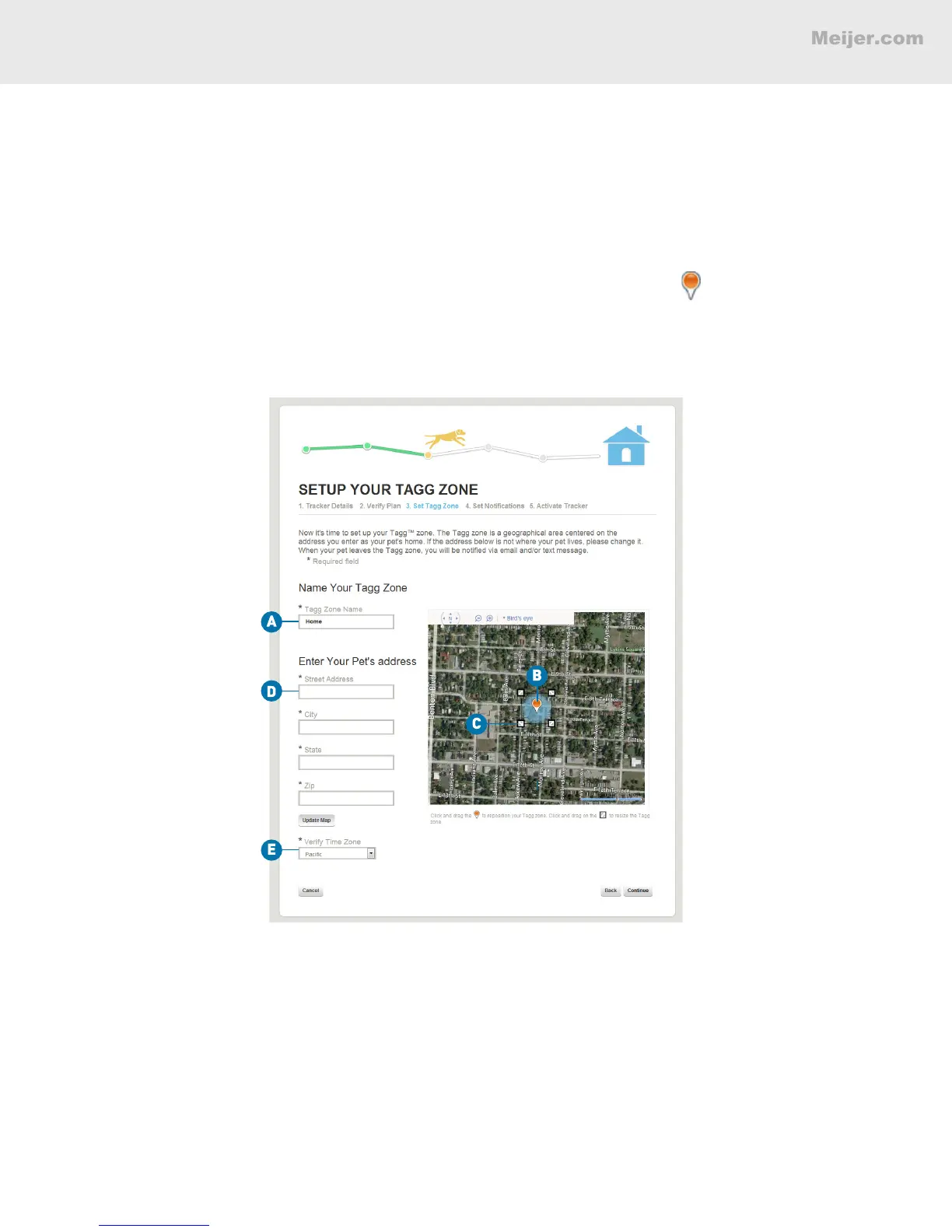
Set Up Your Tagg Zone
This is the boundary around the area where your pet spends most of his time. When your pet leaves the
Tagg zone, you will receive an alert.
A. Give your Tagg zone a name (e.g., Home).
Note: Each account can only have one Tagg zone, even when multiple pets are on the account.
B. Adjust the Tagg zone by clicking and dragging the orange center pin to the proper spot.
C. The Tagg zone defaults to the smallest possible area: a 75-yard radius around the pet’s
home. Click and drag the corner squares to enlarge the area up to 1,000 yards.
(Your screen will look similar to this.)
IMPORTANT: The docking station must be located inside the Tagg zone.
D. The Pet Address eld may have been auto-populated with your shipping address. If so,
the system has created your initial Tagg zone around this address. If this is not your pet’s
home, please enter your pet’s home address and click Update Map.
E. Verify the time zone where you'll be using the tracker.
BASIC SETUP


 To Next Page