58
EN
ATYSt - 541995C - SOCOMEC
9.3.3. Step 3: ATySt Auto conguration
The ATySt includes an “Auto Conguration feature to detect the mains voltage, phase rotation, neutral position and frequency
nominal values and save them in the ATS controller.
Before conguring the nominal values ensure that the product is properly wired, veried and ready for commissioning. It
is imperative that the network supply (208 – 277 Vac ±20%) is available and that the wiring to the ATySt voltage sensing
terminals 103 – 106 has been done. It is preferable to use the ATyS sensing kit that may be provided as an accessory.
PROG
OK
AUT
READY
ATyS t
0
1
5
10
20
60
0
1
5
10
20
60
G: U
10% F
5%
H: U
20% F
10%
E:
F:
REMOTE CONTROL
A: 3 Ph
B: 1 Ph
C: Neutral
D: Neutral
Motorised Changeover Switch
ATyS
1600A Ref : 95054160
Un N° PP / PN
1: 220 / 127
2: 380 / 220
3: 400 / 230
4: 415 / 240
5: 480 / 277
6: 208 / 120
7: 220 / 127
8: 230 / 132
9: 240 / 138
10: 380 / 220
11: 400 / 230
12: 415 / 240
13: 480 / 277
5
6
7
8
9
10
11
12
13
14
15
16
18
20
1:
2:
3:
4:
5:
6:
7:
8:
9:
10:
11:
12:
13:
14:
3
3
4
4
5
5
6
6
7
7
8
8
9
10
N°: Δ
U ΔF %
XXX
50 Hz60 Hz
XXXXXXXX
Set Pot
PROG
AUT
Press
60ms
Press
2s
Ready !
PROG
Set Dip
1 2 3
45
PROG
POWER
AUT
Ø 4 ... 8mm
PROG
OK
AUT
READY
TEST ON LOAD
TEST OFF LOAD
ATyS g
Un
Auto Conf
5
1
10
14
5
1
10
13
0
1
5
10
20
60
0
1
5
10
20
60
G:
H:
E:
F:
REMOTE CONTROL
A: 3 Ph
B: 1 Ph
C: Neutral
D: Neutral
ATyS
Un N° PP / PN
1: 220 / 127
2: 380 / 220
3: 400 / 230
4: 415 / 240
5: 480 / 277
6: 208 / 120
7: 220 / 127
8: 230 / 132
9: 240 / 138
10: 380 / 220
11: 400 / 230
12: 415 / 240
13: 480 / 277
5
6
7
8
9
10
11
12
13
14
15
16
18
20
1:
2:
3:
4:
5:
6:
7:
8:
9:
10:
11:
12:
13:
14:
3
3
4
4
5
5
6
6
7
7
8
8
9
10
N°: Δ
U ΔF %
XXX
50 Hz60 Hz
XXXXXXXX
Motorised Changeover Switch
1600A Ref : 95054160
• Ensure that the product is in manual mode.
• Press and hold the Red “PROG OK” button for >2s to measure the supply voltage, frequency, phase rotation and
neutral position.
Note: The READY LED will ash green (on and off) as soon as settings are measured and until these settings have been
saved by pressing the PROG OK button a second time momentarily. (Refer to STEP 4).
9.3.4. Step 4: Saving the congured values
To SAVE the recorded setting conguration press the PROG OK button momentarily: <60ms.
Note:The ashing READY LED goes off once the values are saved in the ATS controller.
PROG
OK
AUT
READY
ATyS t
0
1
5
10
20
60
0
1
5
10
20
60
G: U
10% F
5%
H: U
20% F
10%
E:
F:
REMOTE CONTROL
A: 3 Ph
B: 1 Ph
C: Neutral
D: Neutral
Motorised Changeover Switch
ATyS
1600A Ref : 95054160
Un N° PP / PN
1: 220 / 127
2: 380 / 220
3: 400 / 230
4: 415 / 240
5: 480 / 277
6: 208 / 120
7: 220 / 127
8: 230 / 132
9: 240 / 138
10: 380 / 220
11: 400 / 230
12: 415 / 240
13: 480 / 277
5
6
7
8
9
10
11
12
13
14
15
16
18
20
1:
2:
3:
4:
5:
6:
7:
8:
9:
10:
11:
12:
13:
14:
3
3
4
4
5
5
6
6
7
7
8
8
9
10
N°: Δ
U ΔF %
XXX
50 Hz60 Hz
XXXXXXXX
Set Pot
PROG
AUT
Press
60ms
Press
2s
Ready !
PROG
Set Dip
1 2 3
45
PROG
9.3.5. Step 5: Putting the ATySt into auto operation
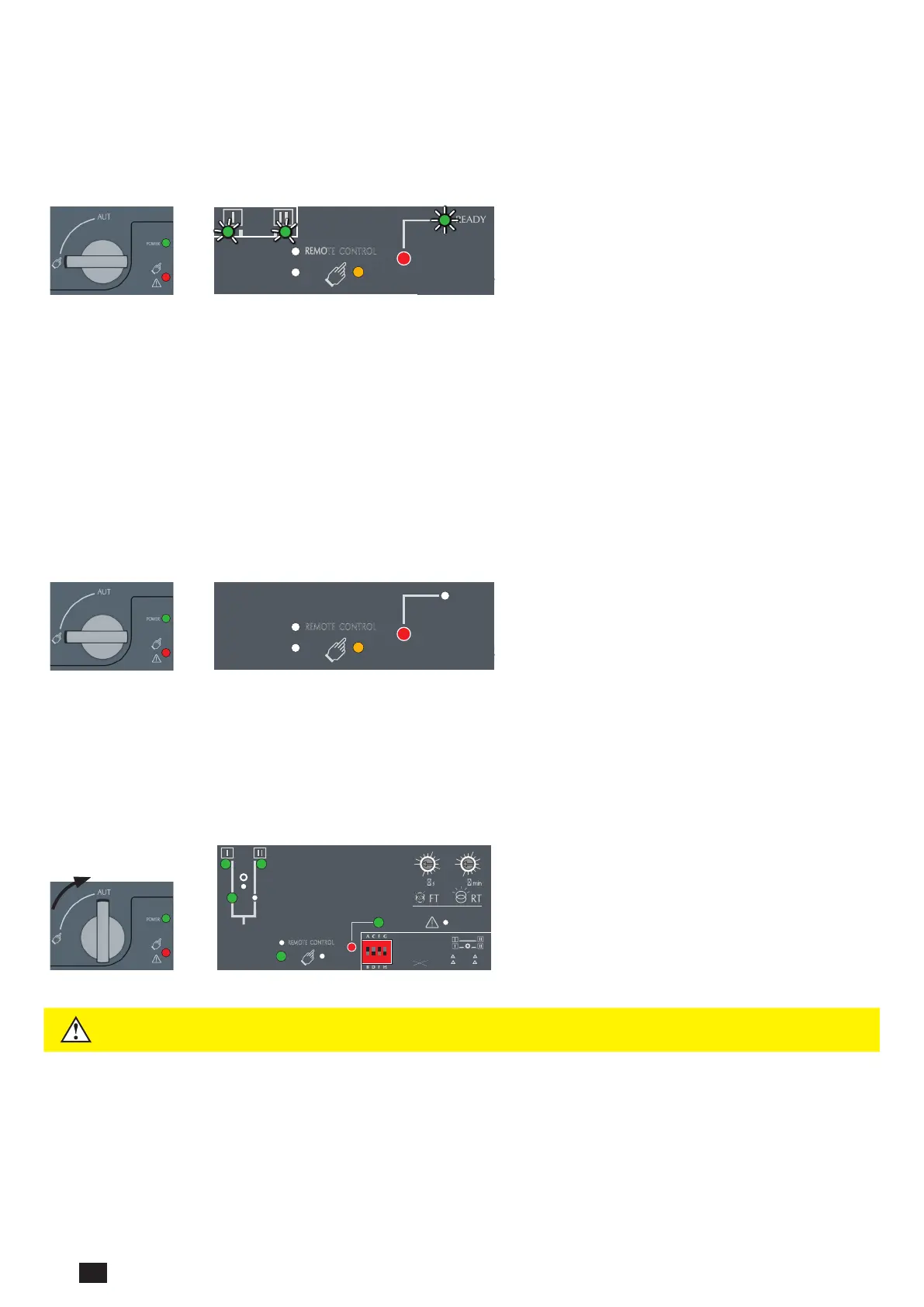
After following Steps 1 to 4, and once ready to put the ATySt into AUTO operation turn the mode selector switch to Auto.
Note: When the product is powered and properly congured, after switching the product from Manual Mode to Auto Mode
the POWER and READY light should be a steady Green light.
PROG
OK
AUT
READY
0
1
10
20
60
0
1
10
20
60
G: U
10% F
5%
H:
U
20% F
10%
E:
F:
REMOTE CONTROL
A: 3 Ph
B: 1 Ph
C: Neutral
D: Neutral
Motorised Changeover Switch
ATyS
1600A Ref : 95054160
Un N° PP / PN
1: 220 / 127
2: 380 / 220
3: 400 / 230
4: 415 / 240
5: 480 / 277
6: 208 / 120
7: 220 / 127
8: 230 / 132
9: 240 / 138
10: 380 / 220
11: 400 / 230
12: 415 / 240
13: 480 / 277
5
6
7
8
9
10
11
12
13
14
15
16
18
20
1:
2:
3:
4:
5:
6:
7:
8:
9:
10:
11:
12:
13:
14:
3
3
4
4
5
5
6
6
7
7
8
8
9
10
N°: Δ
U ΔF %
XXX
50 Hz60 Hz
XXXXXXXX
Set Pot
PROG
AUT
Press
60ms
Press
2s
Ready !
PROG
Set Dip
1 2 3
45
PROG
WARNING
Depending on the state of the ATySt the ATS automation may change the switch position as
soon as the mode selector is switched to AUT. This is a normal operation.



 To Next Page
 Loading...