MedDream VideoStation v4.00 User Manual 22
6. Tasks
Tasks represents VS process actions, that can be done in background.
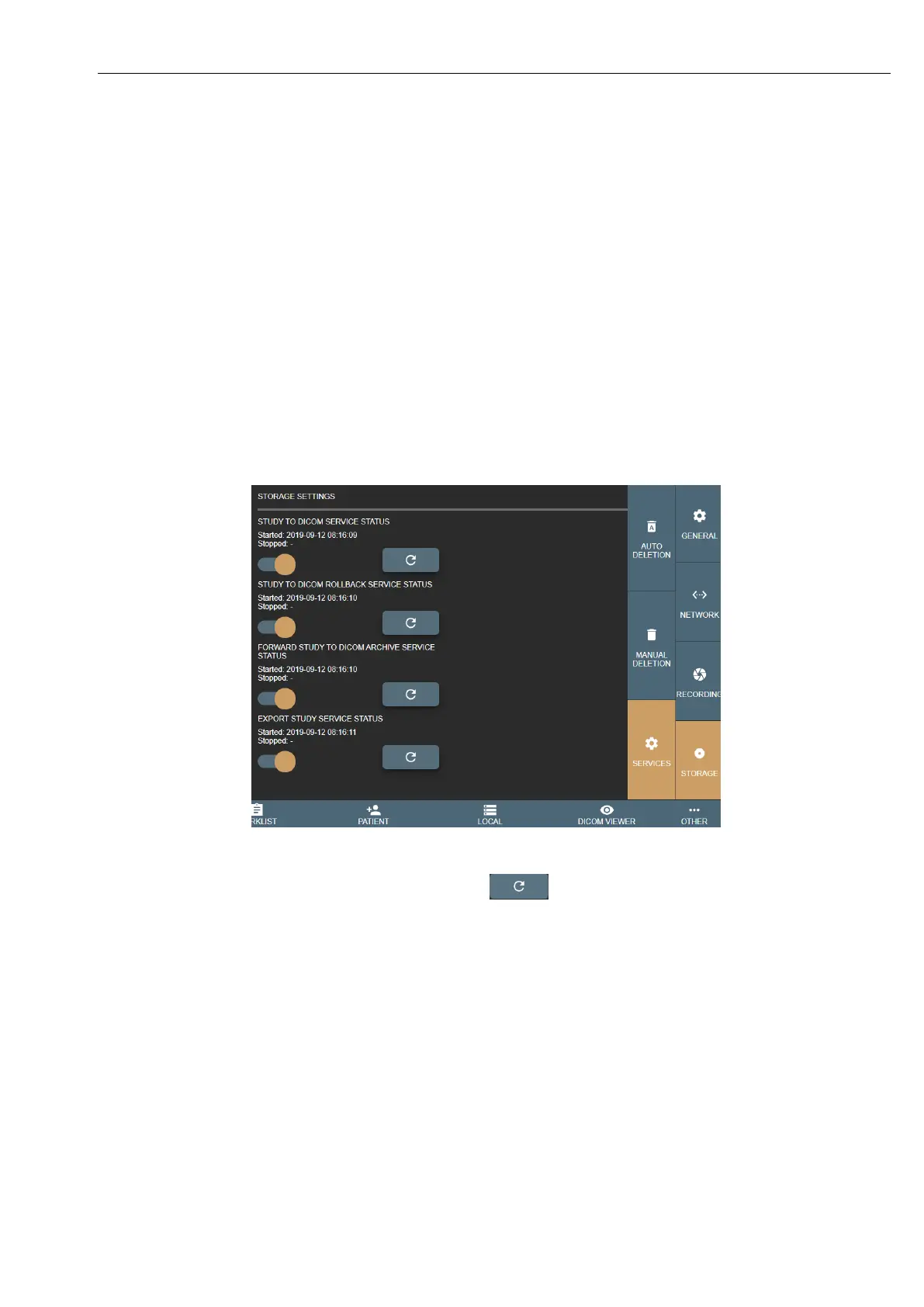
Services: In menu “Other ->Settings-> Storage -> Services” administrator can stop/start services.
VS uses services:
• STUDY TO DICOM SERVICE STATUS – responsible to save (convert to DICOM) studies, recommended always
ensure, that this service is running.
• STUDY TO DICOM ROLLBACK SERVICE STATUS – responsible to convert back DICOM files to image and
video format. This service is used to convert back DICOM files, because conversion fails or study needs more
changes.
• FORWARD STUDY TO DICOM ARCHIVE SERVICE STATUS - responsible to send saved studies to remote
DICOM archive,
• EXPORT STUDY SERVICE STATUS - responsible to export study to external storage.
Picture 37. Services settings.
Each Service status can be checked by pressing refresh button .
TASKS: In menu “Others -> Task” user/administrator can check each study saving process and find their status. Task list
is divided in 3 categories:
• NEW/STARTED – started or pending tasks.
• STOPPED – stopped tasks. User can try to load again later.
• COMPLETED – successfully finished tasks. All completed tasks without errors, will be deleted after 1 hour.



 To Next Page