MedDream VideoStation v4.00 User Manual 26
EXTERNAL KEYBOARD - use physical keyboard connected to PC or use windows keyboard on screen. Default is to use
keyboard on screen due touch screen monitor, but sometimes monitor is hanged very high and cannot be controlled by hand.
For this requires to connect mouse and keyboard.
SYSTEM LOGGING – set logging level to None, Error, Info or Debug of all actions. Recommended to turn on logs to Error
level to identify system bugs or hazard situations. Log file locations can be found under LOG FILE LOCATION option and
can be viewed with text editor.
CHARSET – set DICOM character set for studies to be encoded. For now, there is 3 common character sets: ISO_IR 100
(Latin1), ISO_IR 144 (Cyrillic) or ISO_IR 192 (UTF-8). To support most of the characters – use ISO_IR 192. But it is
recommended to consult to your DICOM archive (PACS) administrator.
Once all settings are set, double check and press save button
7.1.2. Network settings
Network settings let you manage LOCAL VS receiver, REMOTE hospital DICOM archive (PACS) and DICOM modality
WORKLIST server connection settings.
Remote hospital DICOM archive and DICOM modality worklist server settings can be the same or not –
depends on hospital infrastructure. Recommended to consult to your DICOM archive or worklist server
administrator.
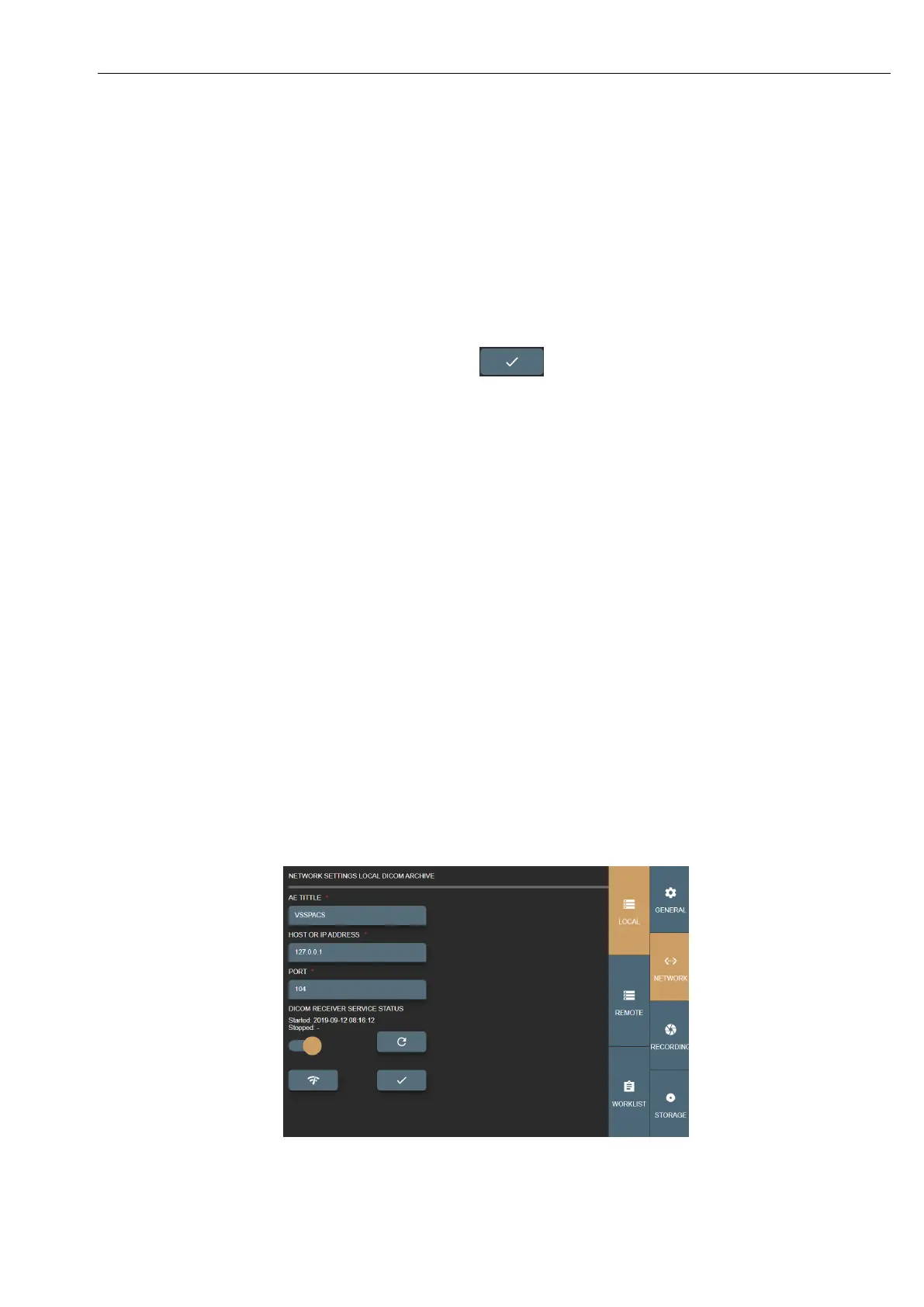
LOCAL – VS DICOM file receiver. This allows to send DICOM files (studies) to VS.
• AET TITLE – max 16 Latin1 characters. Requires to ask your administrator for this entity title to identify VS PC.
• HOST OR IP ADDRESS – VS PC host or IP address. It is recommended to set IP address for faster network lookup.
For receiver it is recommended to leave 127.0.0.1 local IP address.
• PORT – max 65535 number. DICOM protocol common use is 104 or 11112 ports that should not be reserved by
OS process. Recommended to consult administrator. For receiver it is recommended to leave 104 port as it is.
• DICOM RECEIVER SERVICE STATUS – will show receiver status (start/stop date and time). Also, you can turn
off receiver and refresh the status.
Picture 43. Local VS settings.



 To Next Page