EasyManua.ls Logo

SOMFY Oximo WT - Operation and Maintenance; Raising and Lowering the Roller Shutter; Stop Function; Obstacle Detection

SOMFY Oximo WT
Print Icon
To Next Page IconTo Next Page
To Previous Page IconTo Previous Page
Loading...
46
Non contractual images Copyright © 2005 - 2014 Somfy SAS. All rights reserved.
EN
2. 4. 2. Re-setting the end limits
1
          


and whether or not there are stops on the end slat.
2. 4. 2. 1. With locks and with stops on the end slat



2. 4. 2. 2. With locks and without stops on the end slat


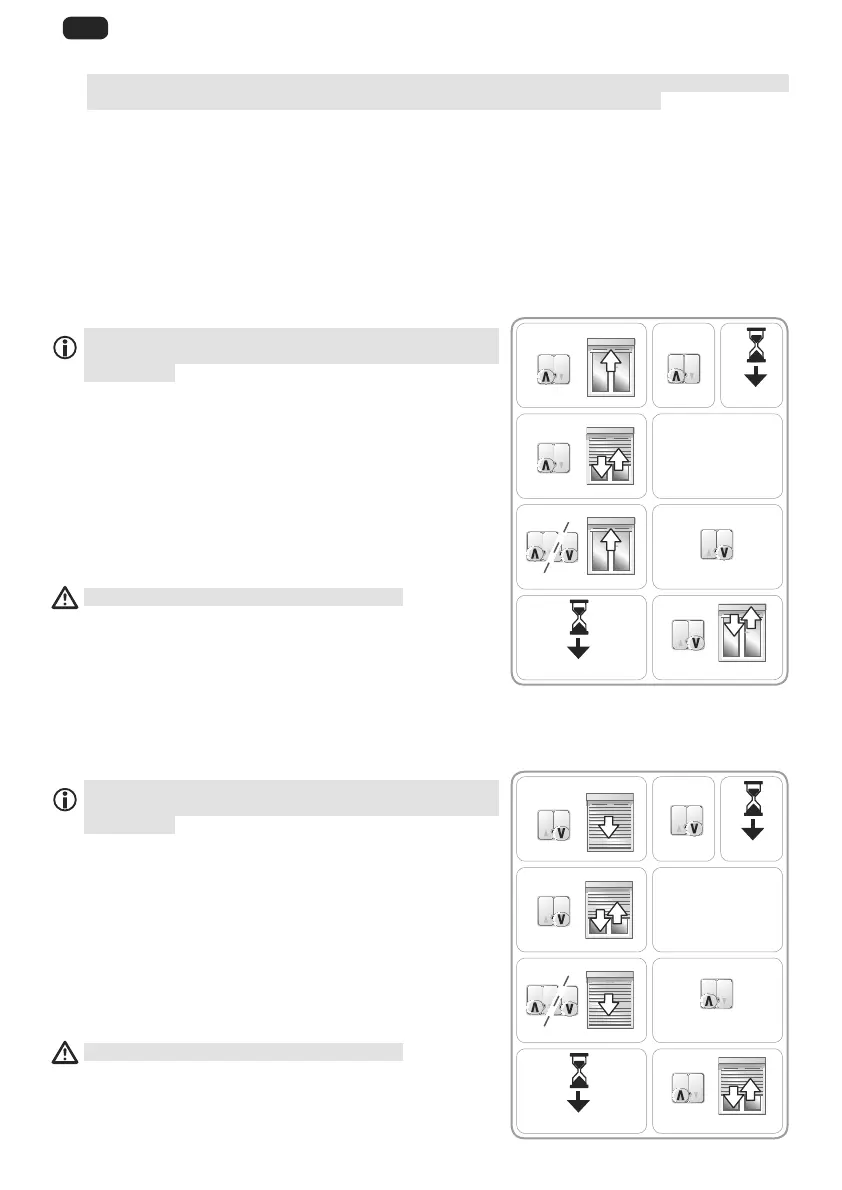
Re-setting the upper end limit

activation of the control point and the reaction by the
application.
1) Place the roller shutter at its upper end limit.
2) 
3) Wait for 2 seconds.
4)        

5) Repeat steps 3 and 4 four times.
 The last back and forth movement is brief.
6) Place the roller shutter in the desired upper end
limit position.
7) 

8) Wait for 2 seconds.
 

The new upper end limit position is programmed.
2. 4. 2. 3. 


Re-setting the lower end limit

activation of the control point and the reaction by the
application.
1) Place the roller shutter at its lower end limit.
2) 
3) Wait for 2 seconds.
4) 

5) Repeat steps 3 and 4 four times.
 The last back and forth movement is brief.
6) Place the roller shutter in the desired lower end
limit position.
7) 

8) Wait for 2 seconds.
        

The new lower end limit position is programmed.
3)
5)
7)
9)
1) 2)
4)
6)
8)
0.5 s
5 s
[Step 3
+
Step 4]

2 s
2 s
2) 3)
5)
7)
9)
1)
4)
6)
8)
0.5 s
5 s
[Step 3
+
Step 4]

2 s
2 s

Table of Contents

Other manuals for SOMFY Oximo WT

Related product manuals