Copyright © 2019 SOMFY ACTIVITES SA. All rights reserved. 4
Video phone V100+
EN
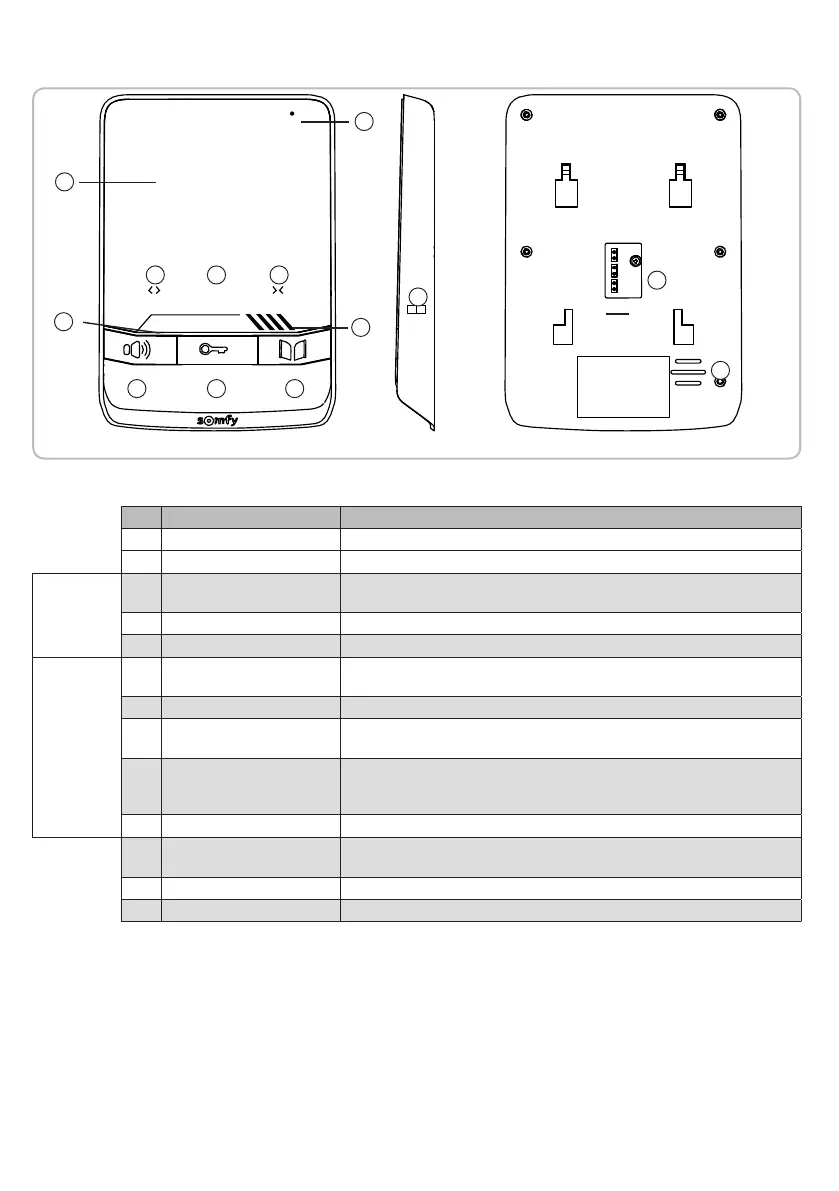
3.2.1 Monitor
STOP
SELECT
No. Designation Description
1 Screen Allows visitors to be seen.
2 Microphone Can be used to speak to visitors.
Wired
controls
3 Microphone activation button Activates the monitor microphone to answer visitors.
Used to access the settings menus (long press for at least 2 seconds).
4 Electric latch/lock button Controls the electric latch/lock. Used to navigate through the settings.
5 Gate button Controls the motorised gate. Used to navigate through the settings.
Wireless
controls
6 Open/On button Control for opening the gate, roller shutter or garage door or for switching lighting on.
7 STOP button Stops the movement of the gate, roller shutter or garage door.
8 Closed/Off button Control for closing the gate, roller shutter, garage door or for switching lighting off.
9 Channel selection button Enables the radio channel controlling a product or a group of products to be selected:
garage door, roller shutter, lighting, gate, etc. (see page 11 for more information
concerning the channels).
10 Channel indicator lights Each indicator light represents one radio channel.
11 PROG button This is used to program the monitor to wirelessly control RTS (Radio Technology Somfy)
equipment.
12 Speaker This is used to hear visitors and the ring tone.
13 Terminal This is used to connect the monitor to the door station and the power supply.
1
2
3
6
4
7
5
8
9
10
11
12
13


 To Next Page
 Loading...