28
8. Initial operation
8.15 Deleting all radio channels
in the receiver
1. Press and hold the Radio button for 30 seconds.
⇒ TheLEDashesafter15seconds.
⇒ Afteranother5seconds,theashsequencechanges
to blinking.
⇒ After another 5 seconds, the LED of the selected
radio channel remains steady.
⇒ After another 5 seconds all LEDs light up.
2. Release the Radio button.
⇒ AllLEDsareoafter5seconds.
⇒ All programmed transmitters are deleted from
the receiver.
⇒ Receiver is completely deleted; this also applies
if the Memo is plugged in.
8.16 Programming a second
transmitter by radio (HFL)
Prerequisites for programming by radio
A handheld transmitter must already be programmed on
the radio receiver. The handheld transmitters used must be
identical. This means, for example, that a Pearl can only be
programmed on a Pearl and a Pearl Vibe on a Pearl Vibe.
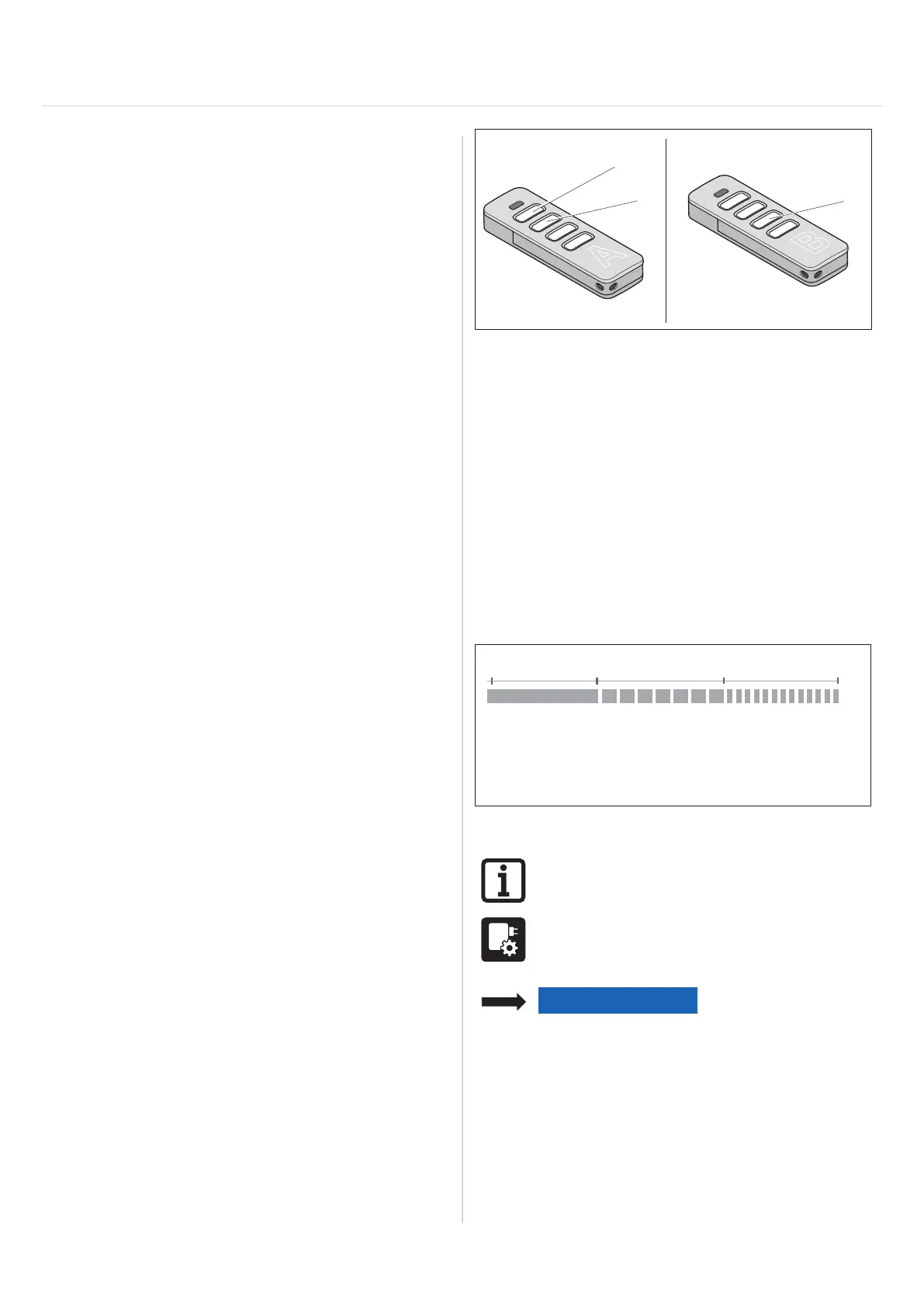
The key assignment of handheld transmitter (A) that put
the radio receiver into programming mode by radio is
used for the new handheld transmitter (B) that is to be
programmed.
The already-programmed transmitter and the new
transmitter to be programmed must be situated in the
range of the radio receiver.
Example:
1. Button 1 on radio channel 1 and button 2 on radio
channel 2 have been programmed by handheld
transmitter (A).
⇒ The newly-programmed transmitter (B) adopts the
button assignment of transmitter (A): Button 1 on
radio channel 1, button 2 on radio channel 2.
Restriction
The following setting is not possible:
• The targeted teach-in of a selected handheld
transmitter button on a radio channel.
1
2
A
3
B
Fig. 1
1. Press buttons 1 + 2 of a programmed handheld
transmitter (A) for 3–5 seconds until the LED briefly
lights up on the handheld transmitter.
⇒ LEDs of the internal lighting blink.
2. Release buttons 1 and 2 of handheld transmitter (A).
⇒ If a radio command is not transmitted within another
30 seconds, the radio receiver switches over to
normal mode.
3. Press any button, e.g. (3) on the new handheld
transmitter (B) to be programmed.
⇒ The LEDs of the internal lighting remain steady.
8.17 Resetting the control unit
15 s1 s 5 s 10 s
Reset of the
safety inputs
Reset of the
programmed
run times
Fig. Overview of the time sequence of the status LED when
pressing the green Reset button
INFORMATION
A SOMlink and a WiFi-enabled device are
required to reset all parameters to the
factory settings.
NOTE
If a frame photocell is used, the run times
must be deleted each time a reset is
performed. Resetting the safety devices
is not sucient.



 To Next Page