SonicWall SonicWave Deployment Guide
Hardware Overview
16
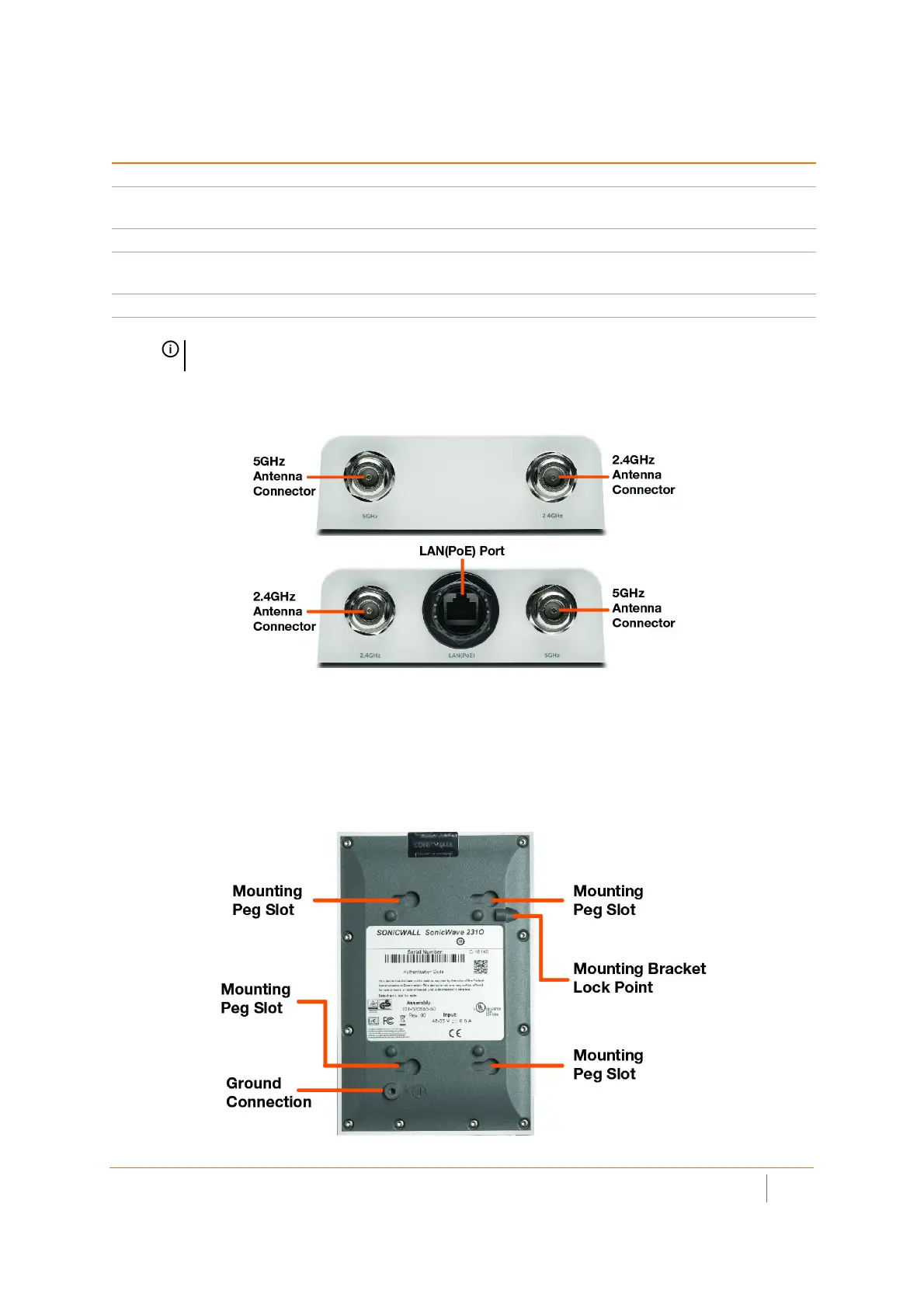
SonicWave 231o Antenna Connectors and LAN(PoE) Port
Four antenna ports on the ends of the SonicWave 231o provide connection points for the two 5GHz antennas
and two 2.4GHz antennas.
The SonicWave 231o provides one LAN(PoE) port for connecting to the PoE injector or PoE-enabled switch and
to your SonicWall network security appliance. You can also use a SonicWall PoE-enabled security appliance to
provide PoE from the appliance itself.
SonicWave 231o Bottom
Scanning radio Dedicated third scanning radio
Antennas 4 external Omni-Antenna (2.4Ghz x 2 / 5Ghz x 2)
1 internal antenna for scanning radio
Power source 802.3af PoE (standard, PoE device sold separately)
Chassis Rectangle 122mm x 188mm x 18mm
Plenum rated
Operating temperature -30° to 60°C
NOTE: The SonicWave 231o enclosure is IP67 compliant with components supplied with the
product and when installed as instructed.
SonicWave 231o Hardware Components
Component Description



 To Next Page