SonicWall SonicWave Deployment Guide
Antenna Installation
37
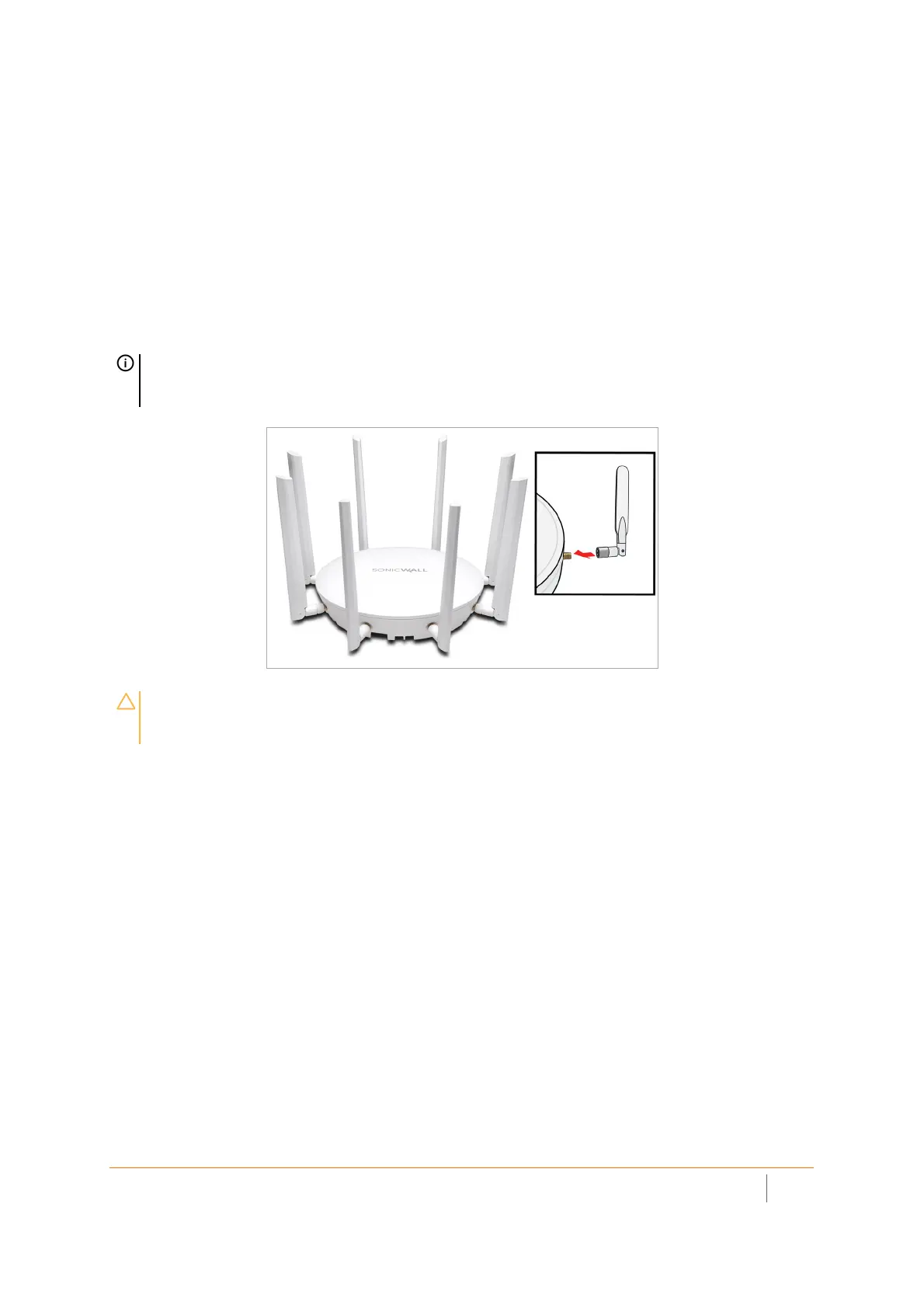
Installing SonicWave 432e Antennas
To install the antennas on your SonicWave 432e:
1 Remove all eight antennas from their bags and place one on each connector.
2 Carefully finger-tighten the fittings.
3 Adjust the antennas upright for optimal reception.
For optimal wireless coverage, the SonicWave 432e antennas should be oriented vertically. The circular design
of the SonicWave aides in creating a strong multi-directional wireless signal pattern. In most cases, leaving the
antennas straight up (as shown in the illustration) provides the best overall coverage.
TIP: There might be a “dead” zone directly underneath the SonicWave 432e when it is mounted
on a ceiling with the antennas oriented vertically. You can mitigate this by slightly angling the
antennas.
CAUTION: Only antennas provided by SonicWall are authorized for use with the SonicWave
432e. Be aware of the regulations in your region before using other antennas. Please refer to
the SonicWave 432e Safety and Regulatory Reference Guide.



 To Next Page