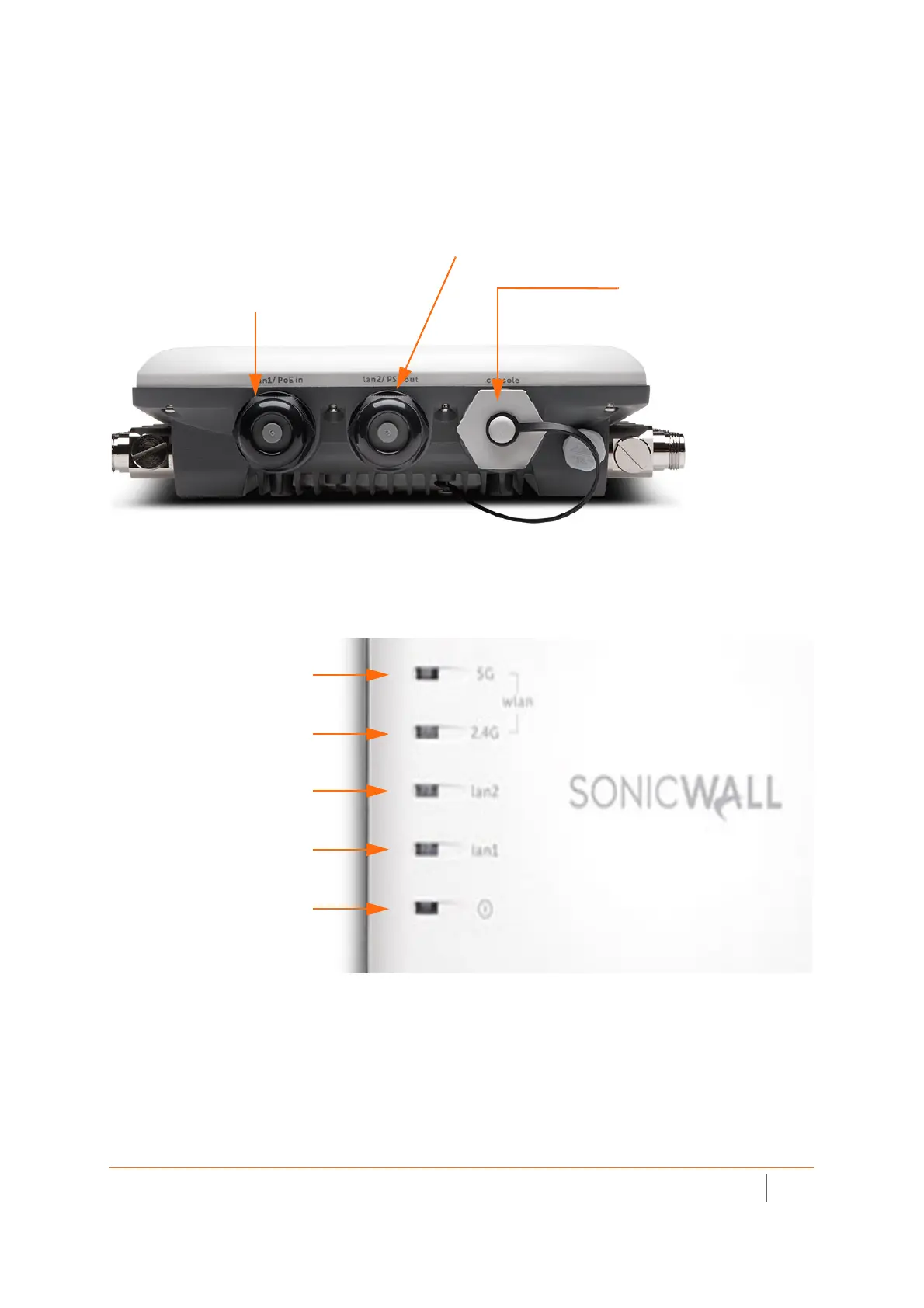
lan2/PSE out port.
Provides an additional Ethernet connection. Refer to
the SonicOS Connectivity Administration
console port.
Provides a management
connection using the SonicWall
console cable (RJ45 to DB9)
lan1/PoE in port.
Provides Ethernet and Power
over Ethernet (PoE)
LED (lan2)
- On (solid yellow or green, Ethernet link)
- Blinking yellow (1G Ethernet activity)
- Blinking green (10/100M Ethernet
activity)
LED (5G)
- On (solid green, 5 GHz radio link)
- Blinking green (5 GHz radio activity)
LED (2.4G)
- On (solid green, 2.4 GHz radio link)
- Blinking (2.4 GHz radio activity)
LED (Power)
- On (solid blue, power)
- Blinking (booting/FW upgrade)
LED (lan1)
- On (solid yellow or green, Ethernet link)
- Blinking yellow (2.5G Ethernet activity)
- Blinking green (1G/100M Ethernet
activity)
LED (safe mode)
- On (solid blue, power) with 4
- Blinking (green)



 To Next Page