31
FM EDIT mode (Edit) - Setting the operator -
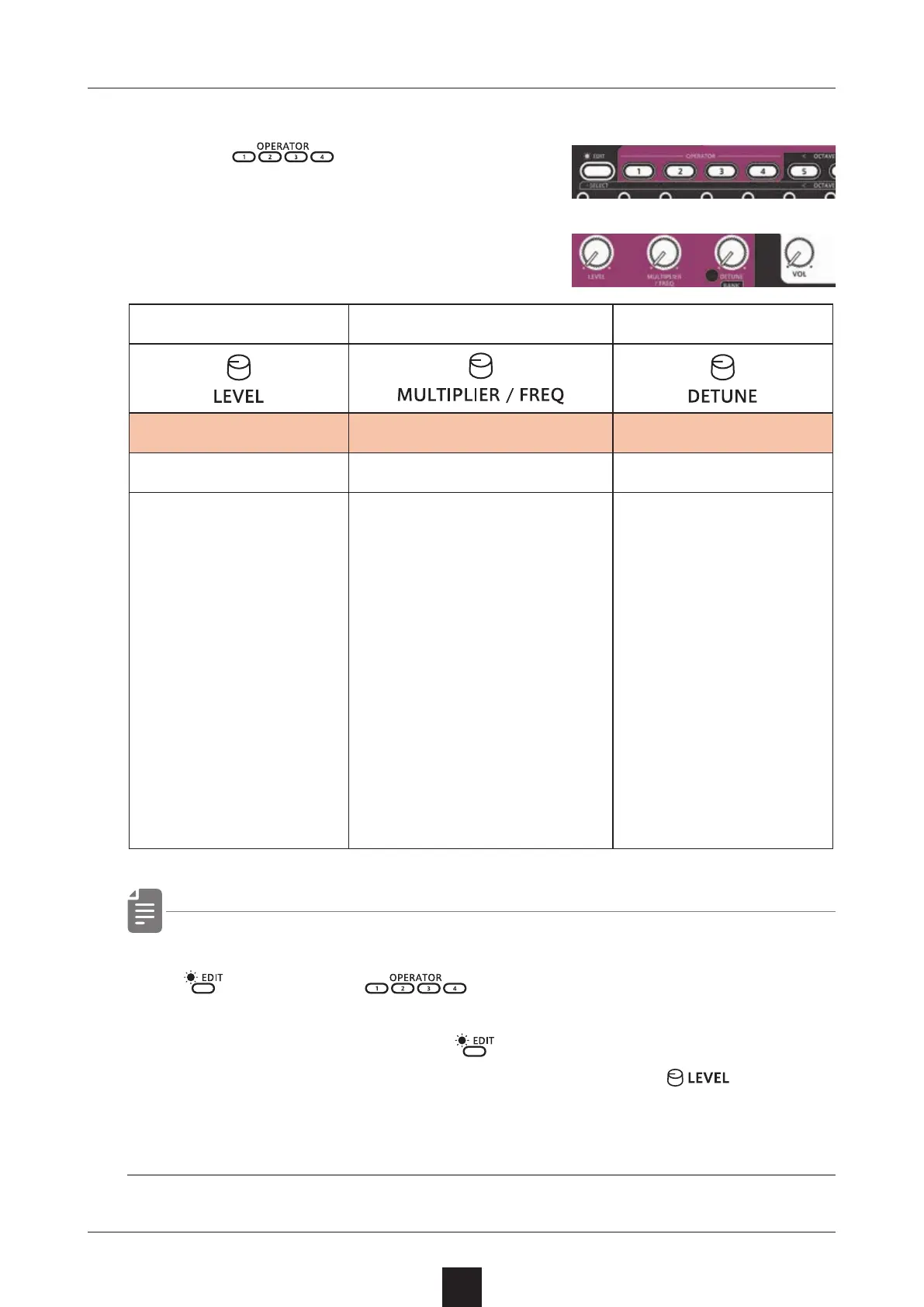
Editing parameters
1
Press to select operators
2
Turn knobs
・ You can temporarily mute the target operator by holding down
and pressing .
Muted operators will be lit orange.
To unmute, hold down the
key and press the muted
operator button again or turn muted operator's
.
・ Mute settings are not saved with the sound.
Operators volume Operators frequency Operators detune
Level MULTIPLIER/FREQ Detune
0 〜 127 0.50 〜 15.00/1.0 〜 9831Hz -3 〜 3
Setting the maximum
volume for the selected
operator.
Setting it to 0 will silence
the operator.
Setting the frequency of the
selected operator.
When FIXED is o, you can set
it in 1.00 increments using
the MALTIPLIER/FREQ knob.
When FIXED is on, you can
set the frequency in 76.5Hz
increments by turning the
MALTIPLIER/FREQ knob.
When FIXED is on, the set
frequency will always be
sounded regardless of the
keyboard you play.
Setting the detune of the
selected operator.



 To Next Page