Manual Integrator Supercal 531 06-06-2011 23
5.2 The display menu
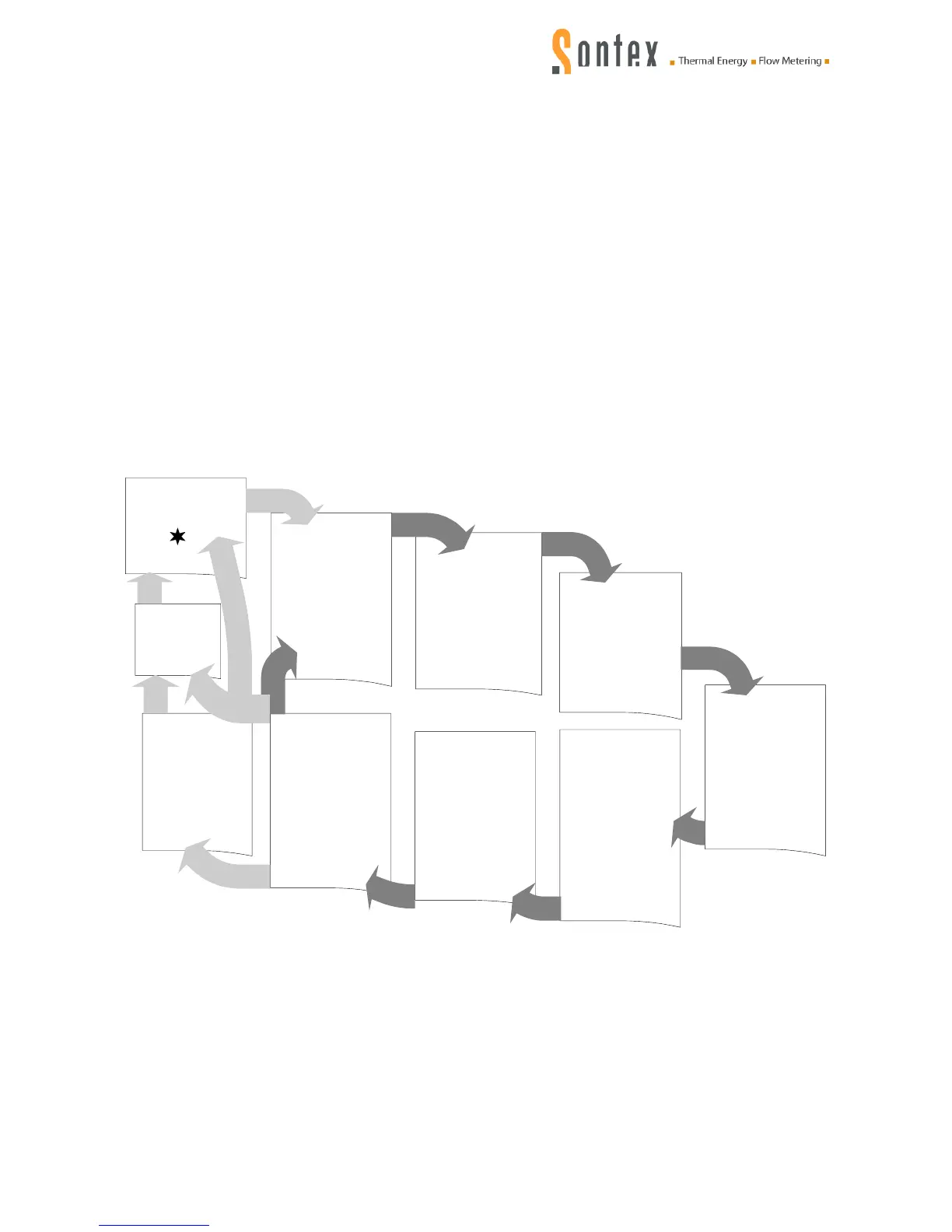
The display sequences are divided into the following menus:
1 Main menu
2 Set day values
3 15 monthly values
4 32 average values
5 32 maximum values
6 Configurations
7 Service information
* Favourites menu (optional)
*1234567 Error menu
1234567 Verification menu
The display sequence can be set according to your requirements:
The menu „favourites“ can be placed on top of the main menu. Acc. to the approval regulations,
the accumulated energy has to be displayed first in this menu. The display levels can be custom-
ized as to the number as well as in the order of the display sequences.
User menu
(Optional)
Main menu
Set day menu
Configuration
Montlyvalues 1...15
Service
Test menu
(only with jumper
JP1 on main PCB)
1234567
Error menu
(only if errorr)
*1234567
1
2
3
4
5
6
7
Average values
1...32
Maximum values
1...32


 To Next Page