1
Insert
a
memory
card
with
recorded
images
into
the
camera.
2
Insert
the
sufficiently
charged
battery
pack
in
the
camera,
or
connect
the
camera
to
a
wall
outlet
(wall
socket)
with
the
AC
Adaptor/charger
(not
supplied).
• When you copy images to your computer using insufficient battery pack,
copying may fail or image data may become corrupted
if
the battery pack
shuts down too soon.
3
Turn
on
the
camera
and
the
computer.
4
Check
that
[USB
connection]
in
~
2
is
set
to
[Mass
Storage].
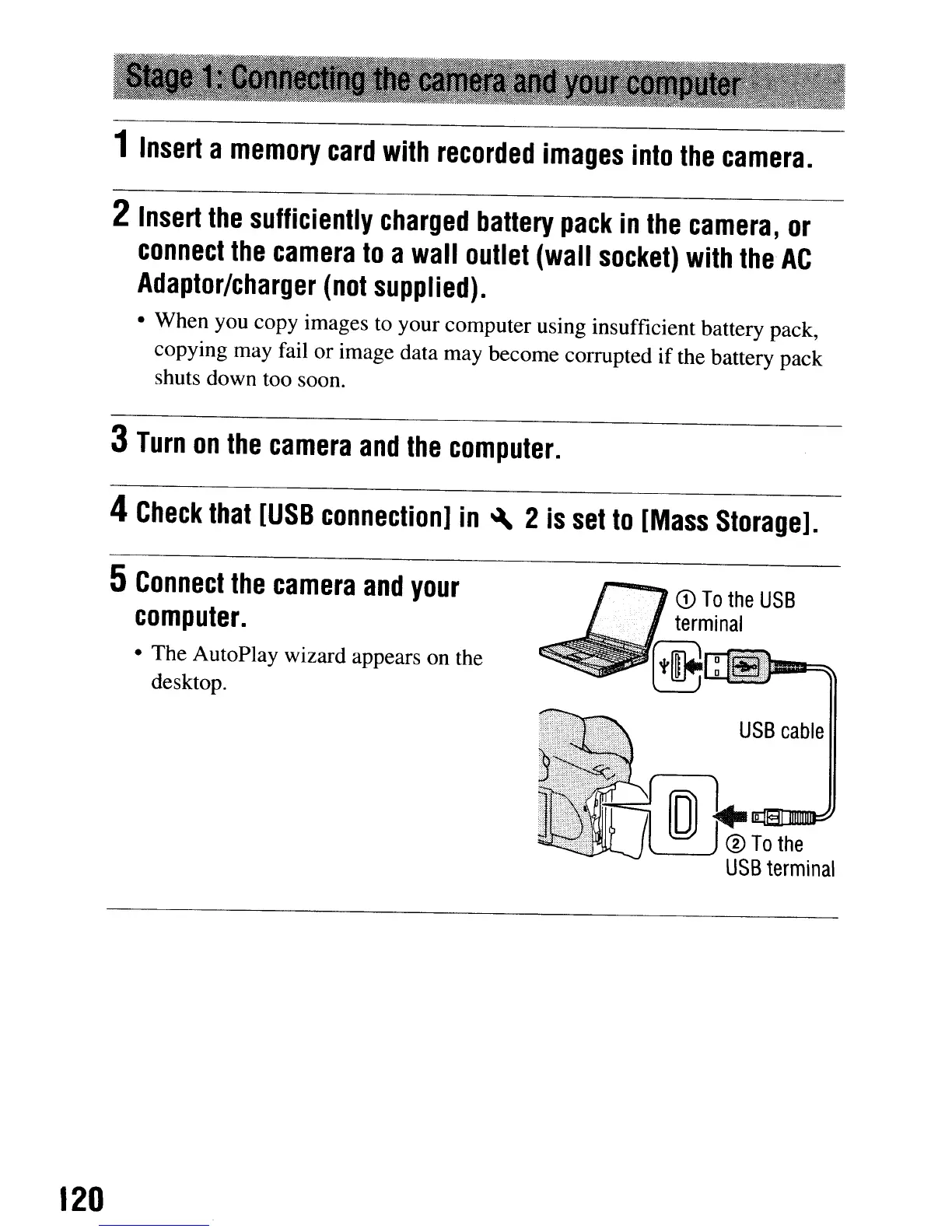
5
Connect
the
camera
and
your
computer.
• The AutoPlay wizard appears on the
desktop.
120
CD
To
the
USB
terminal
USB
cable
1
Insert
a
memory
card
with
recorded
images
into
the
camera.
2
Insert
the
sufficiently
charged
battery
pack
in
the
camera,
or
connect
the
camera
to
a
wall
outlet
(wall
socket)
with
the
AC
Adaptor/charger
(not
supplied).
• When you copy images to your computer using insufficient battery pack,
copying may fail or image data may become corrupted
if
the battery pack
shuts down too soon.
3
Turn
on
the
camera
and
the
computer.
4
Check
that
[USB
connection]
in
~
2
is
set
to
[Mass
Storage].
5
Connect
the
camera
and
your
computer.
• The AutoPlay wizard appears on the
desktop.
120
CD
To
the
USB
terminal
USB
cable













 To Next Page