To
use
Program
shift
1
Press
the
shutter
button
halfway
down
to
adjust
the
focus.
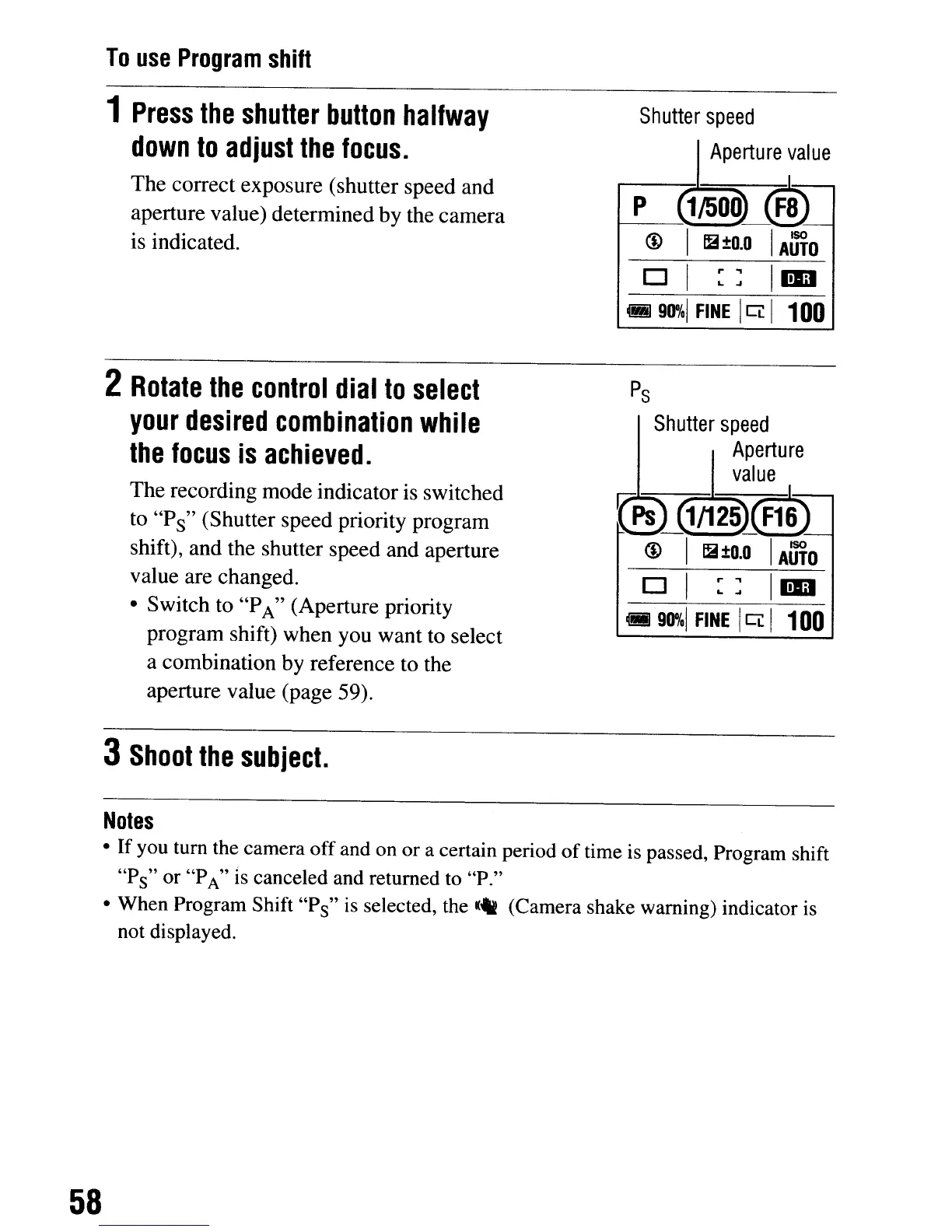
The correct exposure (shutter speed and
aperture value) determined by the camera
is indicated.
2
Rotate
the
control
dial
to
select
your
desired
combination
while
the
focus
is
achieved.
The recording mode indicator is switched
to
"P
s
"
(Shutter speed priority program
shift), and the shutter speed and aperture
value are changed.
• Switch to
"P
A"
(Aperture priority
program shift) when you want to select
a combination by reference to the
aperture value (page 59).
3
Shoot
the
subject.
Shutter
speed
I
Aperture
value
r--p-~_®
@ I
~±o.o
I
AUTO
D I
::
IIiD
M
90%1
FINE
I
Ci:
I
100
P
s
Shutter
speed
~
APerture
value
V"Ps_1/125
JF1~)
@ I
~±o.o
I
AUTO
D I
::
IIiD
cfiiI
90%1
FINE
I
Ci:
I
100
Notes
•
If
you turn the camera off and on or a certain period
of
time is passed, Program shift
"P
s
"
or
"P
A"
IS
canceled and returned to "P."
• When Program Shift
"P
s
"
is
selected, the
K4i!
(Camera shake warning) indicator
is
not displayed.
58
To
use
Program
shift
1
Press
the
shutter
button
halfway
down
to
adjust
the
focus.
The correct exposure (shutter speed and
aperture value) determined by the camera
is indicated.
2
Rotate
the
control
dial
to
select
your
desired
combination
while
the
focus
is
achieved.
The recording mode indicator is switched
to
"P
s
"
(Shutter speed priority program
shift), and the shutter speed and aperture
value are changed.
• Switch to
"P
A"
(Aperture priority
program shift) when you want to select
a combination by reference to the
aperture value (page 59).
3
Shoot
the
subject.
Shutter
speed
I
Aperture
value
r--p-~_®
@ I
~±o.o
I
AUTO
D I
::
IIiD
M
90%1
FINE
I
Ci:
I
100
P
s
Shutter
speed
~
APerture
value
V"Ps_1/125
JF1~)
@ I
~±o.o
I
AUTO
D I
::
IIiD
cfiiI
90%1
FINE
I
Ci:
I
100
Notes
•
If
you turn the camera off and on or a certain period
of
time is passed, Program shift
"P
s
"
or
"P
A"
IS
canceled and returned to "P."
• When Program Shift
"P
s
"
is
selected, the
K4i!
(Camera shake warning) indicator
is
not displayed.
58













 To Next Page