116
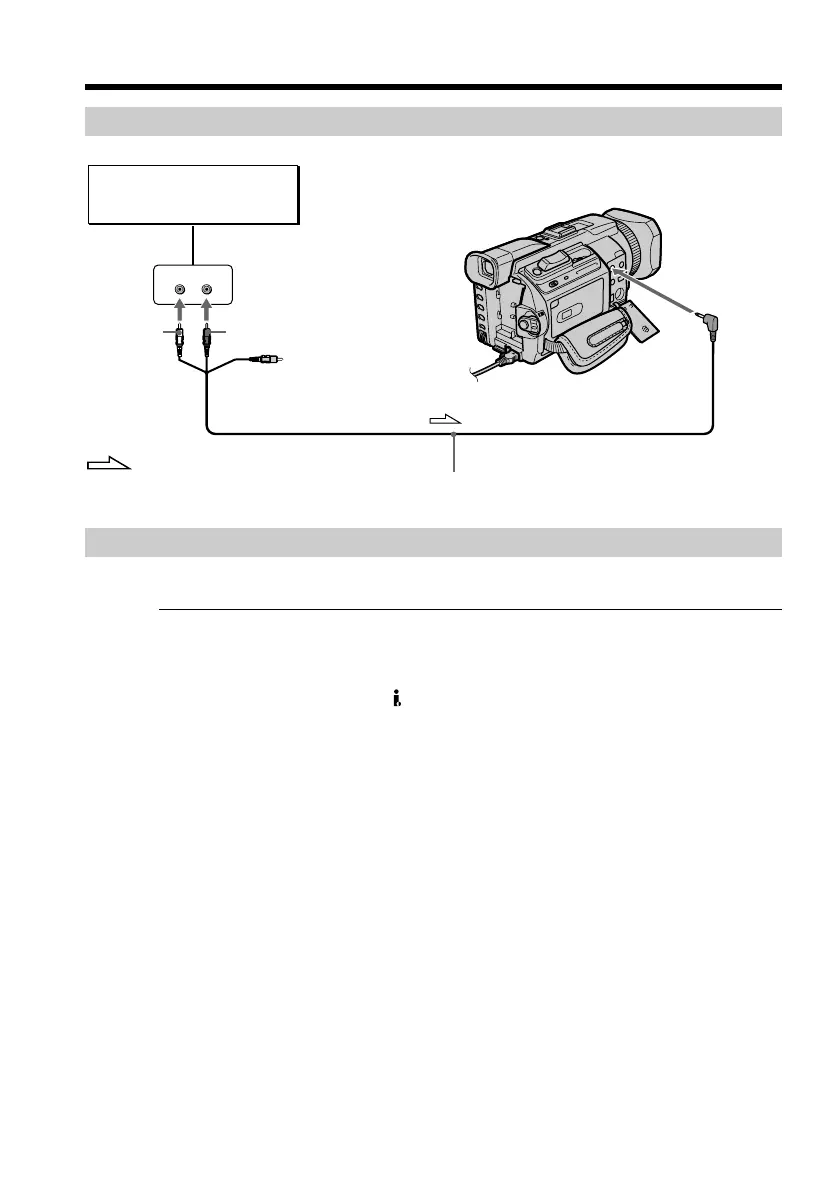
Connecting the A/V connecting cable to the AUDIO/VIDEO jack
Dubbing with the built-in microphone
No connection is necessary.
Notes
•When dubbing with the AUDIO/VIDEO jack or the built-in microphone, pictures are
not output through the S VIDEO jack or the AUDIO/VIDEO jack. Check the recorded
picture on the screen. You can check the recorded sound by using headphones.
•You cannot add audio with the DV Interface.
If you make all the connections
The audio input to be recorded will take precedence over others in the following order:
•MIC (PLUG IN POWER) jack
•Intelligent accessory shoe
•AUDIO/VIDEO jack
•Built-in microphone
Audio dubbing
LINE OUT
LR
AUDIO/
VIDEO
Audio equipment
Do not connect the
video (yellow) plug.
: Signal flow
AUDIO L
(White)
AUDIO R (Red)
A/V connecting cable (supplied)














 To Next Page