124
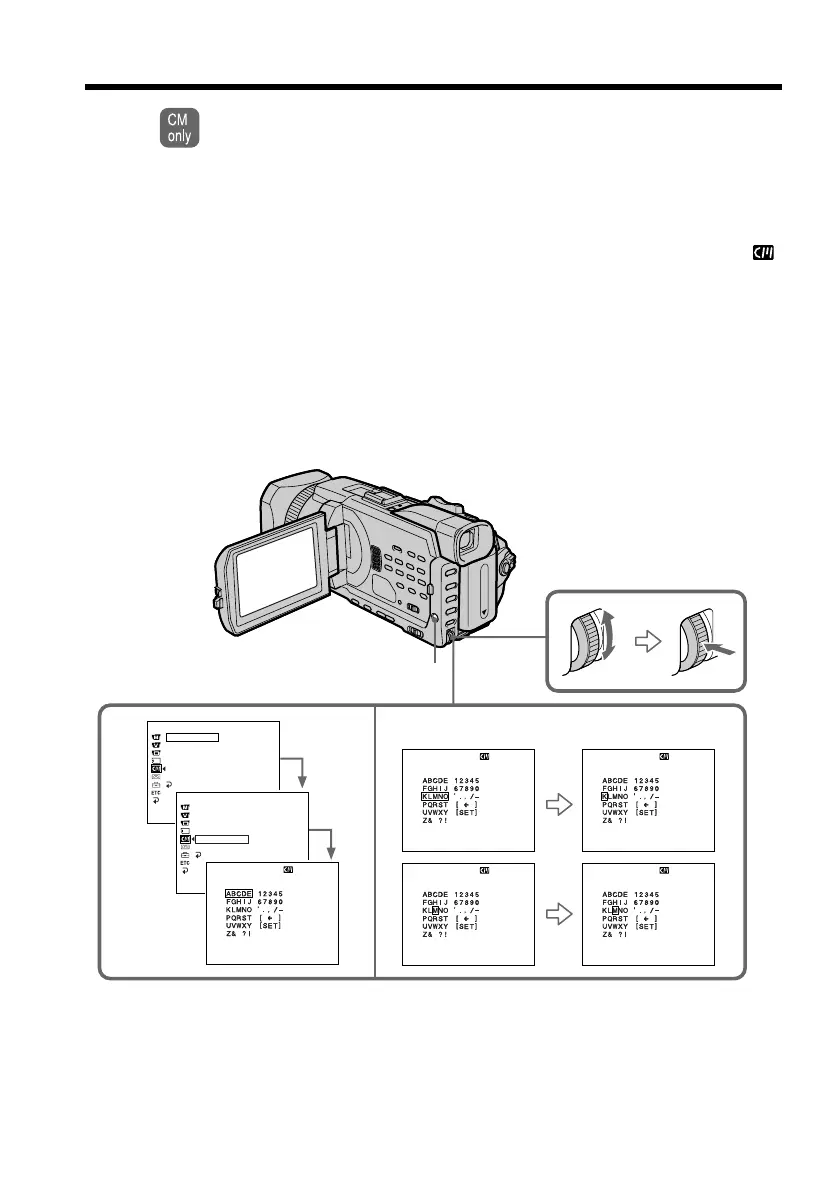
If you use a cassette with cassette memory, you can label a cassette. Labels can
consist of up to 10 characters and is stored in cassette memory. When you insert
the labeled cassette and when the POWER switch is set to CAMERA or VCR, the
label is displayed for about five seconds.
(1) Insert the cassette you want to label.
(2) Set the POWER switch to CAMERA or VCR.
(3) Press MENU, then turn the SEL/PUSH EXEC dial to select TAPE TITLE in
,
then press the dial (p. 213). Tape title display appears.
(4) Turn the SEL/PUSH EXEC dial to select the column of the desired character,
then press the dial.
(5) Turn the SEL/PUSH EXEC dial to select the desired character, then press the
dial.
(6) Repeat steps 4 and 5 until you finish the label.
(7) Turn the SEL/PUSH EXEC dial to select [SET], then press the dial.
The label is stored in the memory.
Labeling a cassette
3 4~6
[
MENU
] :
END
TAPE TITLE
––––––––––
[
MENU
] :
END
TAPE TITLE
––––––––––
[
MENU
] :
END
TAPE TITLE
––––––––––
[
MENU
] :
END
TAPE TITLE
M
–––––––––
[
MENU
] :
END
CM SET
TITLE
TITLEERASE
TITLE DSPL
CM SEARCH
TAPE TITLE
ERASE ALL
RETURN
READY
––––––––––
[
MENU
] :
END
CM SET
TITLE
TITLEERASE
TITLE DSPL
CM SEARCH
TAPE TITLE
ERASE ALL
RETURN
[
MENU
] :
END
TAPE TITLE
––––––––––
MENU














 To Next Page