41
Playback – Basics
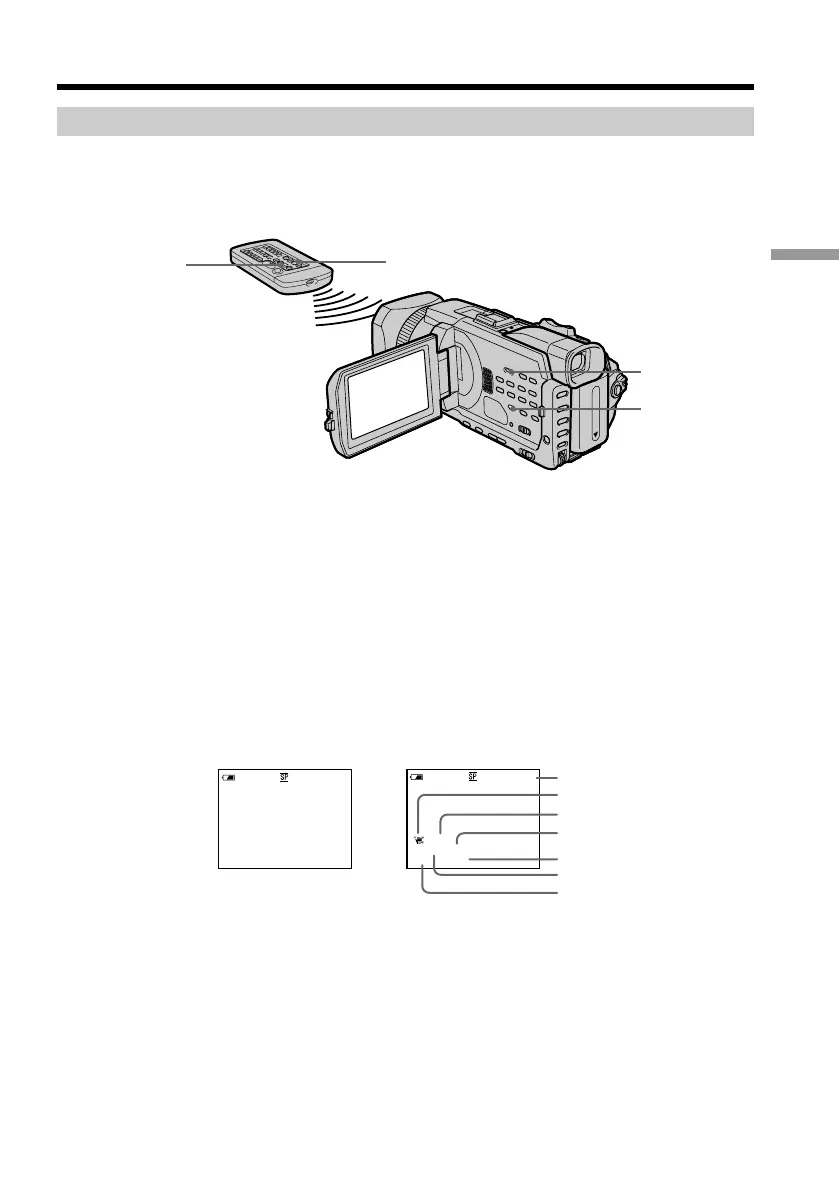
To display the screen indicators – Display function
Press DISPLAY/TOUCH PANEL on your camcorder or DISPLAY on the Remote
Commander supplied with your camcorder. The indicators disappear on the screen. To
make the indicators appear, press DISPLAY/TOUCH PANEL or DISPLAY again.
About date/time and various settings
Your camcorder automatically records not only images on the tape but also the
recording data (date/time or various settings when recorded) (data code).
1 Set the POWER switch to VCR, then play back a tape.
2 Press DATA CODE on your camcorder or the Remote Commander.
The display changes as follows when you press the DATA CODE:
date/time t various settings (SteadyShot, exposure, white balance, gain, shutter
speed, aperture value) t no indicator
[a] Tape counter
[b] SteadyShot OFF
[c] Exposure mode
[d] White balance
[e] Gain
[f] Shutter speed
[g] Aperture value
Playing back a tape
DISPLAY/
TOUCH PANEL
DATA CODE
DATA CODE
DISPLAY
Date/time Various settings
[g]
[b]
[d]
[e]
[f]
[c]
[a]
60 AWB
F1.8 9dB
AUTO
JUL 4 2002
12:05:56 AM
50min
0:00:23:01
40min
0:00:23:01














 To Next Page