53
Advanced Recording Operations
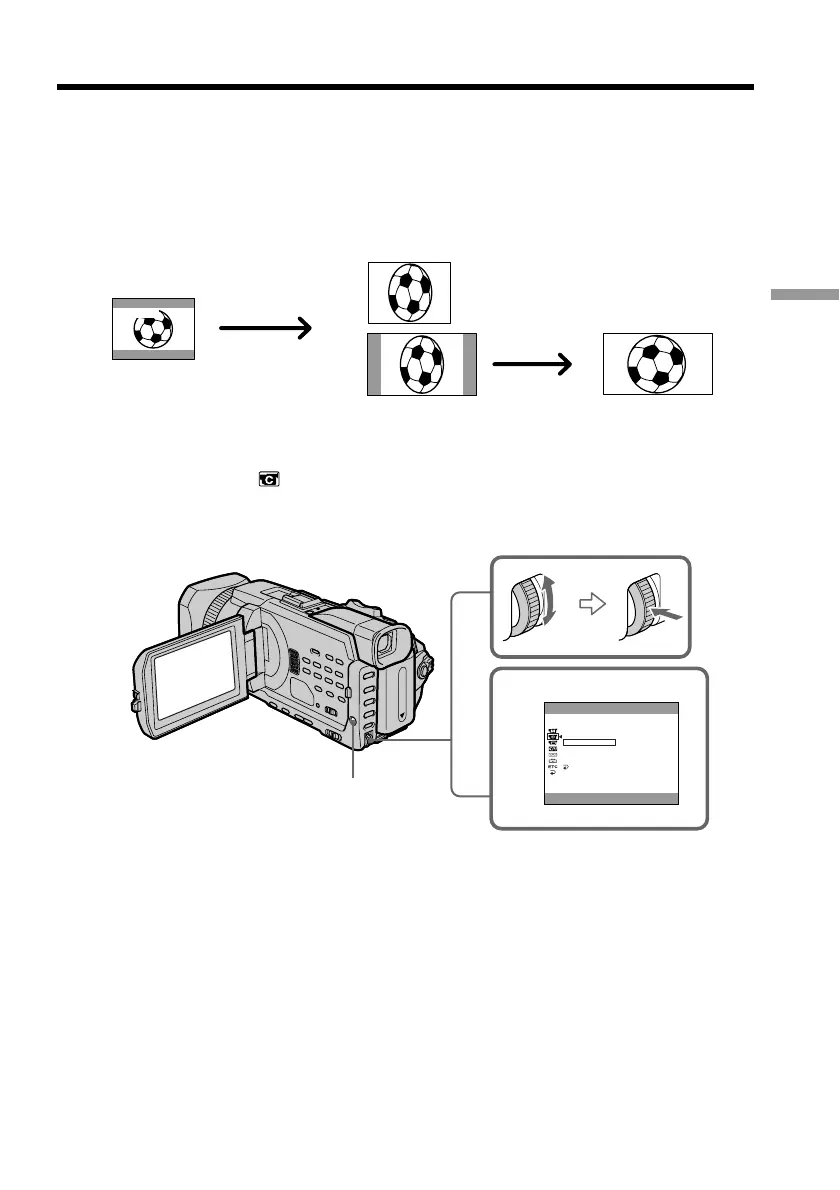
You can record a 16:9 wide picture to watch on a 16:9 wide-screen TV (16:9WIDE). If
you connect a TV compatible with the ID-1/ID-2 system, the screen size is
automatically selected.
Black bands appear on the screen during recording in 16:9WIDE mode [a]. The picture
during playback on a normal TV [b] or on a wide-screen TV [c] is compressed in the
longwise direction. If you set the screen mode of the wide-screen TV to the full mode,
you can watch pictures of normal images [d].
(1) In the standby, press MENU, then turn the SEL/PUSH EXEC dial to select
16:9WIDE in
, then press the dial (p. 209).
(2) Turn the SEL/PUSH EXEC dial to select ON, then press the dial.
To cancel the wide mode
Set 16:9WIDE to OFF in the menu settings.
Using the wide mode
2
ON
CAMERA SET
D ZOOM
PHOTO REC
16:9WIDE
STEADYSHOT
FRAME REC
INT. REC
RETURN
[
MENU
]
:
END
MENU
[a]
[c]
[b]
[d]
16:9
WIDE














 To Next Page