62
Presetting the adjustment for picture
quality – Custom preset
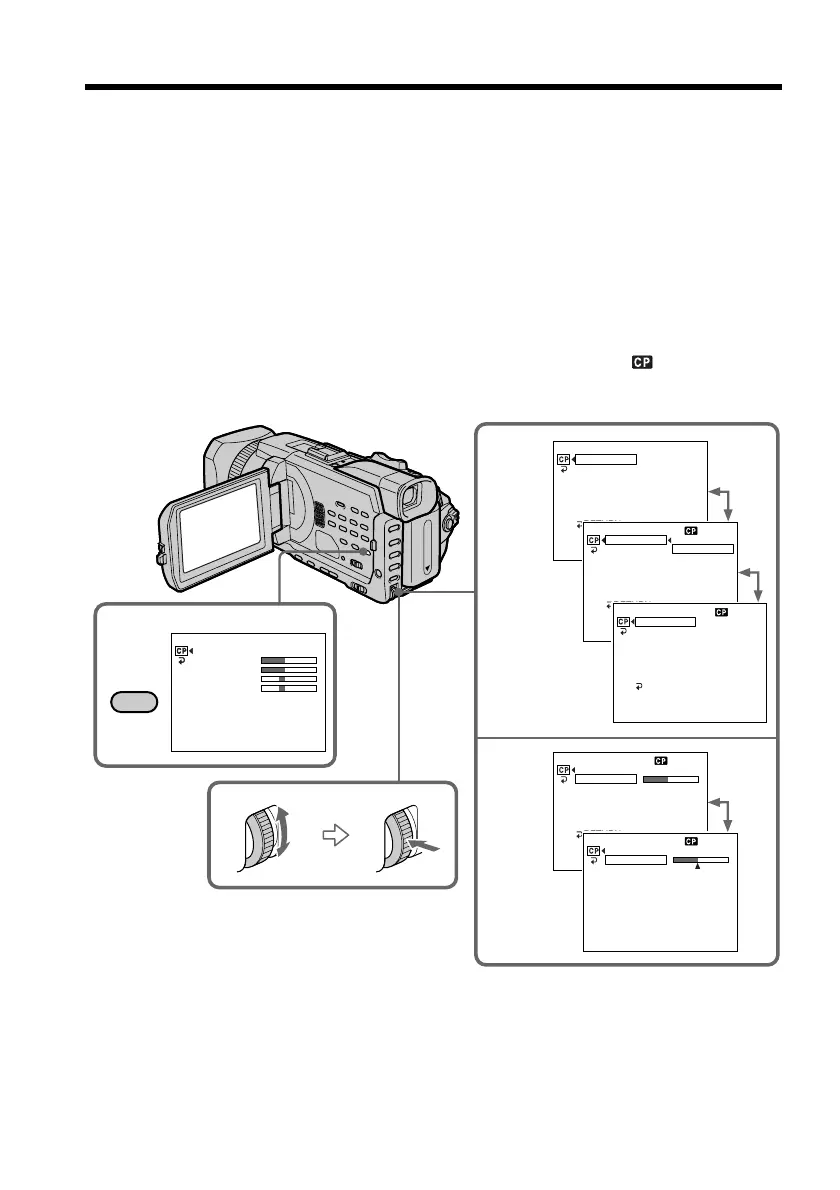
You can preset the camcorder to record the picture with the desired picture quality.
When presetting, adjust the picture by shooting a subject and checking the picture
displayed on a TV (p. 45).
(1) Press CUSTOM PRESET to display the CUSTOM PRESET menu while the
POWER switch is set to CAMERA or MEMORY/NETWORK (DCR-TRV950
only).
(2) Press the SEL/PUSH EXEC dial.
(3) Turn the SEL/PUSH EXEC dial to select SET, then press the dial.
(4) Turn the SEL/PUSH EXEC dial to select ON, then press the dial.
(5) Turn the SEL/PUSH EXEC dial to select the desired item, then press the dial.
(6) Turn the SEL/PUSH EXEC dial to adjust the selected item, then press the dial.
(7) Press CUSTOM PRESET.
The CUSTOM PRESET menu disappears and the indicator
appears on the
screen.
2-4
5,6
1
CUSTOM PRESET
[
CP
]
:
END
CUSTOM PRESET STBY
[
CP
]
:
END
CUSTOM PRESET STBY
SET
COLOR LVL
SHARPNESS
WB SH
I
FT
AE SH
I
FT
AGC LIMIT
RESET
RETURN
OFF
[
CP
]
:
END
CUSTOM PRESET STBY
SET
COLOR LVL
SHARPNESS
WB SH
I
FT
AE SH
I
FT
AGC LIMIT
RESET
RETURN
OFF
ON
[
CP
]
:
END
CUSTOM PRESET STBY
SET
COLOR LVL
SHARPNESS
WB SH
I
FT
AE SH
I
FT
AGC LIMIT
RESET
RETURN
ON
[
CP
]
:
END
CUSTOM PRESET STBY
SET
COLOR LVL
SHARPNESS
WB SH
I
FT
AE SH
I
FT
AGC LIMIT
RESET
RETURN
[
CP
]
:
END
CUSTOM PRESET STBY
COLOR LVL
[
CP
]
:
END
SET
COLOR LVL
SHARPNESS
WB SH
I
FT
AE SH
I
FT
AGC LIMIT
RESET
OFF
OFF
CUSTOM
PRESET














 To Next Page