4
*
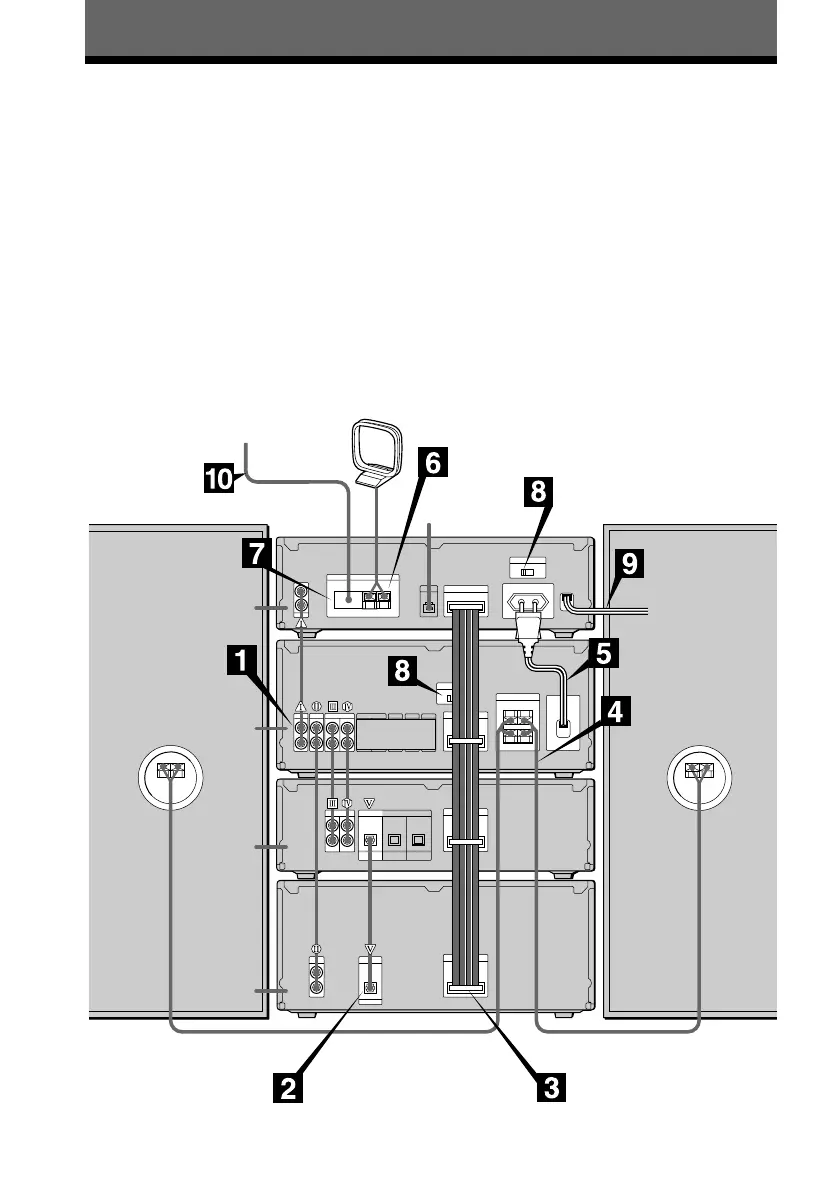
Perform the following procedure 1 to 0 to hook up your system using the supplied cords and
accessories.
This system is designed for easy connection when the components are stacked vertically as
shown below. Be sure to stack the components in the same order shown in the illustration to
prevent misconnection.
The supplied antennas are for indoor use. We recommend connecting an outdoor antenna
(optional) to ensure stable reception. See page 79 for connecting outdoor antennas and other
optional equipment.
Preparations
1 Take the transport cartridge out of the MD deck.
2 Remove the transit key on the bottom of the CD player.
3 Stack the components vertically in the order shown in the illustration below.
* Used to connect the optional TC-TX770 tape deck (for DHC-EX880MD only, see page 84).
Getting Started
FM lead antenna
AM loop antenna
Tuner
Amplifier
MD deck
Speaker
(right)
Speaker
(left)
CD player
Rear panel
Step 1: Hooking up the system









 To Next Page