74
2 Turn VOLUME to adjust the
volume.
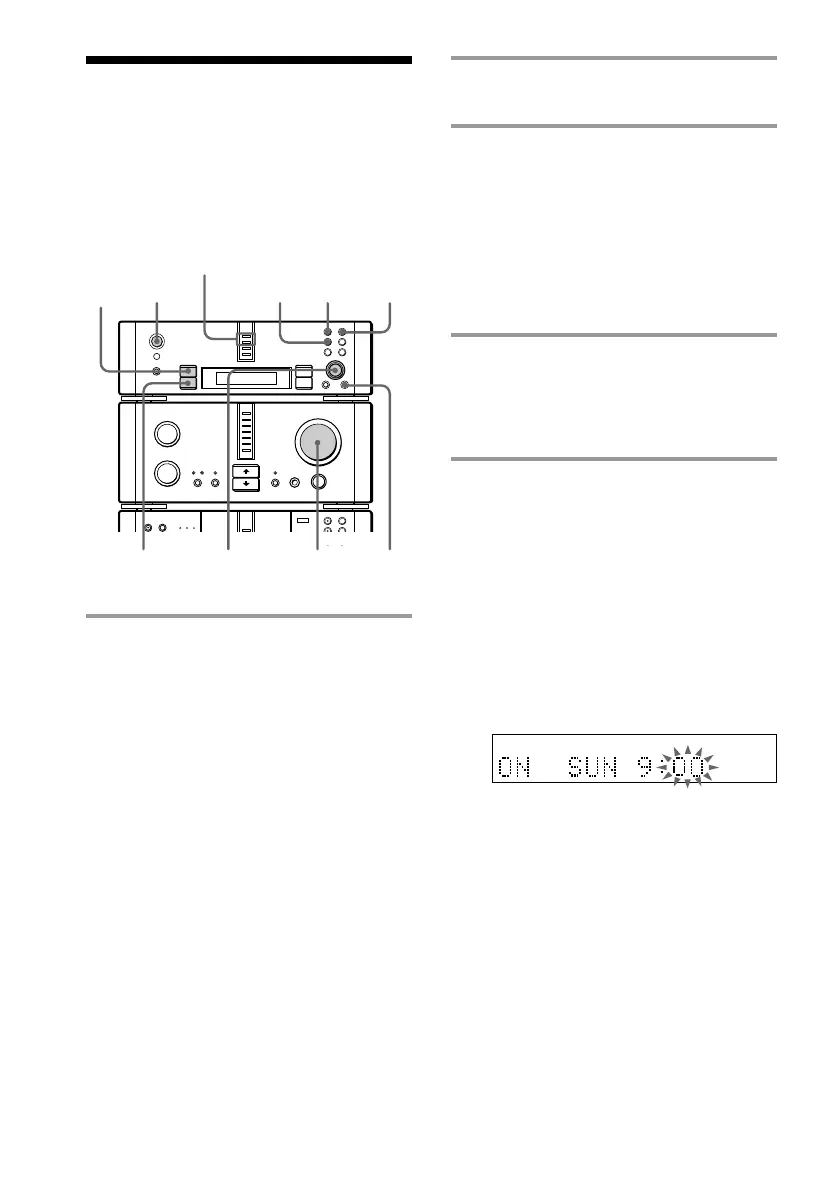
3 Press CLOCK/TIMER SET, then
turn MULTI CONTROLLER to
select “ONCE TIMER” or
“DAILY TIMER”.
If you select “ONCE TIMER”, the Wake-
up Timer activates only once. If you
select “DAILY TIMER”, the Wake-up
Timer activates at the same time every
day.
4 Press ENTER/YES.
If you selected “ONCE TIMER”, the day
indication starts flashing. If you selected
“DAILY TIMER”, the hour indication
starts flashing.
5 Set the time to start playback.
If you selected “DAILY TIMER” in
step 3, skip step 1 below.
1 Turn MULTI CONTROLLER to set the
day, then press n or ENTER/YES.
The hour indication starts flashing.
The clock is on a 24-hour system for
the DHC-EX880MD, and a 12-hour
system for DHC-MD717.
2 Turn MULTI CONTROLLER to set the
hour, then press n or ENTER/YES.
The minute indication starts flashing.
3 Turn MULTI CONTROLLER to set the
minute, then press n or ENTER/YES.
The day or hour indication flashes
again.
Waking up to music
— Wake-up Timer
You can wake up to music at a preset time.
Make sure you have set the clock (see
page 12).
1 Prepare the sound source you want
to play.
• CD: Place the desired CD in the tray.
To play the tracks in a specific order,
press PROGRAM repeatedly so that
one of “PROGRAM-1” to
“PROGRAM-3” appears (see page 27).
• MD: Insert the desired MD to the slot.
To play the tracks in a specific order,
make a program (see page 35).
• Radio: Tune in the desired station (see
page 13).
• Tape: Insert a tape in the optional tape
deck.
ONCE and DAILY
indicators
•
•
•
•
•
•
•
•
•
0
10
n
N
5,8 3
4,5,
10
11
2
3,5,7,9
DAILY ONCE
N









 To Next Page