65
Combining recorded
tracks
— Combine Function
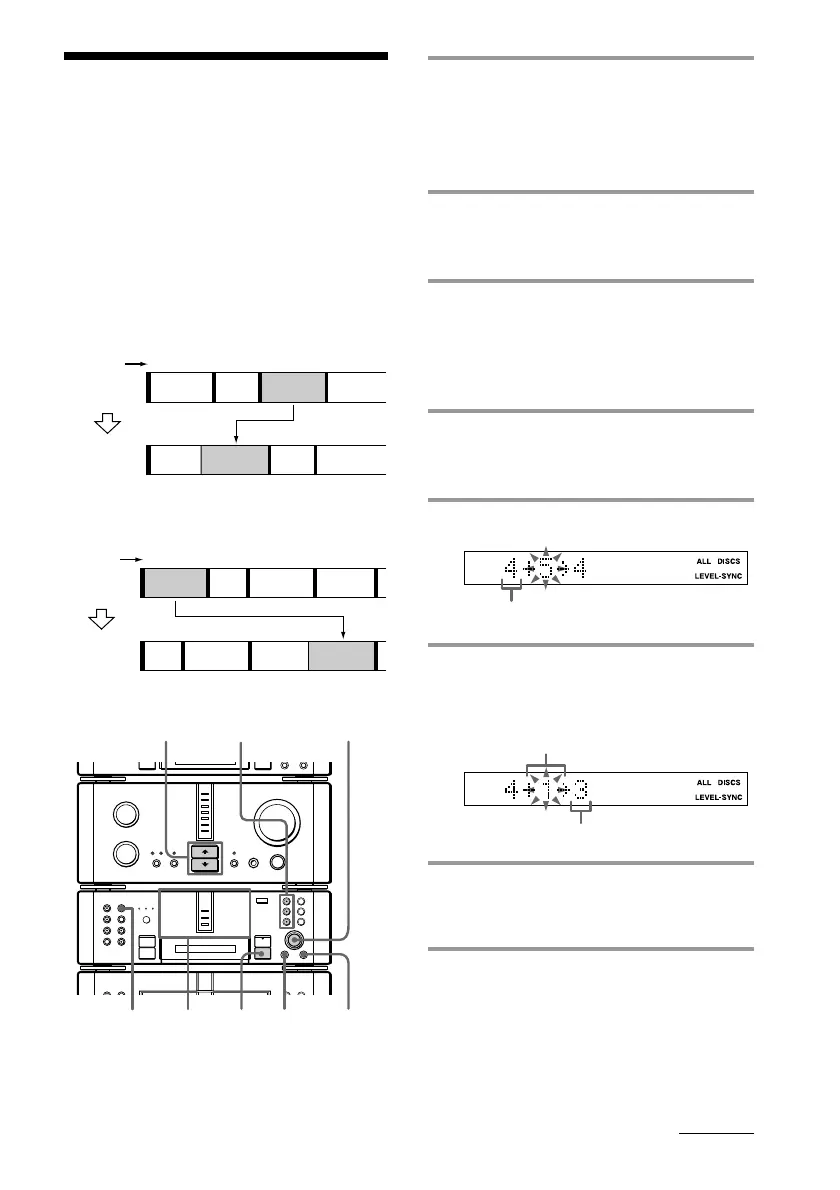
1 Insert the MD you want to edit, then
press DISC SKIP on the MD deck (or
MD D.SKIP on the remote) so the
MD 1 to 3 button of the slot
containing the MD lights green.
2 Press FUNCTION >/ . on the
amplifier repeatedly to switch the
function to MD.
3 Turn SELECTOR until the number
of the first track of the two to be
combined appears.
For example, to combine tracks 4 and 1,
select track 4.
4 Press MENU/NO, then turn
SELECTOR until “Combine ?”
appears.
5 Press ENTER/YES.
6 Turn SELECTOR until the number
of the second track of the two to be
combined appears.
7 Press ENTER/YES.
“Complete” appears for a few seconds
and the combined tracks start playing.
To cancel the Combine Function
Press p on the MD deck.
This function lets you put several tracks or
several independently recorded portions into
a single track. The total number of tracks
decrease by one and all the tracks following
the combined ones are renumbered.
Example: Combining track 3 to track 1.
Track
number
Original
tracks
After
COMBINE
Example: Combining track 1 to track 4.
Track
number
Original
tracks
After
COMBINE
First track
Track to be combined
New track number
continued
MD 1 – 3
buttons
•
•
•
•
•
•
•
•
•
0
10
N
)
n
0
N
·∏
p
+=
§
1
4 5,7
2
p
3,4,6
1
1
2
1
2
3
4
3
ABC D
ABCD
1
2
12
3
4
3
5
4
ABC D
ABC D









 To Next Page