42
Recording 3 CDs in
succession on an MD
— Seamless Recording
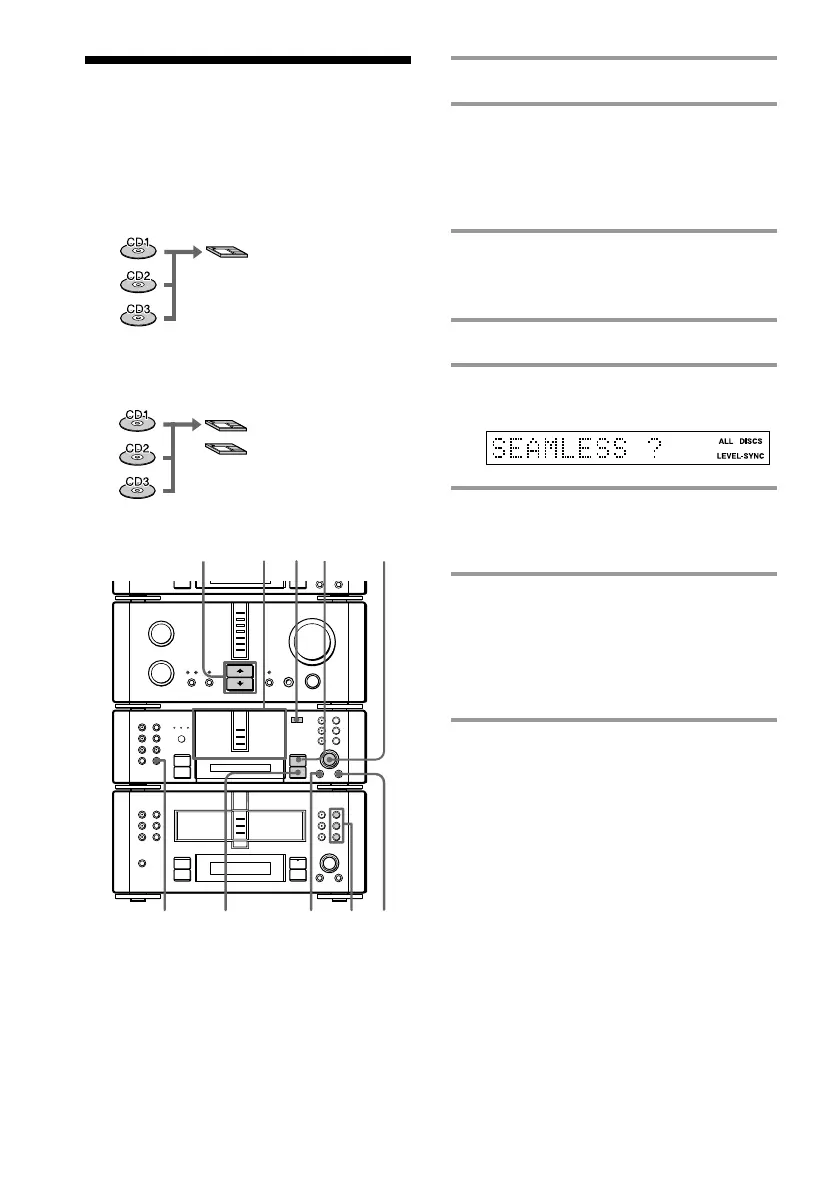
1 Place the CDs on each disc tray.
2 Insert the recordable MDs in order
from the MD 1 slot.
The MDs are recorded in order from the
MD in MD 1. Remove any unwanted
MDs from the slots.
3 Press FUNCTION >/. on the
amplifier repeatedly to switch the
function to CD.
4 Press CD SYNC on the MD deck.
5 Turn SELECTOR on the MD deck
until “SEAMLESS ?” appears.
6 Press ENTER/YES on the MD deck.
The CD is in pause for playback and the
MD deck stands by for recording.
7 Press ·∏ on the MD deck (or
MDP on the remote).
CD playback and MD recording start.
The CD player and MD deck stop
automatically when the recording is
completed.
To cancel recording
Press MENU/NO on the MD deck during
steps 4 to 6.
To stop recording
Press p on the MD deck.
•
•
•
•
•
•
•
•
•
0
10
N
)
n
0
N
·∏
p
+=
+=
)
n
0
N
·∏
p
§
§
§
327
64
1
p
§
5
MENU/NO
MD1
MD1
MD2
For example, you can record three single CDs
in succession on an MD.
You can also record a three-disc album on
two MDs.



 To Next Page