81
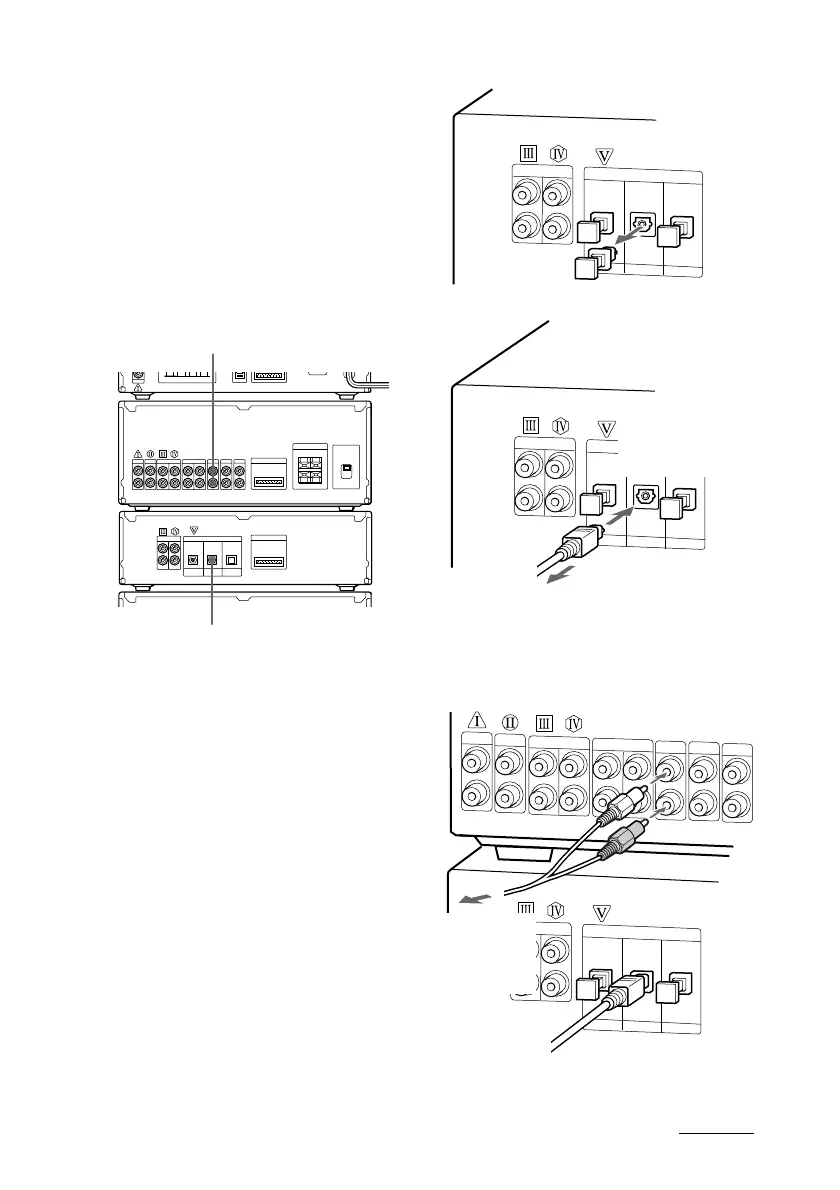
To the digital optical output of
a digital component
To the audio output of
a digital component
Amp-
lifier
MD
deck
Connecting digital
components
Connect the digital component to the
VIDEO 1 DIGITAL IN jack (CS/BS DIGITAL
IN jack for DHC-MD717) (digital) on the MD
deck using an optical cable (sold separately),
and to the VIDEO1 IN jacks (CS/BS IN jacks
for DHC-MD717) (analog) on the amplifier
using an audio cord (sold separately). The
digital audio signal from the connected
component is digitally recorded to the MD.
continued
1 Connect an optical cable (sold separately).
2 Connect an audio cord (sold separately).
3 Connect the cable to
the digital optical
output of an optional
digital component.
1 Take off the cap.
2Connect an optical
cable (sold
separately).
Connect the
cord to the
audio output
of an optional
digital
component.









 To Next Page