46
Recording only the
first track on each CD
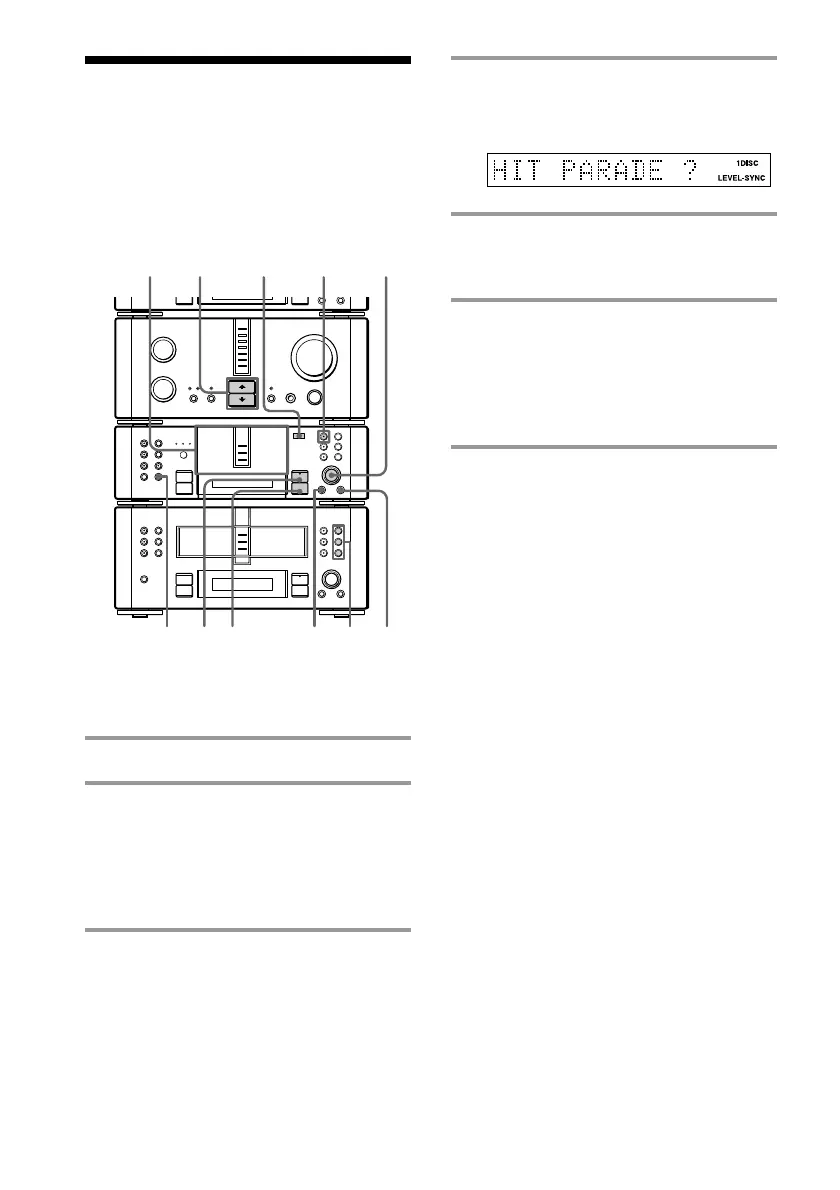
— Hit Parade
4 Press CD SYNC on the MD deck,
then turn SELECTOR until
“HIT PARADE ?” appears.
5 Press ENTER/YES on the MD deck.
The MD deck stands by for recording
and the CD is in pause for playback.
6 Press ·∏ on the MD deck (or
MDP on the remote).
Recording starts from the last recorded
portion of the MD. The CD player and
MD deck stop automatically when the
recording is completed.
Recording from four or
more CDs
Repeat steps 1 and 4 to 6.
To cancel recording
Press MENU/NO on the MD deck.
To stop recording
Press p on the MD deck.
When recording is completed
Press § and eject the MD. “TOC Writing” flashes
and the MD Table of Contents (TOC) is updated.
While “TOC Writing” is flashing
Do not move the deck or pull out the power cord to
ensure the complete recording. The deck is currently
updating the Table of Contents (TOC).
Note
You can only record on the MD in MD 1.
This feature is useful when you record single
CDs in succession.
Recording from three CDs
1 Place the CDs on each disc tray.
2 Insert a recordable MD to the MD 1
slot.
You can only record on the MD in MD 1.
When the MD 1 button is lit green, press
§ and eject the MD, then insert a
recordable MD.
3 Press FUNCTION >/. on the
amplifier repeatedly to switch the
function to CD.
MD 1
button
•
•
•
•
•
•
•
•
•
0
10
N
)
n
0
N
·∏
p
+=
+=
)
n
0
N
·∏
p
§
§
§
2
4
6
5
4
3
1
p
§
MENU/NO









 To Next Page