60
Erasing recordings
— Erase Function
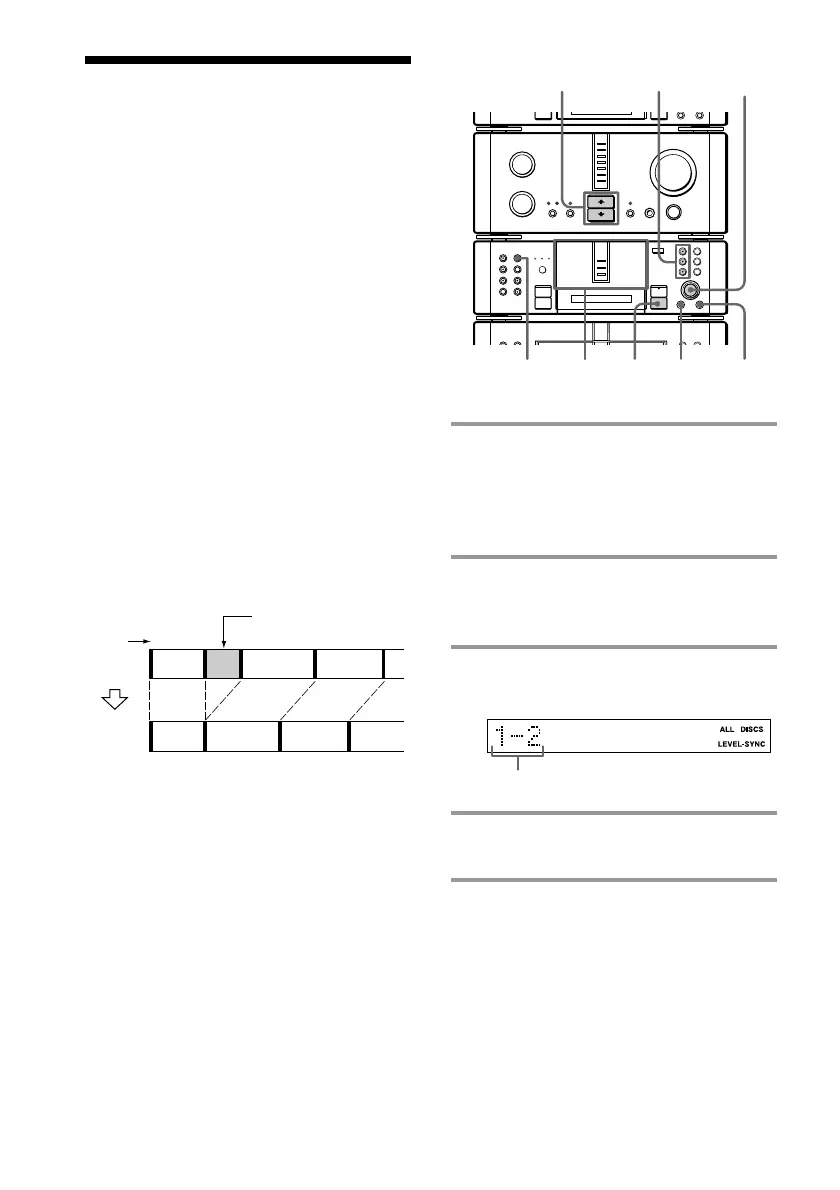
1 Insert the MD you want to edit, then
press DISC SKIP on the MD deck (or
MD D.SKIP on the remote) so the
MD 1 to 3 button of the slot
containing the MD lights green.
2 Press FUNCTION >/ . on the
amplifier repeatedly to switch the
function to MD.
3 Turn SELECTOR until the track
number you want appears.
4 Press MENU/NO, then turn
SELECTOR until “Erase ?” appears.
5 Press ENTER/YES.
“Erase ??” appears.
The MD system lets you erase unwanted
sound quickly and easily. You can restore
erased recordings by using the Undo
Function (see page 66) immediately after the
erase operation. However, you cannot restore
erased recordings if you do other editing, so
be careful when erasing recordings.
The three options to erase recordings are:
• Erasing a single track
• Erasing all tracks
• Erasing a portion of a track
Erasing a single track
You can erase a track simply by specifying its
track number. When you erase a track, the
total number of tracks on the MD decreases
by one and all the tracks following the erased
one are renumbered.
Example: Erasing track 2.
All the tracks following the erased one are
renumbered, so when erasing multiple tracks
(e.g., tracks 2, 5 and 6), we recommend
erasing from the higher numbered tracks.
The track number you want
•
•
•
•
•
•
•
•
•
0
10
N
)
n
0
N
·∏
p
+=
§
1 4 5,6
2
p
3,4
1
Erase track B.
Track
number
Original
tracks
After
ERASE
123
123
4
AB C D
AC D
MD 1 – 3
buttons









 To Next Page