EasyManua.ls Logo

Sony Digital8 M2000 - Page 31

Sony Digital8 M2000
46 pages
Print Icon
To Next Page IconTo Next Page
To Previous Page IconTo Previous Page
Loading...
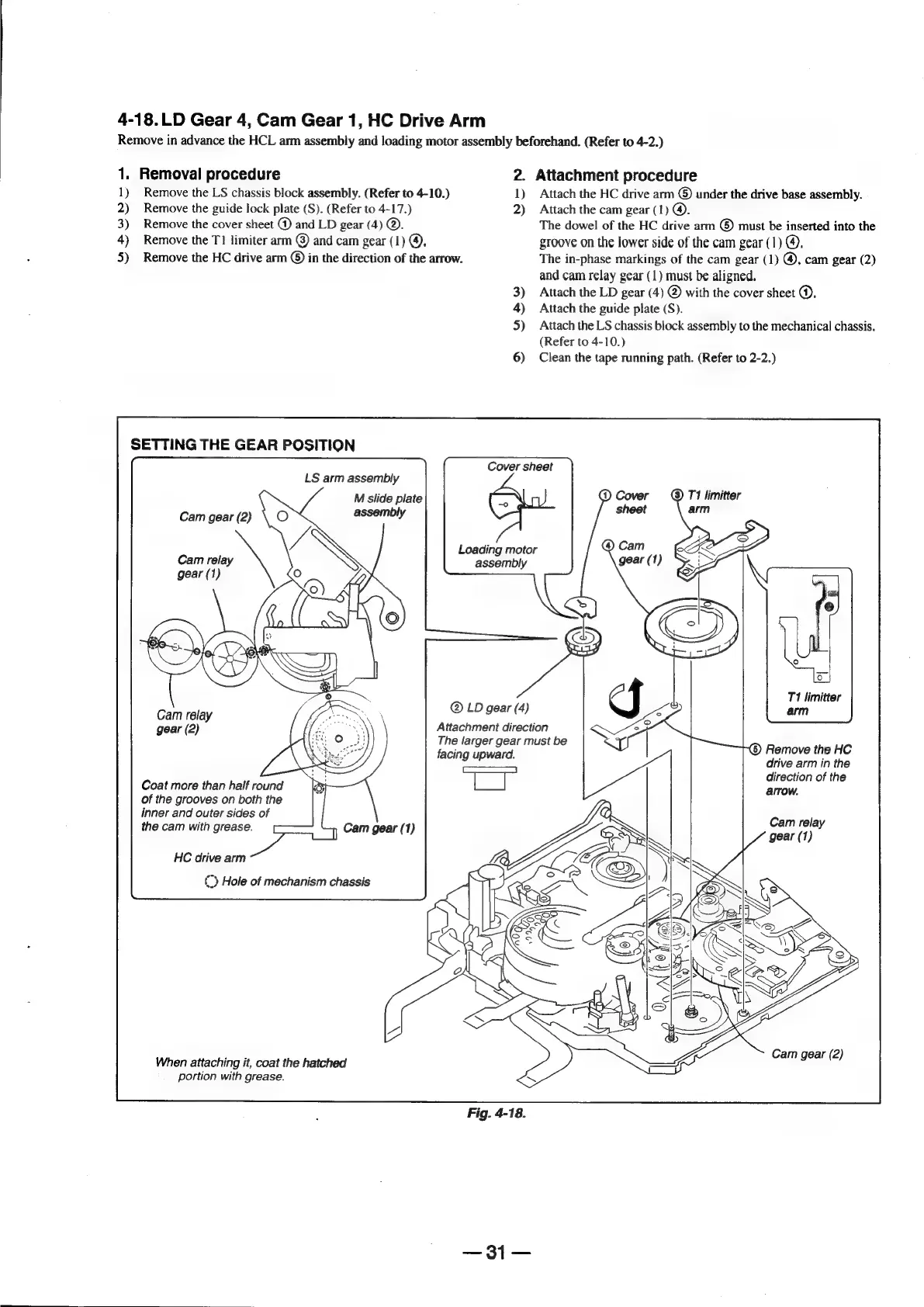
4-18.LD
Gear
4,
Cam
Gear
1,
HC
Drive
Arm
Remove
in
advance
the
HCL
arm
assembly
and
loading
motor
assembly
beforehand.
(Refer
to
4-2.)
1.
Removal
procedure
2.
Attachment
procedure
1)
Remove
the
LS
chassis
block
assembly.
(Refer
to
4-10.)
1)
Attach
the
HC
drive
arm
©)
under
the
drive
base
assembly.
2)
Remove
the
guide
lock
plate
(S).
(Refer
to
4-17.)
2)
Attach
the
cam
gear
(1)
@.
3)
Remove
the
cover
sheet
@
and
LD
gear
(4)
©.
The
dowel
of
the
HC
drive
arm
©
must
be
inserted
into
the
4)
Remove
the
TI
limiter
arm
©
and
cam
gear
(1)
@,
groove
on
the
lower
side
of
the
cam
gear
(1)
@.
5)
Remove
the
HC
drive
arm
©)
in
the
direction
of
the
arrow.
The
in-phase
markings
of
the
cam
gear
(1)
@,
cam
gear
(2)
and
cam
relay
gear
(1)
must
be
aligned.
3)
Attach
the
LD
gear
(4)
@
with
the
cover
sheet
@.
4)
Attach
the
guide
plate
(S).
5)
Attach
the
LS
chassis
block
assembly
to
the
mechanical
chassis.
(Refer
to
4-10.)
6)
Clean
the
tape
running
path.
(Refer
to
2-2.)
SETTING
THE
GEAR
POSITION
Cover
sheet
LS
arm
assembly
M
slide
plate
Cam
gear
(2)
assembly
Loading
motor
assembly
gear
(1)
.
®LD
4
T1
limitter
Cam
relay
tN
pearl
)
am
gear
(2)
a
rae
Attachment
direction
fi
The
larger
gear
must
be
Ri
the
HC
facing
upward.
‘emove
ine
ee
drive
arm
in
the
ae
Se
fc
direction
of
the
Coat
more
than
half
round
arrow.
of
the
grooves
on
both
the
inner
and
outer
sides
of
Cam
relay
the
cam
with
grease.
)
Cam
gear
(1)
gear
(1)
HC
drive
arm
{>
Hole
of
mechanism
chassis
dealt
clei?
Cam
gear
(2)
When
attaching
it,
coat
the
hatched
portion
with
grease.
sae

Table of Contents

Related product manuals