EasyManua.ls Logo

Sony Digital8 M2000 - Page 39

Sony Digital8 M2000
46 pages
Print Icon
To Next Page IconTo Next Page
To Previous Page IconTo Previous Page
Loading...
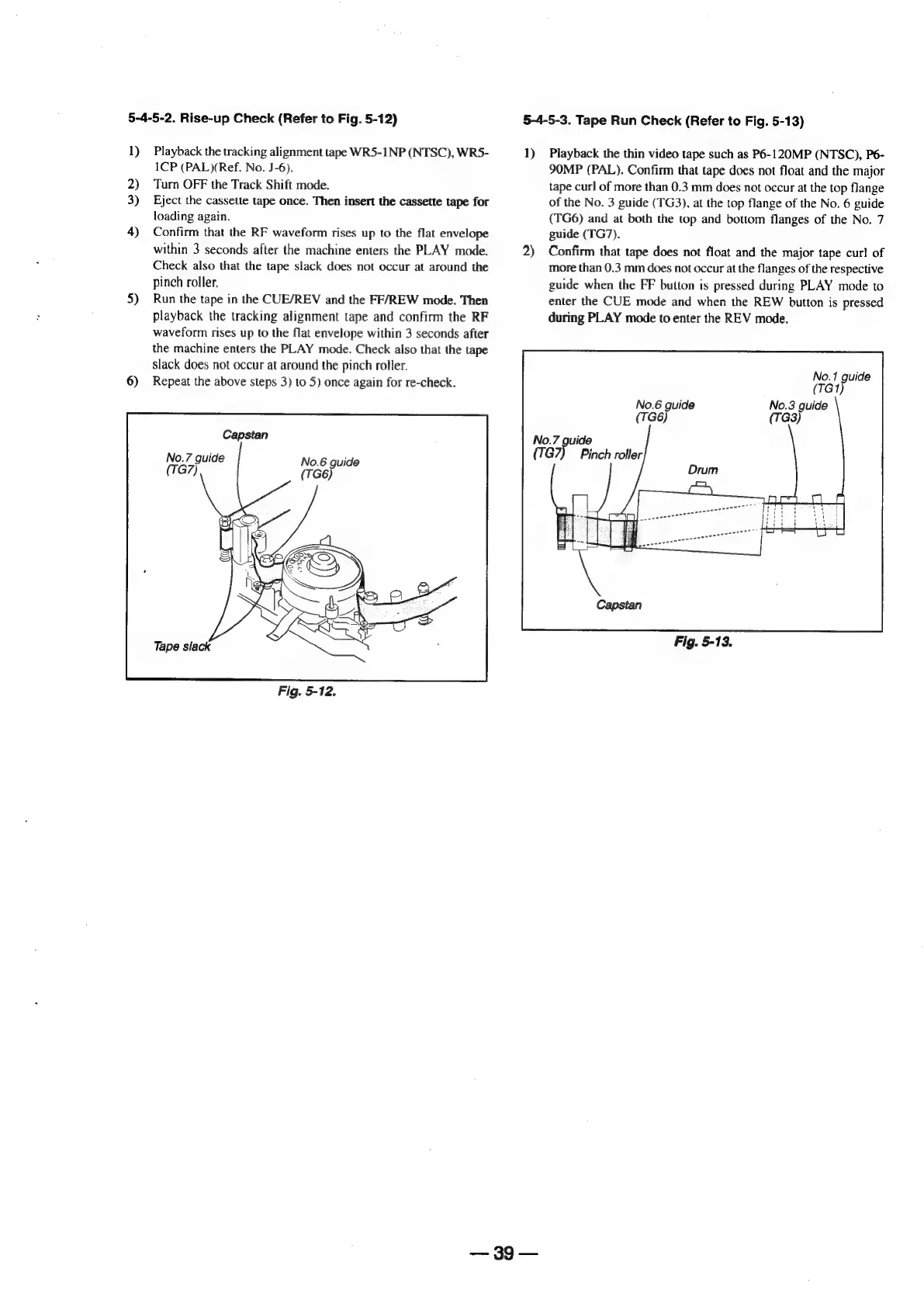
5-4-5-2.
Rise-up
Check
(Refer
to
Fig.
5-12)
1)
2)
3)
4)
5)
6)
Playback
the
tracking
alignment
tape
WR5-1NP
(NTSC),
WR5-
1CP
(PAL)(Ref.
No.
J-6).
Turn
OFF
the
Track
Shift
mode.
Eject
the
cassette
tape
once.
Then
insert
the
cassette
tape
for
loading
again.
Confirm
that
the
RF
waveform
rises
up
to
the
flat
envelope
within
3
seconds
after
the
machine
enters
the
PLAY
mode.
Check
also
that
the
tape
slack
does
not
occur
at
around
the
pinch
roller.
Run
the
tape
in
the
CUE/REV
and
the
FF/REW
mode.
Then
playback
the
tracking
alignment
tape
and
confirm
the
RF
waveform
rises
up
to
the
flat
envelope
within
3
seconds
after
the
machine
enters
the
PLAY
mode.
Check
also
that
the
tape
slack
does
not
occur
at
around
the
pinch
roller.
Repeat
the
above
steps
3)
to
5)
once
again
for
re-check.
Capstan
No.7
guide
(TG7)
No.6
guide
Fig.
5-12.
39
5-4-5-3.
Tape
Run
Check
(Refer
to
Fig.
5-13)
1)
2)
Playback
the
thin
video
tape
such
as
P6-120MP
(NTSC),
P6-
SOMP
(PAL).
Confirm
that
tape
does
not
float
and
the
major
tape
curl
of
more
than
0.3
mm
does
not
occur
at
the
top
flange
of
the
No.
3
guide
(TG3),
at
the
top
flange
of
the
No.
6
guide
(TG6)
and
at
both
the
top
and
bottom
flanges
of
the
No.
7
guide
(TG7).
Confirm
that
tape
does
not
float
and
the
major
tape
curl
of
more
than
0.3
mm
does
not
occur
at
the
flanges
of
the
respective
guide
when
the
FF
button
is
pressed
during
PLAY
mode
to
enter
the
CUE
mode
and
when
the
REW
button
is
pressed
during
PLAY
mode
to
enter
the
REV
mode.
No.1
guide
(TG?)
No.3
guide
(TG3)
No.6
guide
(Tt
No.7
guide
Fig.
5-13.

Table of Contents

Related product manuals