EasyManua.ls Logo

Sony Digital8 M2000 - Page 7

Sony Digital8 M2000
46 pages
Print Icon
To Next Page IconTo Next Page
To Previous Page IconTo Previous Page
Loading...
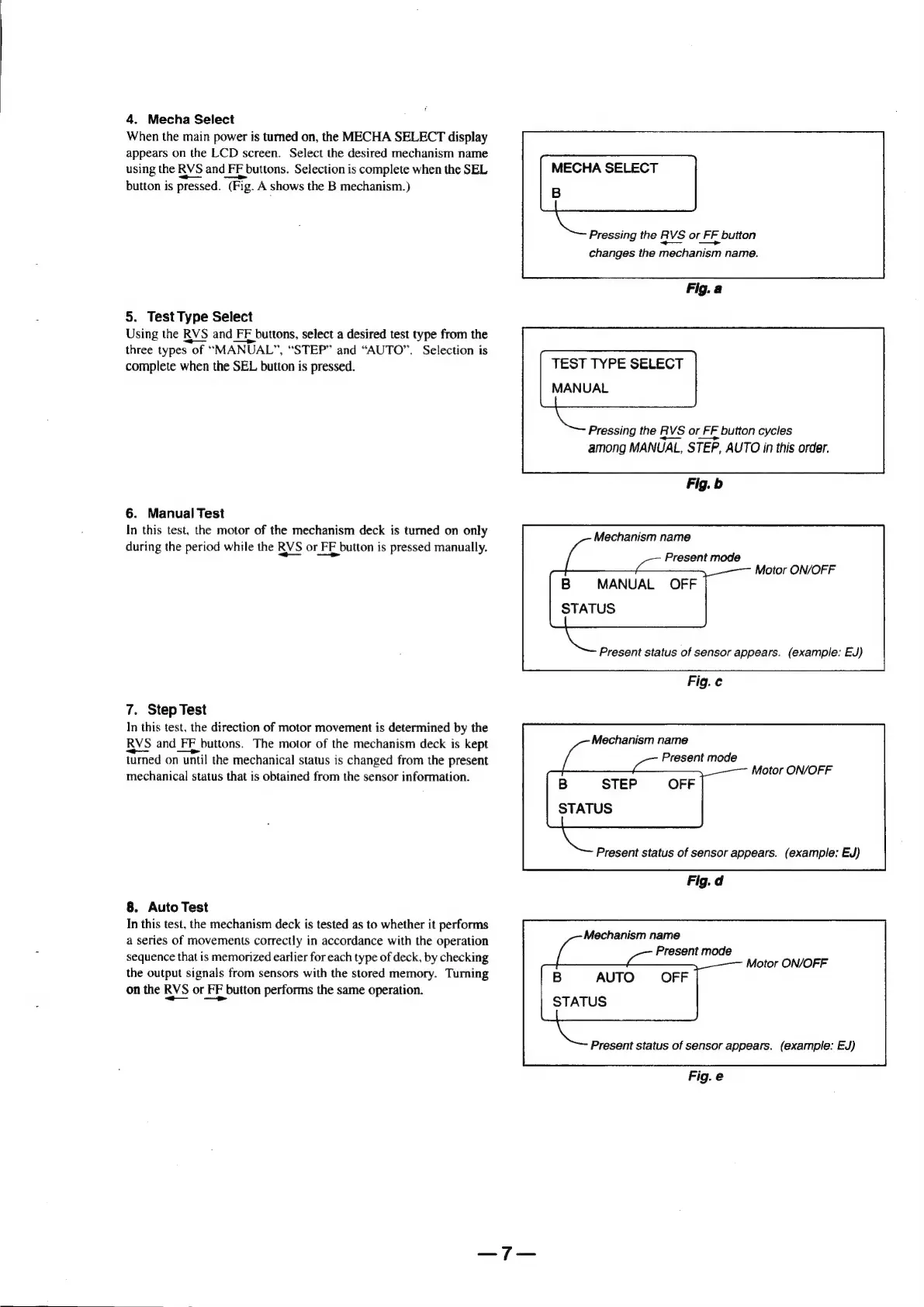
4.
Mecha
Select
When
the
main
power
is
turned
on,
the
MECHA
SELECT
display
appears
on
the
LCD
screen.
Select
the
desired
mechanism
name
using
the
RVS
and
FF
buttons.
Selection
is
complete
when
the
SEL
button
is
pressed.
(Fig.
A
shows
the
B
mechanism.)
5.
Test
Type
Select
Using
the
RVS
and
FE
buttons,
select
a
desired
test
type
from
the
three
types
of
“MANUAL”,
“STEP”
and
“AUTO”.
Selection
is
complete
when
the
SEL
button
is
pressed.
6.
Manual
Test
In
this
test,
the
motor
of
the
mechanism
deck
is
turned
on
only
during
the
period
while
the
RVS
or
FE
button
is
pressed
manually.
7.
Step
Test
In
this
test,
the
direction
of
motor
movement
is
determined
by
the
RVS
and
FE
buttons.
The
motor
of
the
mechanism
deck
is
kept
turned
on
until
the
mechanical
status
is
changed
from
the
present
mechanical
status
that
is
obtained
from
the
sensor
information.
8.
Auto
Test
In
this
test,
the
mechanism
deck
is
tested
as
to
whether
it
performs
a
series
of
movements
correctly
in
accordance
with
the
operation
sequence
that
is
memorized
earlier
for
each
type
of
deck,
by
checking
the
output
signals
from
sensors
with
the
stored
memory.
Turning
on
the
RVS
or
FF
button
performs
the
same
operation.
—_—
—>
MECHA
SELECT
B
Pressing
the
RVS
or
FF
button
changes
the
mechanism
name.
Fig.a
TEST
TYPE
SELECT
MANUAL
Pressing
the
RVS
or
FF
button
cycles
among
MANUAL,
STEP,
AUTO
in
this
order.
Fig.
b
Mechanism
name
Present
mode
B
=
MANUAL
OFF
STATUS
Motor
ON/OFF
Present
status
of
sensor
appears.
(example:
EJ)
Fig.c
Mechanism
name
Present
mode
B
STEP
OFF
STATUS
Motor
ON/OFF
Present
status
of
sensor
appears.
(example:
EJ)
Fig.
d
Mechanism
name
Present
mode
B
AUTO
OFF
STATUS
Motor
ON/OFF
Present
status
of
sensor
appears.
(example:
EJ)
Fig.e

Table of Contents

Related product manuals