EasyManua.ls Logo

Sony Digital8 M2000 - Page 8

Sony Digital8 M2000
46 pages
Print Icon
To Next Page IconTo Next Page
To Previous Page IconTo Previous Page
Loading...
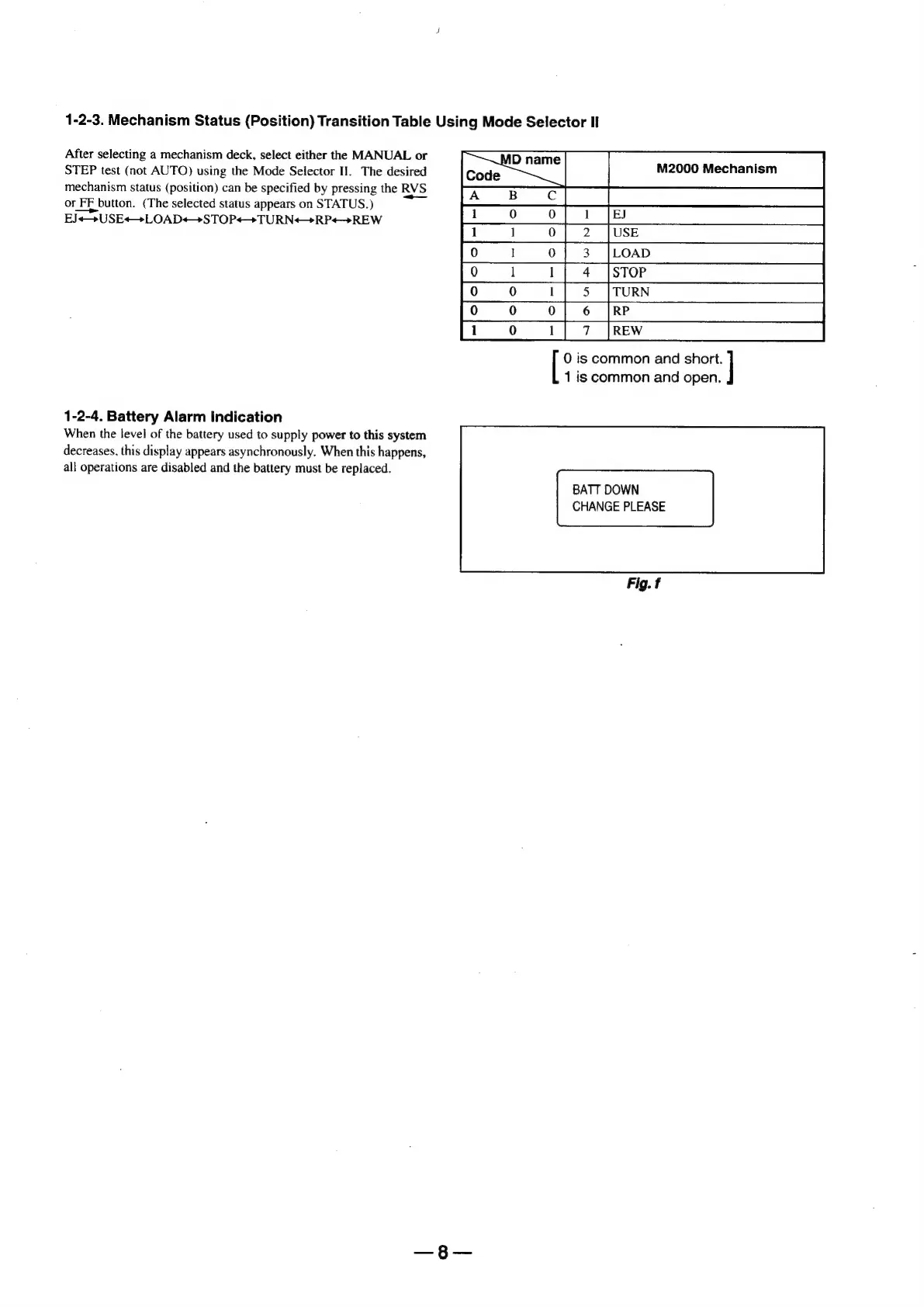
1-2-3.
Mechanism
Status
(Position)
Transition
Table
Using
Mode
Selector
Il
After
selecting
a
mechanism
deck,
select
either
the
MANUAL
or
STEP
test
(not
AUTO)
using
the
Mode
Selector
II.
The
desired
mechanism
status
(position)
can
be
specified
by
pressing
the
RVS
or
FF
button.
(The
selected
status
appears
on
STATUS.)
EJ«<—+USE«+LOAD++>STOP++TURN+—+>RP«—+REW
0
is
common
and
|
1
is
common
and
open.
Te
|
1-2-4.
Battery
Alarm
Indication
When
the
level
of
the
battery
used
to
supply
power
to
this
system
decreases,
this
display
appears
asynchronously.
When
this
happens,
all
operations
are
disabled
and
the
battery
must
be
replaced.
BATT
DOWN
CHANGE
PLEASE
Fig.
f

Table of Contents

Related product manuals