Setup Menu 6-17
Chapter 6 Setup Menu
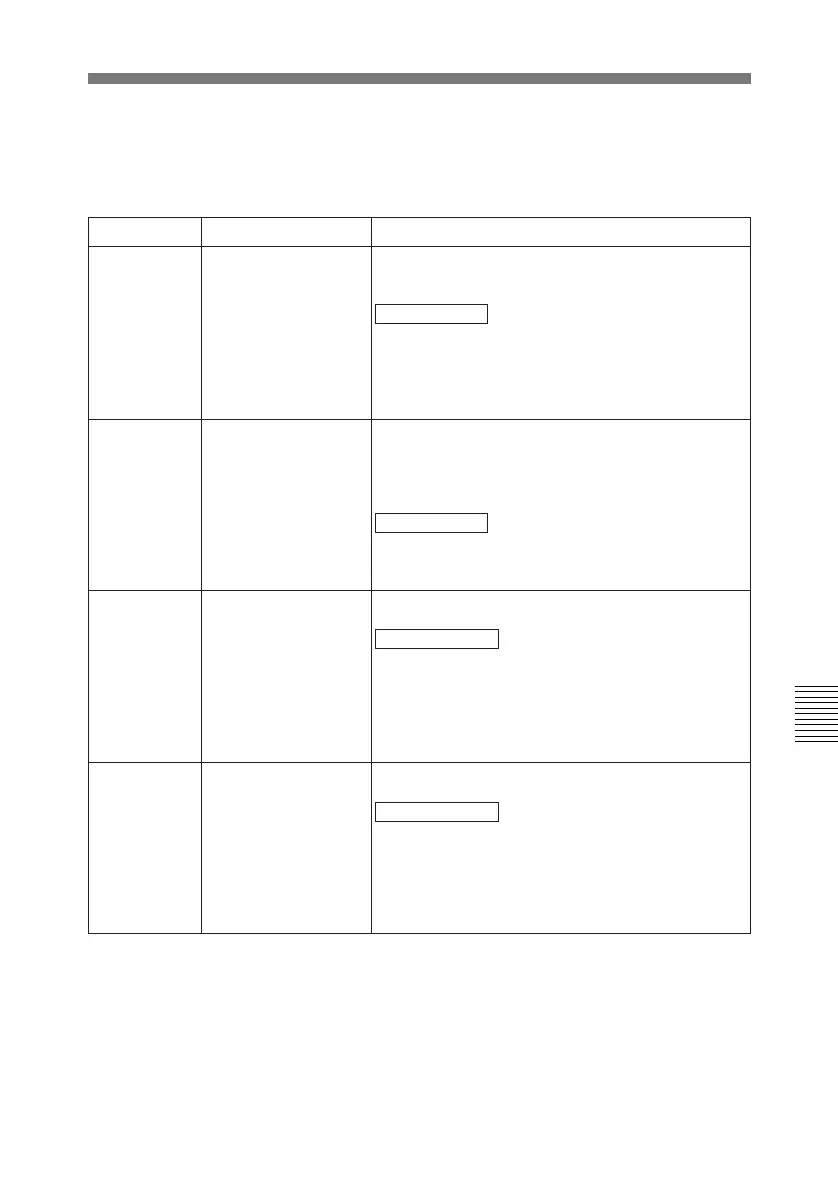
Items 311 to 314 (settings for digital audio editing): If you use an editor (BVE-600, etc) or a
remote controller which cannot control digital audio edit preset, select how to activate edit
preset of each digital audio channel on the unit using the analog audio edit preset function of
the editor or remote controller.
Item number
Item name Settings
311 ANALOG AUDIO
EDIT PRESET
REPLACE FOR CH 1
Select how to activate the CH-1 edit preset of the
unit.
NO DEFINITION : Not defined
ANALOG CH 1 : Use the edit preset for analog
audio channel 1.
ANALOG CH 2 : Use the edit preset for analog
audio channel 2.
ANALOG CH 1+CH 2: Use the edit preset for
analog audio channel 1 or channel 2.
312 ANALOG AUDIO
EDIT PRESET
REPLACE FOR CH 2
Select how to activate the CH-2 edit preset of the
unit.
NO DEFINITION: Not defined
ANALOG CH 1: Use the edit preset for analog
audio channel 1.
ANALOG CH 2 : Use the edit preset for analog
audio channel 2.
ANALOG CH 1+CH 2: Use the edit preset for
analog audio channel 1 or channel 2.
313 ANALOG AUDIO
EDIT PRESET
REPLACE FOR CH 3
Select how to activate the CH-3 edit preset of the
unit.
NO DEFINITION : Not defined
ANALOG CH 1: Use the edit preset for analog
audio channel 1.
ANALOG CH 2 : Use the edit preset for analog
audio channel 2.
ANALOG CH 1+CH 2: Use the edit preset for
analog audio channel 1 or channel 2.
314 ANALOG AUDIO
EDIT PRESET
REPLACE FOR CH 4
Select how to activate the CH-4 edit preset of the
unit.
NO DEFINITION : Not defined
ANALOG CH 1: Use the edit preset for analog
audio channel 1.
ANALOG CH 2 : Use the edit preset for analog
audio channel 2.
ANALOG CH 1+CH 2: Use the edit preset for
analog audio channel 1 or channel 2.



 To Next Page