Extended Menu
6-18 Setup Menu
Chapter 6 Setup Menu
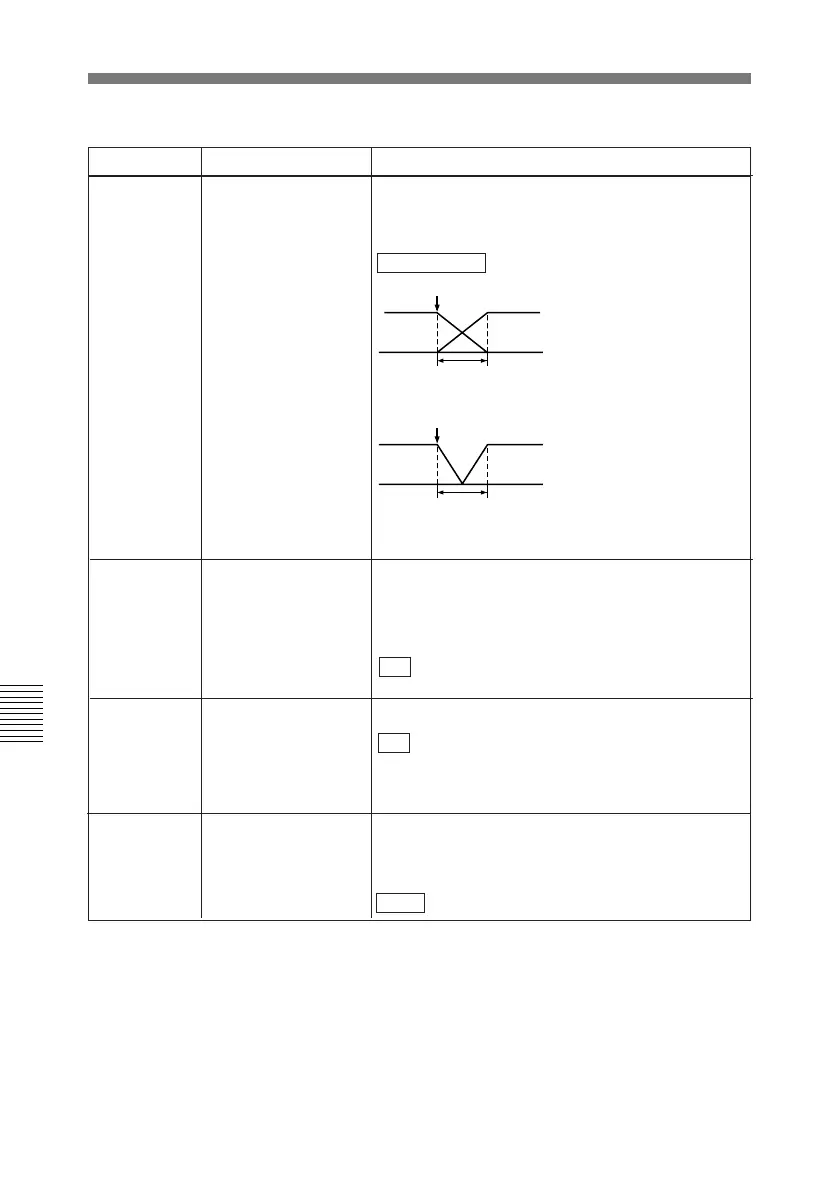
317 AUDIO EDIT MODE Specifies the type of editing for digital audio signals.
CUT EDIT: Cut editing (discontinuity in audio signal
may result at the editing point, causing noise.)
CROSS FADE : Cross-fade
IN/OUT
t
FADE IN/OUT: Fade out and fade in
IN/OUT
t
The “t” in the figures is the time set by item 803
“DIGITAL AUDIO FADE TIME”.
Item number Item name Settings
318 EDIT RETRY When editing with two DNW-A25/A25P units, set for
the recorder unit. Selects the operation if the
recorder unit was not synchronized in time.
OFF: Editing is not carried out, and the unit stops.
ON : The editing is automatically retried (up to
twice).
320 DIGITAL AUDIO PB
PROCESS ON EDIT
POINT
Select the treatment of audio at edit points.
CUT: Carry out a cut (possibly resulting in audio
discontinuities at the edit point).
FADE : Fade out and fade in.
Menu items in the 300s, relating to editing operations (continued)
319 PREREAD SELECT
Select the signals used for preread editing.
A/V : Both audio and video signals
AUDIO: Audio signal only
VIDEO: Video signal only.



 To Next Page