Setup Menu 6-19
Chapter 6 Setup Menu
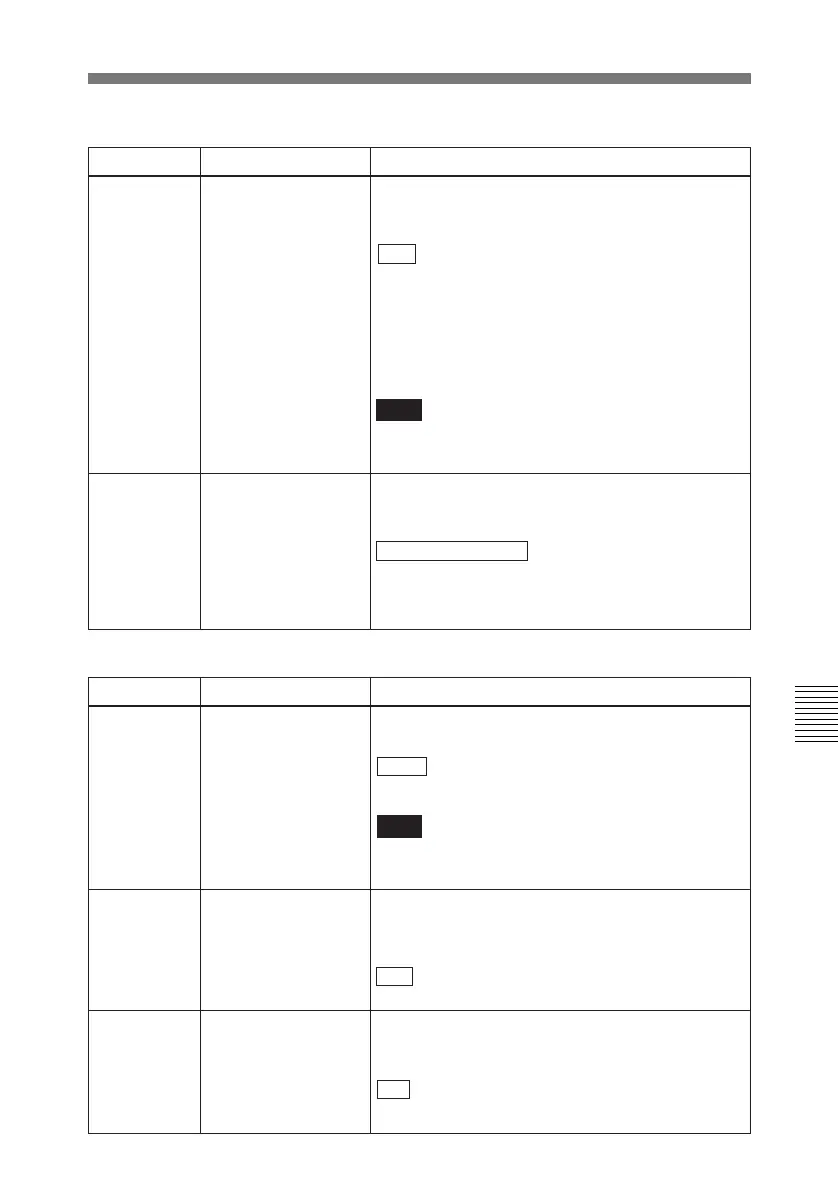
Menu items in the 400s, relating to preroll
Item number Item name Settings
401
FUNCTION MODE
AFTER CUE-UP
402
TIME REFERENCE
FOR PREROLL
When prerolling a tape section at which timecode
signals are discontinuous, select which to use, the
timecode or CTL signals recorded preceding the
section, for timecode advance and preroll.
Select the state that the unit goes into after a cuing-
up operation.
STOP : Stops (the “STOP mode”).
STILL: Still playback (in search mode).
Note
When controlling this unit from an editor with the
standard constants set, select “STOP”.
CTL : Using CTL signals.
TC: Using timecode signals.
Item number Item name Settings
326
AUTOMATIC IN
ENTRY AFTER
AUTO EDIT
Select whether or not to set the OUT point timecode
for the IN point of the next auto-edit automatically
when an auto-edit is completed.
OFF : Do not set the IN point timecode
automatically.
R-IN: Set the recoder IN point timecode
automatically.
R-IN, P-IN: Set the recoder and player IN points
timecode automatically.
Note
For audio split editing, only the video IN point is set
automatically.
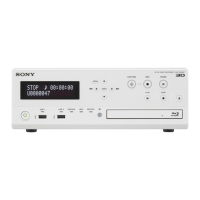
Menu items in the 300s, relating to editing operations (continued)
328
POST ROLL POINT After carrying out auto editing, select whether to
display the image of the OUT point, or the last
recorded image.
FOLLOWING HEAD : the image of the OUT point
(postroll to the OUT point)
PREVIOUS TAIL: the last recorded image (postroll
to two frames before the OUT point)
AUTOMATIC
PREROLL
REFERENCE ENTRY
403
Select whether or not the edit IN point is
automatically set by pressing the PREROLL button
when the IN point is not set before starting preroll.
DIS : IN point is not set automatically.
ENA: IN point is set automatically.



 To Next Page