Setup Menu 6-25
Chapter 6 Setup Menu
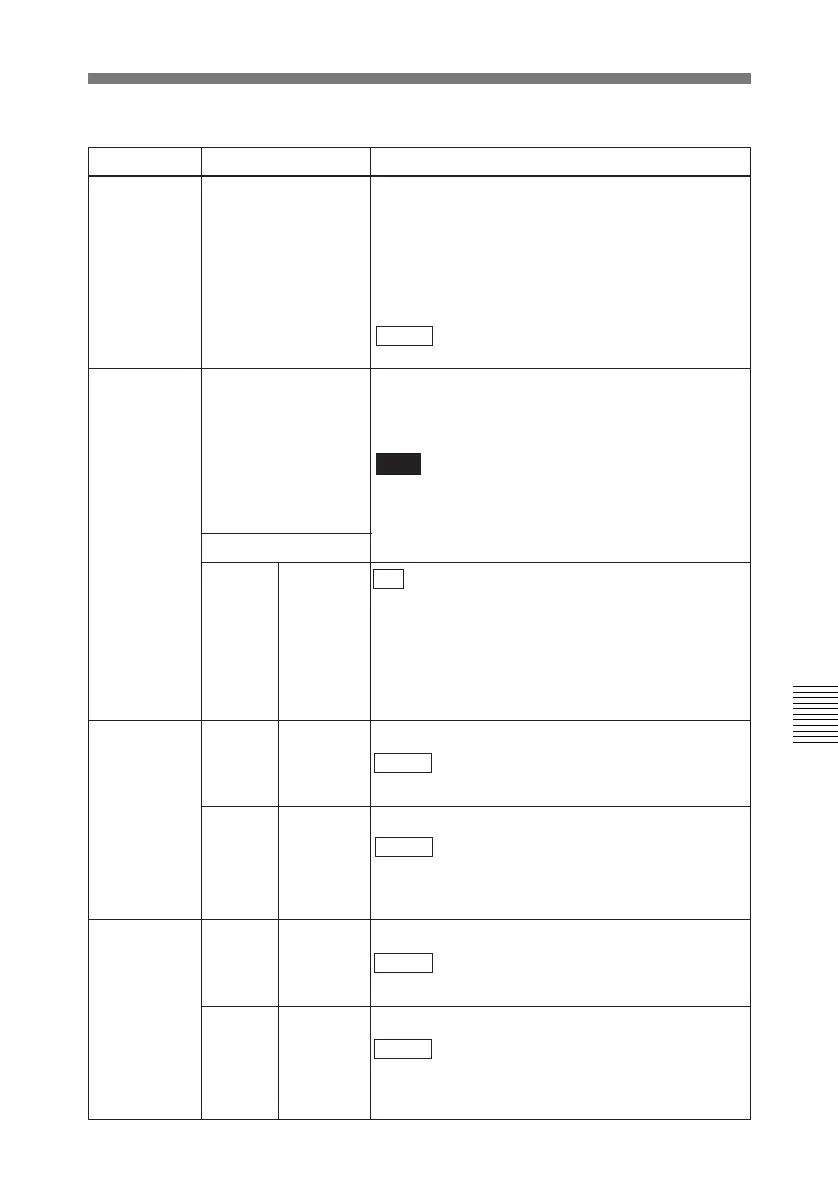
Menu items in the 700s, relating to video control
Item number Item name Settings
701
SELECTION OF
VIDEO/SYNC DELAY
An E-E video signal is output delayed with respect
to the video input signal by the time for video circuit
processing. With this item, select whether or not to
delay the sync signal attached to the output video
signal by an amount corresponding to the delay.
SYNC: Delay the sync signal by the corresponding
amount before attaching it.
VIDEO : Attach a sync signal with the same timing
as the input signal.
703 BLANK LINE
SELECT
Switch blanking on or off for individual lines in the
vertical blanking interval. The Y/C signal and odd/
even fields are blanked simultaneously.
Note
For playback of an analog Betacam cassette
(Betacam SP, etc.) regardless of the setting of this
item, the chrominance signal is blanked up to line
15.
Sub-Item
0
ALL LINE - - - : Specify the blanking for each line separately.
BLANK: Regardless of the setting of other sub-
items, blank all lines which can be specified in this
menu item.
THROU: Regardless of the setting of other sub-
items, switch off blanking for all lines which can be
specified in this menu item.
In 525 mode
12...20
LINE 12...
LINE 20
Specify blanking for lines 12 to 20.
BLANK : Carry out blanking.
THROU: Switch off blanking.
In 625 mode
9...22
LINE9...
LINE 22
Specify blanking for lines 9 to 22.
BLANK : Carry out blanking.
THROU: Switch off blanking.
23
LINE 23
Specify blanking for line 23.
BLANK : Carry out blanking.
HALF : Carry out half-blanking.
THROU: Switch off blanking.
21 LINE 21
Specify blanking for line 21.
BLANK : Carry out blanking.
HALF: Carry out half-blanking.
THROU: Switch off blanking.



 To Next Page