Extended Menu
6-28 Setup Menu
Chapter 6 Setup Menu
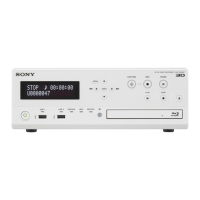
2 INPUT VBLK
CONT
REMOV: Remove the setup amount in the vertical
blanking interval of the input signal.
THROU : Do not remove the setup amount in the
vertical blanking interval of the input signal.
3 BETACAM PB
LEVEL
MSTER : Set the Betacam playback signal to the
master setting.
0.0%...7.5%...10.0%: Set the setup amount to be
removed from the Betacam playback signal in this
range, in 0.5% increments.
4 OUTPUT LEVEL MSTER : Set the output signal to the master setting.
0.0%...7.5%...10.0%: Set the setup amount to be
added to the output signal in this range, in 0.5%
increments.
713 VIDEO SETUP
REFERENCE LEVEL
(525 system)
Set the video setup amounts to be removed from a
recording signal and Betacam playback signal, and
to be added to a composite output signal. There
are independent settings for a recording signal
(referred to below as an input signal), a Betacam
signal, and a composite output signal (referred to
below as an output signal).
Notes
• Setup removal is carried out only with respect to
a Batacam format CAV input signal (menu
setting) and NTSC composite input signal. It is
not carried out with respect to other input
signals.
• The setup amounts specified in this menu item
have no connection with the SETUP/BLACK
LEVEL knob on the front control panel.
Sub-Item
0
MASTER LEVEL
When the input signal, Betacam playback signal,
and output signal settings are “MSTER” (master),
the setup amount specified for this sub-item is
removed from the input signal and Betacam
playback signal, and is added to the output signal.
0.0% ... 7.5% ...10.0%: Setting in this range, in
0.5% increments.
1 INPUT LEVEL MSTER : Set the input signal to the master setting.
0.0% ... 7.5% ...10.0%: Set the setup amount be
removed from the input signal in this range, in 0.5%
increments.
Item number Item name Settings
Menu items in the 700s, relating to video control (continued)



 To Next Page