Extended Menu
6-32 Setup Menu
Chapter 6 Setup Menu
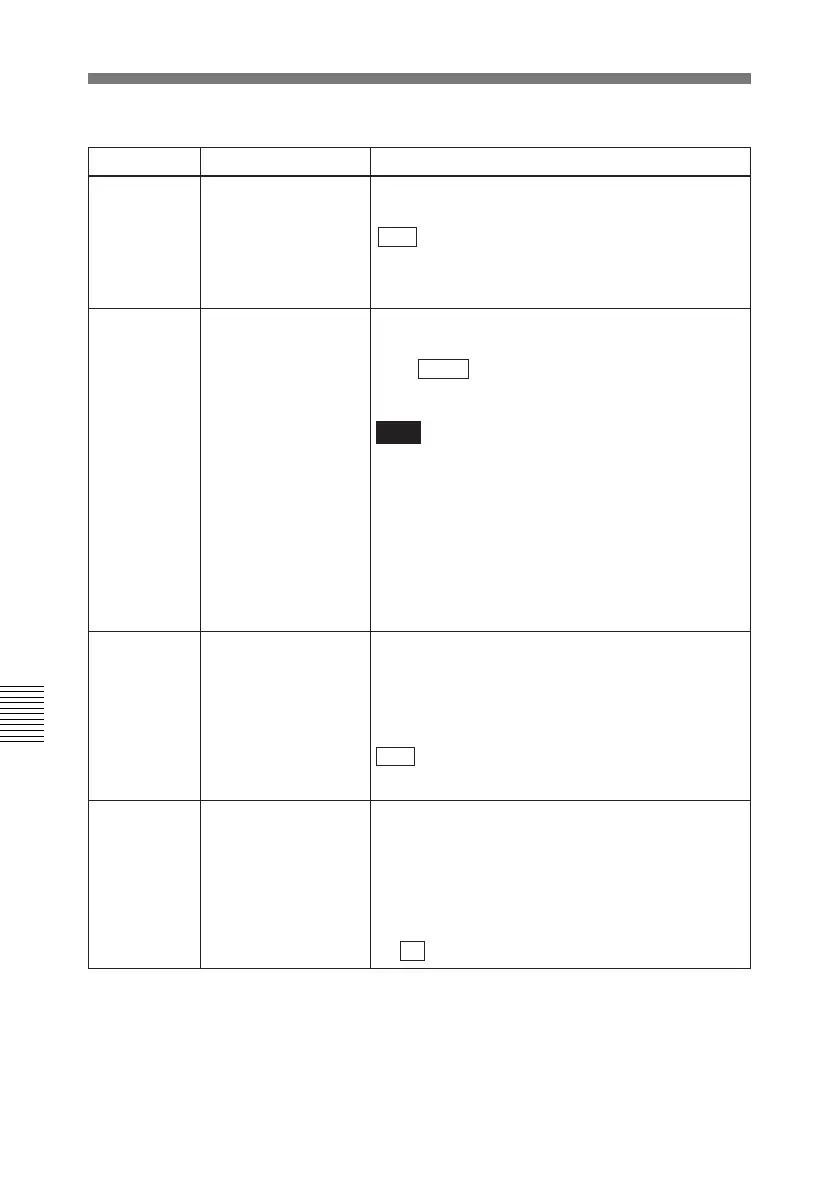
Menu items in the 800s, relating to audio control
Item number Item name Settings
802
DIGITAL AUDIO
MUTE IN SHUTTLE
MODE
Set the digital audio muting conditions during
shuttle playback.
OFF : Not muted.
CUEUP: Muted during cue-up or preroll operations.
FULL: Muted in shuttle mode.
805 AUDIO MONITOR
OUTPUT MIXING
Select the audio mixing method used for digital
audio signals and Betacam playback analog audio
signals supplied to the MONITOR OUTPUT
connector.
ADD: Simple addition.
RMS : Root-mean-square.
AVE: Simple average.
807 AUDIO OUTPUT
PHASE
Select the output timing of a digital audio playback
signal (SDI only). The reference position
corresponds to a setting of 80H; when the setting is
less than 80H, the output timing is advanced, and
when it is higher than 80H, the output timing is
delayed. (80H, 128 samples=approx. 2.7 ms, 1
sample=approx. 20 µs)
0... 80 ...FF: Setting in this range
803 DIGITAL AUDIO
FADE TIME
Specifies the time for cross-fade or fade in/out
processing of digital audio signals.
5 ms, 10 ms , 15 ms, 20 ms, 25 ms
a)
, 50 ms
b)
,
85 ms, 115 ms
c)
Note
Cross-fade, fade in, or fade out processing is
applied to the recordings after the IN or OUT point.
Setting this item allows rewrite of the recordings
after the OUT point. Even when the minimum value
(5ms) is selected, one-field recordings are rewritten.
To avoid rewrite, select CUT in menu item 317.
However, the audio signals discontinue at edit
points. (There is no effect on the recordings of the
video signal.)
a) The cross-fade time is 24 ms.
b) The actual value is 49 ms.
c) The actual value is 114 ms.



 To Next Page