Setup Menu 6-31
Chapter 6 Setup Menu
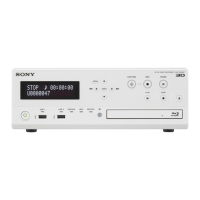
726 H BLANKING WIDTH Select the horizontal blanking width of a video
output signal.
NARROW: Digital blanking (narrow)
Selecting NARROW is recommended for longer H-
period of video when editing is performed between
digital devices.
WIDE : Analog blanking (wide, complied with
SMPTE 170A)
Selecting WIDE is recommended for broadcast
transmission or editing in which an analog device
(i.e. BVW-series VTR) is used as recorder.
727 VIDEO EDIT
PREVIEW
SWITCHER
Set the output phase for the video playback signal
when any of the ASSEMBLE, VIDEO, AUDIO CH-1
to CH-4, and TC indicators is lit.
INT : The video playback signal output phase is the
same as the output phase in the E-E mode. Use
this setting when editing with a single VTR, or when
previewing while watching the VTR output signal.
EXT: The video playback signal output phase is the
same as the phase of an input video signal or
external reference signal.
Note
Whichever setting is used, the correct editing results
will be obtained. When, however, you are using an
external switcher to switch the video output signal
from this unit for the purposes of preview, select
EXT. This will prevent any image shifts at editing IN
and OUT points.
Item number Item name Settings
Menu items in the 700s, relating to video control (continued)
728 OUTPUT SCH
PHASE SETTING
Adjusts the SCH phase.
Default value: 800H
730
PICTURE SHIFT Shifts the picture played back in Betacam SX mode.
OFF : Do not shift.
1/4H: By 1/4 of the display area in the horizontal
direction
3/4H: By 3/4 of the display area in the horizontal
direction
1/4V: By 1/4 of the display area in the vertical
direction
3/4V: By 3/4 of the display area in the vertical
direction



 To Next Page