Handling Cassettes
2-8 Preparations
Chapter 2 Preparations
If there is no choice but to
remove the cassette manually
Remove the cassette manually when
battery power falls to below about 9
V.
Note
Power the unit off before removing
the cassette manually. If the unit is
powered, the drums may rotate and
cause body injury.
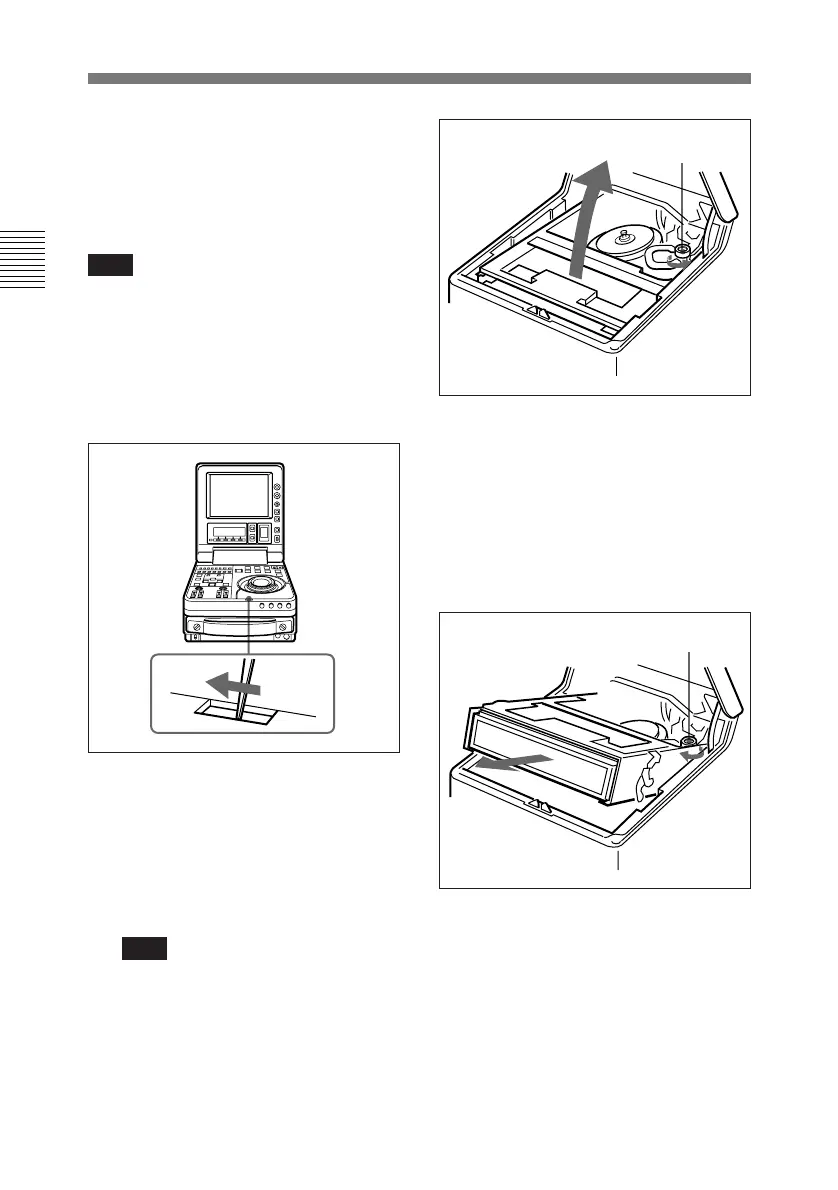
1 Using a tool such as tweezers,
release the control panel lock.
2 Lift the control panel up, and
press the manual eject knob (the
red knob). Rotate the knob about
30 rotations in the
counterclockwise direction while
keeping it pressed down.
Note
Perform the operation carefully so
that edges of internal parts will
not injure your hand.
The cassette compartment rises
up.
3 Remove the cassette, and rotate
the manual eject knob 3 or 4
rotations in the clockwise
direction while keeping it pressed
down.
4 Close the control panel.
Manual eject knob
Manual eject knob



 To Next Page