EasyManua.ls Logo

Sony EV-S7000 - Audio;video (A;V) hookup

Sony EV-S7000
84 pages
Print Icon
To Next Page IconTo Next Page
To Previous Page IconTo Previous Page
Loading...
ere
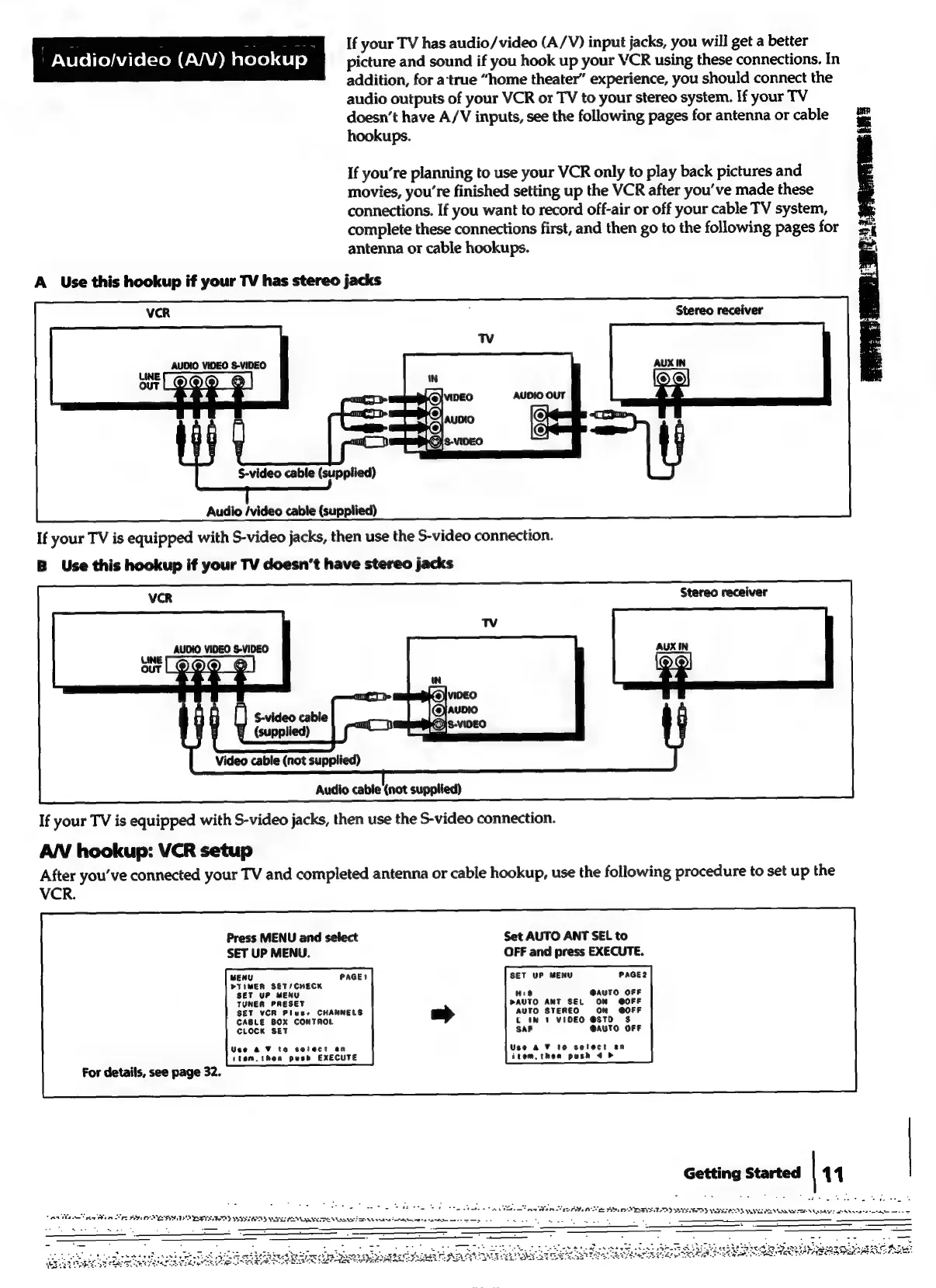
If
your
TV
has
audio/video
(A/V)
input
jacks,
you
will
get
a
better
Audio/video
(A/V)
hookup
picture
and
sound
if
you
hook
up
your
VCR
using
these
connections.
In
addition,
for
a‘true
“home
theater”
experience,
you
should
connect
the
audio
outputs
of
your
VCR
or
TV
to
your
stereo
system.
If
your
TV
doesn’t
have
A/V
inputs,
see
the
following
pages
for
antenna
or
cable
ome
hookups.
=
If
you’re
planning
to
use
your
VCR
only
to
play
back
pictures
and
movies,
you're
finished
setting
up
the
VCR
after
you’ve
made
these
connections.
If
you
want
to
record
off-air
or
off
your
cable
TV
system,
;
complete
these
connections
first,
and
then
go
to
the
following
pages
for
antenna
or
cable
hookups.
od
A
Use
this
hookup
if
your
TV
has
stereo
jacks
Stereo
receiver
AUDIO
VIDEO
S-VIDEO
S-video
cable
(supplied)
Audio
/video
cable
(supplied)
If
your
TV
is
equipped
with
S-video
jacks,
then
use
the
S-video
connection.
B
Use
this
hookup
if
your
TV
doesn’t
have
stereo
jacks
AUDIO
VIDEO
S-VIDEO
§
(supplied)
Video
cable
(not
supplied)
Audio
cable
(not
supplied)
If
your
TV
is
equipped
with
S-video
jacks,
then
use
the
S-video
connection.
AN
hookup:
VCR
setup
After
you’ve
connected
your
TV
and
completed
antenna
or
cable
hookup,
use
the
following
procedure
to
set
up
the
VCR.
Press
MENU
and
select
Set
AUTO
ANT
SEL
to
SET
UP
MENU.
OFF
and
press
EXECUTE.
MENU
PAGE?
SET
UP
MENU
PAGE2
PTIMER
SET/CHECK
up
MENU
His
@AUTO
OFF
PAUTO
ANT
SEL
ON
GOFF
SET
VCR
Plus+
CHANNELS
AUTO
STEREO
ON
@OFF
CABLE
BOX
CONTROL
t
IN
1
VIDEO
@STD
$
P
A!
CLOCK
SET
@AUTO
OFF
Use
@ F
to
select
an
Use
2%
10
select
an
ttem,then
push
EXECUTE
item,thea
push
4
For
details,
see
page
32.
Getting
Started
|
11
TERT
rte
Bee
re
BP
ES
ER
TE
ETE
SOD
POS
STEED
VTE
RU
SO
A
ean
oes
ee