EasyManua.ls Logo

Sony EV-S7000 - Hookup 1; Using cable box control

Sony EV-S7000
84 pages
Print Icon
To Next Page IconTo Next Page
To Previous Page IconTo Previous Page
Loading...
Hookup
1
Using
cable
box
control
Recommended
use
This
hookup
is
recommended
for
most
cable
systems
with
cable
boxes.
It
allows
the
VCR’s
cable
box
control
feature
to
control
the
channel
on
the
cable
box,
simplifying
the
recording
process.
You
should
use
this
hookup
if
you
have
a
cable
box,
especially
if
your
cable
system
scrambles
all
or
most
channels.
A
list
of
compatible
cable
boxes
is
on
page
28.
What
you
can
and
can‘t
do
with
this
hookup
What
you
can
do
e
Record
any
channel
by
using
the
VCR’s
cable
box
control
feature
to
select
channels
on
the
cable
box
What
you
can’t
do
¢
Record
with
the
cable
box
turned
off
¢
Record
one
channel
while
watching
another
channel
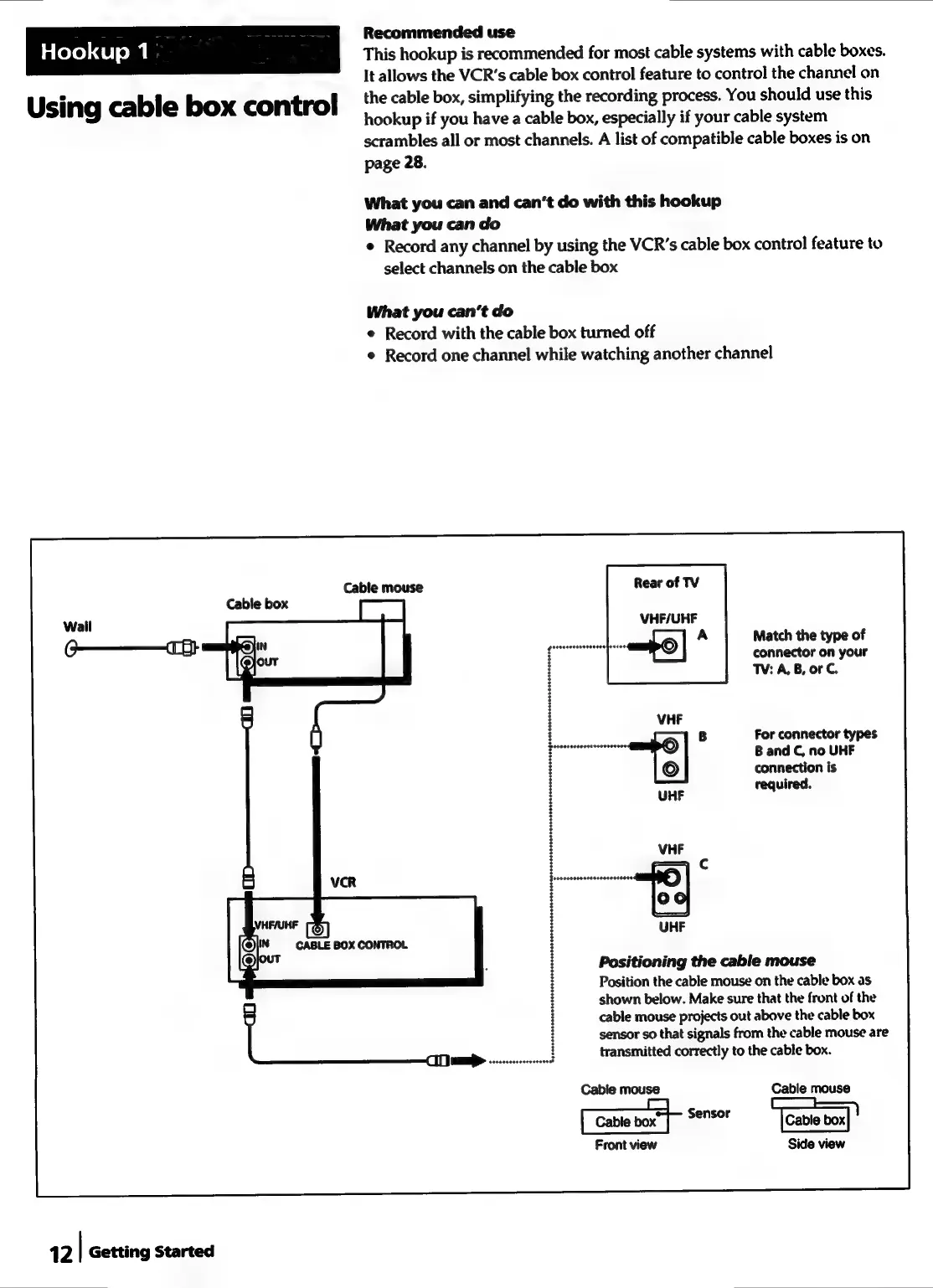
Cable
mouse
Rear
of
TV
Cable
box
12
|
Getting
Started
VHF/UHF
Match
the
type
of
connector
on
your
TV:
A,
B,
or
C.
For
connector
types
B
and
C,
no
UHF
connection
is
required.
Positioning
the
cable
mouse
Position
the
cable
mouse
on
the
cable
box
as
shown
below.
Make
sure
that
the
front
of
the
cable
mouse
projects
out
above
the
cable
box
sensor
so
that
signals
from
the
cable
mouse
are
transmitted
correctly
to
the
cable
box.
Cable
mouse
Cable
mouse
==
aan
ensor
[Cable
box
Front
view
Side
view