EasyManua.ls Logo

Sony EV-S7000 - Setting up VCR Plus+; How to set up your VCR

Sony EV-S7000
84 pages
Print Icon
To Next Page IconTo Next Page
To Previous Page IconTo Previous Page
Loading...
ee
ere
ee
Setting
up
VCR
Plus+
Example
of
“PlusCode”
PlusCode
5:30
MOVIE
Musical
(2hrs.)
SPORTS
Golf
(hr.
25min.)
42060
—WS
9974
6:30
EJEIEIORAMA—Comedy
(2hrs.)
17390
EASCIENCE
AND
TECHNOLOGY
(ihe.
15min.)
73457
Example
of
“Channel!
Line-up
Chart”
Guide
channel
number
Arts
&
Entertainment
Network
|
39
American
Movie
Classics
[35
|
Bravo
(program
grid
gylly)
|
54
|
Cable
News
Netwo
ff
|
[qeacsran
C-SPAN
a
_|
ea
ee
[ED
The
Disney
Gog
Far
|
ae
|
I
The
Discovery
Enyfnel”
|
Geren
SSD
GED
The
Family
Chacne
|
47
GHD
tome
saree’
8
Diem
|
_
jnemar’
4s
|
MES
Madison
Square
Gardens
Networ
|
19
|
Lae
|
3
[&Wsporschannes
|
PqWIsrowtime
|
PEED
TeSsuperstation
|
GEIS
The
Movie
Channel
|
ss
|
[GD
The
Nashvile
Network
|
a9
USA
Network
30
|
Getting
Started
VCR
Plus+
is
a
feature
in
Sony
VCRs
that
simplifies
the
task
of
programming
the
VCR
to
make
timer
recordings.
How
VCR
Plus+
works
Whenever
you
want
to
record
a
TV
program,
all
you
need
to
do
is
look
up
the
program’s
“PlusCode,”
a
number
assigned
to
each
program
that’s
published
in
the
TV
section
of
most
newspapers,
cable
TV
listings,
and
even
TV
GUIDE
magazine.
Then,
just
enter
the
PlusCode
of
the
program
you
want
and
the
VCR
is
automatically
programmed
to
record
that
show.
It’s
that
simple.
With
VCR
Plus+,
you
no
longer
have
to
go
through
a
lengthy
and
often
repetitive
procedure
when
you
set
start
and
stop
times,
channel
numbers,
and
dates.
All
this
information
is
automatically
sent
to
your
VCR
when
you
enter
the
program’s
PlusCode.
How
to
set
up
your
VCR
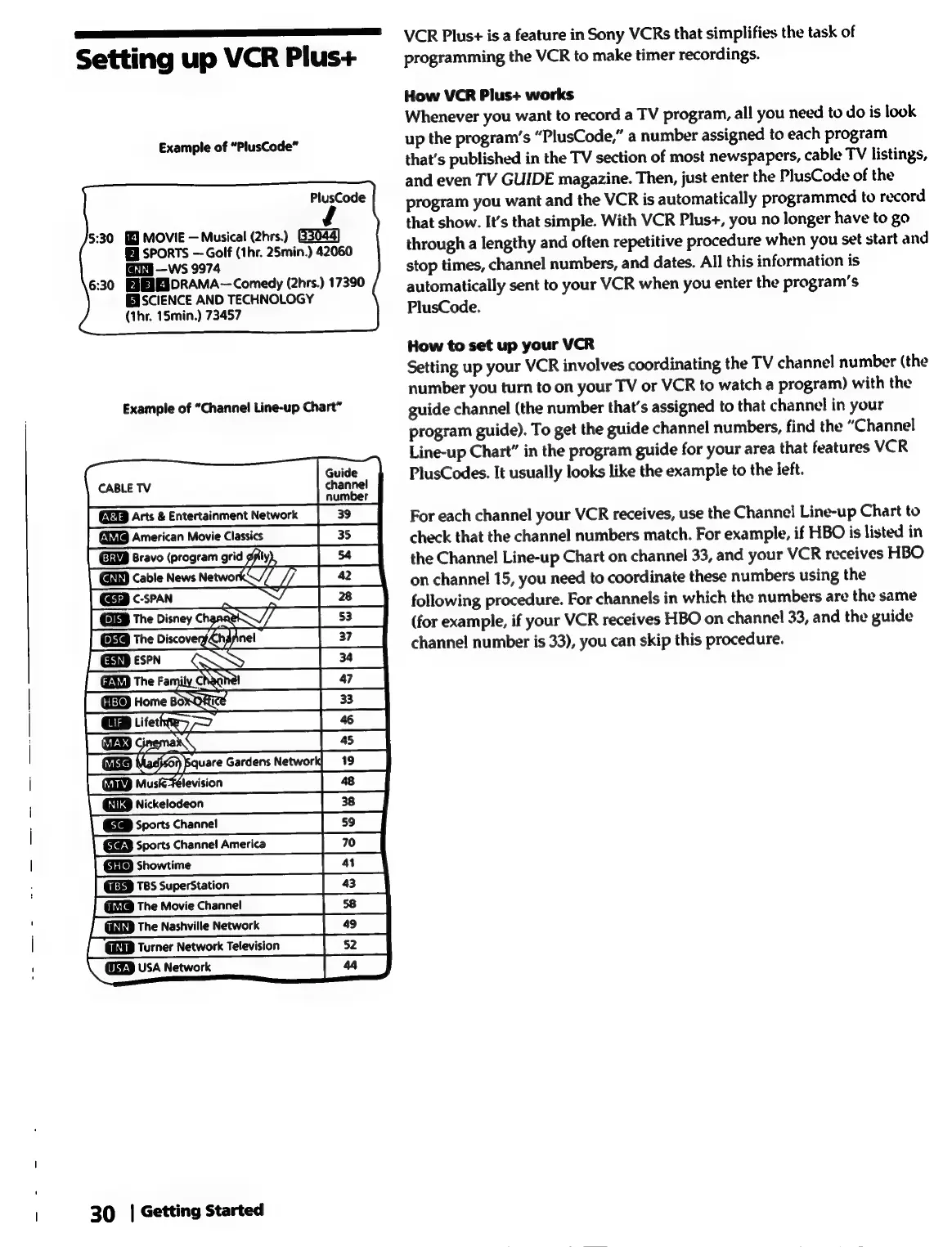
Setting
up
your
VCR
involves
coordinating
the
TV
channel
number
(the
number
you
turn
to
on
your
TV
or
VCR
to
watch
a
program)
with
the
guide
channel
(the
number
that’s
assigned
to
that
channel
in
your
program
guide).
To
get
the
guide
channel
numbers,
find
the
“Channel
Line-up
Chart”
in
the
program
guide
for
your
area
that
features
VCR
PlusCodes.
It
usually
looks
like
the
example
to
the
left.
For
each
channel
your
VCR
receives,
use
the
Channel
Line-up
Chart
to
check
that
the
channel
numbers
match.
For
example,
if
HBO
is
listed
in
the
Channel
Line-up
Chart
on
channel
33,
and
your
VCR
receives
HBO
on
channel
15,
you
need
to
coordinate
these
numbers
using
the
following
procedure.
For
channels
in
which
the
numbers
are
the
same
(for
example,
if
your
VCR
receives
HBO
on
channel
33,
and
the
guide
channel
number
is
33),
you
can
skip
this
procedure.

Related product manuals